Searching for a 1080p webcam with a built‑in ring light? This guide highlights five top options that balance brightness control, autofocus, privacy features, and plug‑and‑play setup. It helps remote workers, online learners, streamers, and meeting participants pick a model that fits lighting needs and space constraints. Each entry notes who it’s best for and a practical limitation to consider.
Buying quick view: the table below compares core specs and best uses for each selected webcam.
| Product | Best For | Light/Camera Specs | Key Benefit |
|---|---|---|---|
| NexiGo N930E | Online learners and remote workers | 1080p @ 30fps, three-level ring light | Auto‑focus with privacy cover |
| Galyimage 4K Webcam | Creators needing high resolution | 4K@30fps, 1080p@60fps, three color temps | TOF autofocus and dual mics |
| Angetube 1080p Webcam | Streamers and content creators on a budget | 1080p @ 60fps, remote control | 5x digital zoom and RGB ring light |
| NexiGo N960E | Conference calls and teams meetings | 1080p @ 60fps, three-level ring fill light | Privacy shutter and dual mics |
| NexiGo N680E Pro | Professional streams and high‑quality video | 4K sensor, 1080p @ 60fps, three‑tone ring light | PDAF autofocus with dual mics |
NexiGo N930E: Ring Light, 1080p, Auto‑Focus
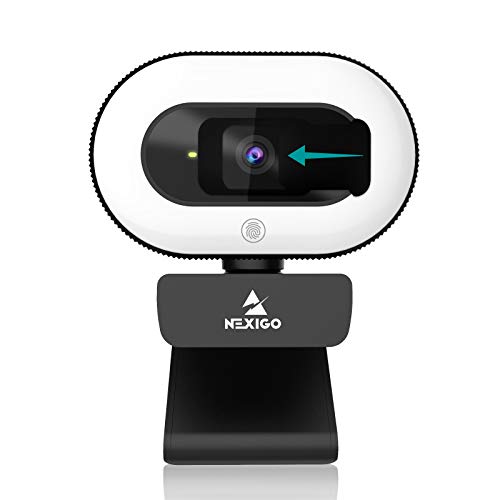
The NexiGo N930E is a 1080p webcam with an integrated three-level ring light and privacy cover. It uses intelligent autofocus to maintain sharp images as you move, and a built-in microphone with noise suppression helps reduce ambient sounds. This model is best for students and professionals who need a simple, plug‑and‑play setup with adjustable lighting for dim rooms.
Who it’s best for: online learners, video call participants, and remote workers who want easy lighting control without external accessories.
Limitation to note: 1080p at 30fps may feel less fluid for fast motion compared with higher frame rates. Lighting is good but not designed for extreme low-light scenarios.
Galyimage 4K Webcam With Ring Light

The Galyimage camera delivers 4K resolution at 30fps, with the option for 1080p at 60fps, making it a strong choice for users who want ultra‑sharp detail during calls or streaming. Its ring light offers three color temperatures (white, natural, warm) with touch‑based brightness control for precise lighting in diverse environments. A TOF autofocus system and dual noise‑cancelling mics help keep faces in focus and voices clear during meetings or lectures.
Who it’s best for: professional presenters and educators who need high image fidelity and flexible lighting.
Caution: 4K output depends on software and system support; if your software or hardware doesn’t handle 4K, you’ll default to 1080p.
Angetube Streaming Webcam With Ring Light

The Angetube streaming webcam focuses on versatility, featuring 1080p at 60fps, a built‑in ring light with RGB options, and a remote control for quick adjustments. It supports 5x digital zoom and real‑time brightness tweaks, making it a practical choice for creators who move between scenes or lighting conditions. It’s easy to set up and widely compatible with livestream software like OBS.
Who it’s best for: streamers and remote presenters who need on‑the‑fly lighting changes and remote control.
Limitation: the 5x digital zoom is a software feature and may reduce image quality if overused at 1080p.
NexiGo N960E: Light Ring, 60fps, Privacy Shutter

The NexiGo N960E offers a three‑level adjustable ring fill light and smooth 1080p video at 60fps, providing responsive motion and clear calls. It includes auto focus to keep subjects sharp and a built‑in privacy shutter for security when not in use. This camera suits meeting rooms or home offices where stable frame rate and privacy matter most.
Who it’s best for: teams and individuals requiring reliable 1080p60 video with a simple privacy solution and adjustable lighting.
Caution: some users may want a higher color depth for very challenging lighting; lighting helps but may not replace a dedicated lighting setup in ultra‑bright or ultra‑dark rooms.
BKELHS 4K UHD Ring Light Webcam
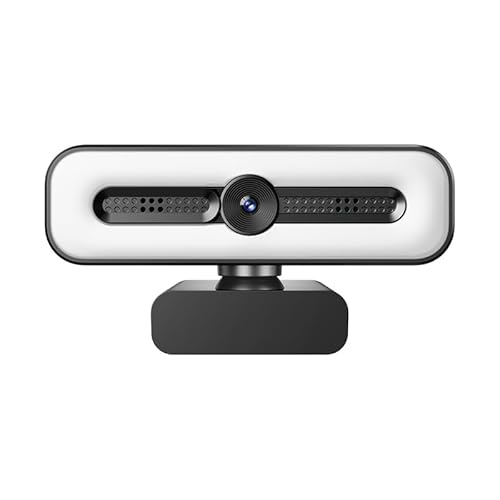
The BKELHS webcam blends 4K ultra‑HD capture with a three‑tone ring light and dual AI microphones for noise reduction. It includes an auto light correction feature and a privacy cover. Its design supports both streaming and conference use, delivering bright, natural colors in varied lighting. This model is well suited for professionals who want high‑resolution video with dependable audio.
Who it’s best for: professionals who require high resolution and a robust lighting system for formal virtual events.
Limitation: 4K output depends on software support; if your software cannot render 4K, the camera will default to 1080p or lower.
Buying Guide: Key Considerations For Your Ring Light Webcam
What resolution do you really need? If you mainly attend video calls, 1080p at 60fps provides smoother motion. For occasional streaming or content creation, 4K is appealing, but ensure your system and software support it.
How important is lighting control? A three‑color or RGB ring light with adjustable brightness helps you adapt to various rooms, from dim offices to sunlit spaces.
Is autofocus critical? Models with PDAF or TOF autofocus maintain sharpness while you move, which helps in dynamic calls. If you stay still, basic autofocus may suffice.
What about privacy? A built‑in shutter or easy access privacy feature protects you when the camera is idle.
What about microphones? Dual noise‑cancelling mics improve voice clarity, but you may also want a separate mic for professional audio in larger rooms.
FAQ
- Do ring lights help in all lighting conditions? Ring lights improve face illumination and reduce shadows in low-light rooms, but extremely bright ambient lighting may require dimming or color temperature adjustments.
- Is 1080p60 significantly better than 1080p30? Yes, 1080p60 provides smoother motion, which matters for dynamic talks or streaming; 1080p30 is typically adequate for standard calls.
- Can I use these webcams with Mac and Windows? Most listed models are plug‑and‑play on both major OSes, with no extra drivers required in typical setups.
- Will higher resolution degrade performance? If your system or software cannot handle 4K, you’ll default to a lower resolution; ensure your hardware and software support the chosen output.
- Are privacy shutters reliable? Built‑in shutters offer convenient protection; for extra security, cover the lens when not using the camera and disable software permissions when not needed.
- Is built‑in audio sufficient for meetings? For small groups, built‑in mics are usually enough; for larger spaces, consider an external microphone to ensure clear voice pickup.