If you need a webcam that fits everyone in the frame without sacrificing clarity, a 120 degree wide-angle model is a strong choice. These cameras excel in meetings, classrooms, and live streaming where multiple participants must be visible at once. The top picks below are suited for different buyers: corporate teams needing reliable conference quality, educators streaming to students, content creators capturing group scenes, and remote workers seeking flexible angles. The summary table highlights each option to compare at a glance.
Buying fast for a wide-angle webcam usually means prioritizing field of view, autofocus performance, microphone quality, and ease of use. The following five products stand out for 120° views, varied software controls, and plug-and-play setup. Use the table for a quick skim, then read the detailed sections to understand who each camera is best for and why it was selected.
| Product | Best For | Key Benefit | Potential Limitation |
|---|---|---|---|
| Angetube Wide Angle 4K Webcam | Business meetings and remote learning | 120° FOV with PDAF autofocus and AI noise cancellation | 4K mode requires software activation |
| Spedal 920 Pro | Boardroom-style meetings | 360° rotation for versatile positioning | Manual focus; may require alignment in larger rooms |
| NexiGo N980P | Daily video calls and streaming | 60FPS at 1080p with dual mics and smart adjustments | 1080p base; no 4K option |
| Shcngqio 1080P | Web-based conferencing in variable lighting | Automatic light correction and wide-angle lens | 1080p only; slightly lower field-quality consistency in extreme lights |
| Ejfete 1080P | Home or small office conferencing | 120° wide angle with plug-and-play USB | Fixed focus; no autofocus |
Angetube Wide Angle 4K Webcam
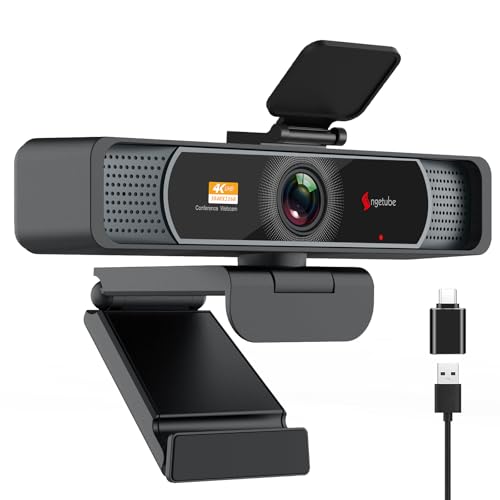
The Angetube camera supports Ultra HD 4K at 30fps or 1080p at 60fps, with a 120° FOV and rapid PDAF autofocus. It includes dual mics with AI noise cancellation for clearer voices during long-distance calls. Best for professionals who need crisp detail during group conferences, remote classes, or streaming sessions. Enable 4K via software like OBS if you want the sharpest image.
remote teams, educators, and streamers who want an expansive field of view with strong auto-focus and noise reduction.
Limitations: 4K requires software activation; default 1080p may be used for most meetings without extra setup.
Spedal 920 Pro Wide Angle Webcam

The 920 Pro emphasizes multi-person coverage with a 120° wide-angle lens and a full 360° horizontal, plus 180° vertical rotation. It ships with a built-in noise-canceling microphone and a newly upgraded flexible gimbal base for adjustable framing. It’s ideal for boardrooms and team huddles where space is shared and a broad view matters.
large group meetings and conference rooms needing panoramic framing with flexible positioning.
Limitation: The product favors wide coverage over intricate close-ups; you may rely on zoom if close details are required.
NexiGo N980P 1080P Webcam

The NexiGo N980P delivers smooth 1080p video at up to 60fps with dual omni-directional microphones. It includes intelligent color adjustments and auto-bright technology, enhanced by a 120° F2.1 lens. This is a solid choice for everyday video calls and streaming where reliable performance in mixed lighting is key.
daily video conferencing with steady frame rate and reliable color accuracy.
Limitation: No 4K mode; optimized for 1080p workflows and quick setup.
Shcngqio 1080P Wide-Angle Webcam

The Shcngqio TWC29 focuses on 1080p clarity with a wide-angle lens and an integrated noise-canceling microphone. It features automatic light correction to improve visibility under varied lighting conditions, making it well-suited for classrooms, webinars, and casual business calls where consistent visibility matters.
users who need reliable performance in fluctuating lighting environments.
Limitation: 1080p resolution may be less sharp than 4K options for close-up detail work.
Ejfete 1080P Wide-Angle Webcam

The Ejfete camera offers a 120° wide-angle fixed focus lens with a 1080p webcam design and built-in microphone. It’s straightforward to use with USB plug-and-play and a privacy cover for lens protection. Choose this if you want a simple setup for group calls or streaming without needing autofocus or advanced controls.
quick setups and multi-person calls in home offices or classrooms.
Limitation: Fixed focus may require manual adjustment if participants move significantly in the frame.
Macally 1080P Webcam
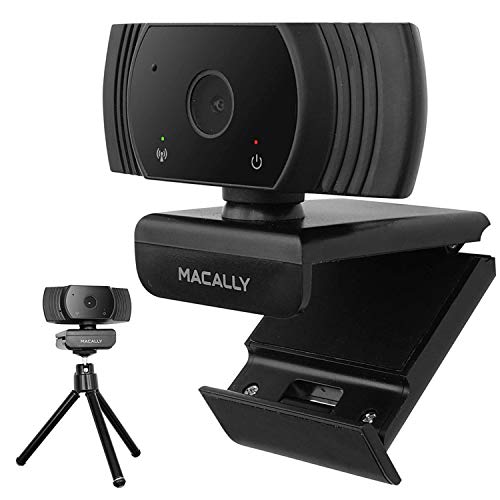
The Macally camera provides 1080p at 30fps with a 120° wide-angle view and a built-in omnidirectional microphone. It emphasizes ease of use with plug-and-play compatibility for both Mac and PC, plus a mounting clip for desks or monitors. Suitable for remote work, online classes, and casual streaming.
users seeking a straightforward, versatile webcam for various devices.
Limitation: 1080p at 30fps; not optimized for fast motion compared to higher frame-rate models.
Buying Guide
What should you consider when choosing a 120° wide-angle webcam?
- Field of View vs. depth: A wider angle shows more in the frame but can distort edges. Look for lenses that balance coverage with realistic perspective.
- Resolution and frame rate: For meetings and teaching, 1080p at 60fps offers smoother motion; 4K adds detail but may require more processing power.
- Autofocus and exposure: PDAF helps keep participants sharp as they move, while smart light correction ensures visibility in dim rooms.
- Microphone quality: Dual mics and noise cancellation reduce background chatter, especially in busy environments.
- Mounting and portability: A sturdy base or clip and tripod compatibility improves placement in conference rooms or classrooms.
- Software and compatibility: Check if the camera works with your preferred platforms (Zoom, Teams, OBS, etc.) and whether you need additional software to enable 4K.
Practical buying questions
- Do I need 4K resolution or is 1080p sufficient for my meetings? If you share screens or want presenter clarity, 4K helps; otherwise, 1080p is typically enough.
- Is autofocus important for a wide-angle camera? Yes, PDAF helps keep moving participants sharp without manual focus.
- Will a wide angle cause distortion at the edges? Some distortion is possible; select cameras with good lens design and software correction.
- Are built-in mics necessary? Dual mics with noise cancellation are beneficial for rooms with ambient noise or multiple speakers.
- Should I choose plug-and-play or software-driven controls? Plug-and-play gives instant setup; software controls offer advanced tuning for streaming or classroom use.
FAQ
- What is the benefit of a 120° webcam? It captures more participants in frame, reducing the need to pan or reposition.
- Can these webcams work with Macs and PCs? Most listed models support both platforms via USB connectivity.
- Do these cameras require drivers? Many are plug-and-play, but some 4K models may benefit from included software.
- Is 4K worth it for video conferencing? It provides higher detail, especially for presenter shots, but 1080p is sufficient for most meetings.
- Do wide-angle webcams distort faces? Some distortion can occur at the edges; good lens design minimizes it, and software correction helps.
- What should I consider for classroom use? Look for a camera with strong field of view, reliable mic pickup, and easy mounting for desks or carts.