Looking for a reliable 17-inch photo printer that delivers gallery-grade color and smooth tonal transitions? This guide highlights five top-performing models, including two 17-inch Epson options and leading 17-inch Canon choices, plus a couple of larger-format alternatives for broader needs. Each entry explains who it’s best for, why it was selected, and any important limitations to consider. The goal is to help photographers, designers, and enthusiasts choose a printer that balances image quality, ease of use, and long-term value.
| Product | Best For | Why It Stands Out |
|---|---|---|
| Epson SureColor P900 17-Inch | Professional photographers and artists | UltraChrome PRO10 with Violet for superb color range and dedicated matte/photo blacks |
| Epson EcoTank Photo ET-8550 | Budget-conscious hobbyists and small studios | Cartridge-free printing with low running costs and 6-color ink system |
| Canon imagePROGRAF PRO-1100 | Color-critical printmakers | 11-pigment inks, Chroma Optimizer for gloss and color depth |
| Canon imagePROGRAF TM-240 (24″ Large Format) | Signage and outdoor/indoor displays | High-speed production, wide media support, robust for posters |
| EPSON SureColor P900 Bundle | Photographers needing a ready-to-run package | Includes cables and cloth for quick setup; same core performance as P900 |
Epson SureColor P900 17-Inch Printer
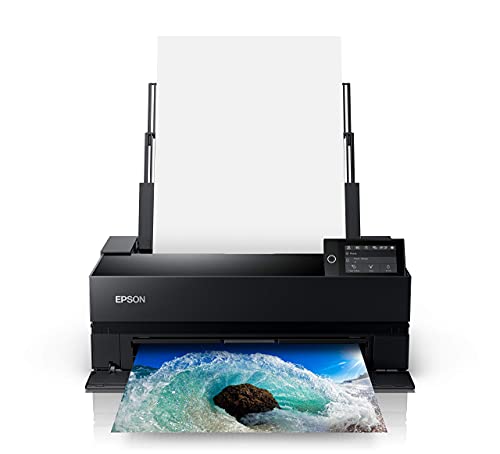
Brand: Epson. Features include UltraChrome PRO10 Ink with Violet for a wide color gamut, dedicated nozzles for photo and matte blacks, and a 10-channel MicroPiezo AMC printhead for speed and accuracy. Best for photographers who demand rich, accurate colors and reliable archival quality. A potential limitation is that the P900 requires a bit more maintenance than cartridge-free models, especially for users who frequently swap between matte and photo black channels.
Epson EcoTank Photo ET-8550 Wireless Wide-Format

Brand: Epson. This cartridge-free model uses high-accuracy printheads and Claria ET Premium 6-color inks for vibrant photos and sharp text. Best for buyers who want low ongoing costs and the ability to print 4″ x 6″ photos economically. Limitation: bulkier footprint and slower print times relative to dedicated photo printers when producing large batches.
Canon imagePROGRAF PRO-1100

Brand: Canon. Features an 11-pigment ink system with Chroma Optimizer to enhance gloss and expand color range. Best for color-critical prints, art reproduction, and photographers who need excellent skin tones and deep blacks. Limitation: larger 17″ format is ideal, but this model is part of a broader family; workflow may require compatible software to maximize color management.
Canon imagePROGRAF TC-21 24″ Printer

Brand: Canon. A 24″ wide-format printer with roll and cut sheet media feeding, a 2.7″ touchscreen, and USB/ Wi-Fi connectivity. Best for users who need signage or large posters. Limitation: it is a larger format; for strictly 17″ photo printing, this is a broader option rather than a direct replacement.
Canon imagePROGRAF TM-240 24″ Large Format

Brand: Canon. The TM-240 offers high-quality output with a 6-color pigment ink system and a high-density PF-06 printhead. Best for store displays, outdoor posters, and large-format work. Limitation: 24″ width may exceed the needs or storage space of smaller studios seeking true 17″ output.
Buying Guide: Key Considerations For a 17-Inch Photo Printer
- Printer Type and Ink System: Photo printers with pigment inks typically offer longer archival life and sharper color detail. Consider whether you prefer pigment or dye inks and the availability of dedicated black channels for photo and matte prints.
- Print Width and Media Handling: For 17-inch formats, verify the maximum media width, borderless printing options, and whether the printer handles heavy photo papers or fine art papers.
- Color Management: Look for printers with wide color gamuts and built-in color-management tools. Compatibility with ICC profiles and professional software improves consistency across jobs.
- Inks and Running Costs: Cartridge-free or bulk-ink systems can reduce costs in the long run. Estimate ink yield and total cost of ownership for the expected print volume.
- Workflow and Connectivity: Ensure reliable network options (Ethernet, Wi‑Fi) and compatibility with your operating system and editing software. Standalone print software can simplify production pipelines.
- Maintenance and Reliability: Consider print head technology and ease of maintenance, as well as availability of replacement parts and service support in your region.
- Size, Footprint, And Setup: A 17-inch printer may still require substantial desk or cabinet space. Measure your workspace and ensure proper ventilation and paper storage.
FAQs
- What is the main advantage of a 17-inch photo printer?
– It balances compactness with professional print width, enabling high-quality large photos without moving to a full 24-inch system. - Are pigment inks better than dye inks for photos?
– Pigment inks typically offer greater longevity and resistance to fading, while dye inks can produce brighter colors and smoother gradients on certain media. - Is borderless printing available on 17-inch models?
– Many 17-inch printers support borderless printing on select media sizes; verify for your preferred media before purchasing. - Can I use third-party ICC profiles with these printers?
– Most professional printers support ICC profiles; check driver settings and software compatibility to ensure accurate color reproduction. - Which model is best for cost-conscious buyers?
– The Epson EcoTank Photo ET-8550 offers cartridge-free printing and lower running costs, albeit with different media and workflow considerations. - Do any of these printers handle large-format signage as well?
– Models like the Canon TM-240 and similar 24″ formats are designed for signage; they accommodate wider media and roll media feeding.