The best 180 degree conference cameras deliver full-room coverage, clear speaker prioritization, and easy plug‑and‑play setup for quick meetings. This guide highlights five top options that suit small teams, home offices, and huddle rooms. Each pick is analyzed for who it’s best for, its standout features, and practical limitations to help you decide quickly.
| Product | Best For | Key Benefit |
|---|---|---|
| Meeteasy 180° Panoramic Camera | Small teams; home office | Two camera modes with real-time speaker tracking |
| Innex C831 180° 4K Webcam | Flexible layouts; large calls | Five preset angles; AI facial tracking |
| Jabra PanaCast 50 | Professional conference rooms | 4K, 180° view with intelligent stitching |
| IPEVO Totem 180 | Hybrid learning; classrooms | Two modes: 180° and 120° with AI framing |
| WYRESTORM 4K AI Tracking | Small meeting rooms | Auto framing and presenter tracking |
Buying tip: Look for a camera that offers AI tracking or auto-framing to keep everyone visible, plus easy USB plug‑and‑play setup for immediate use. If your room tends to have mixed lighting, prioritize models with adaptive image processing to reduce shadows and glare.
Meeteasy Panoramic 180° Video Camera

Features: Immersive remote video conference experience with two camera modes: ultra-wide for an overall view and collaboration mode for a close-up of speakers with real-time tracking. Three non-fisheye lenses deliver 1080P Full HD with natural perspective. Plug‑and‑play USB connectivity with an optional power cable for external power.
Best for: Small huddle rooms and home offices needing quick switching between overall room view and speaker focus. This model is ideal for teams that want a simple setup and a natural, distortion-free image.
Limitation: 1080P resolution may fall short for rooms requiring ultra-high detail in every participant, compared to 4K options.
Innex C831 180° Panoramic 4K Webcam

Features: Immersive 180° panorama captured by three 12MP lenses with real-time stitching for a distortion-free 4K image. Five preset view angles from 180° to 75° allow quick tailoring of the shot. Includes Innex Studio software for AI features like facial tracking and auto-zooming.
Best for: Teams that need flexible layouts and AI-assisted framing to include every participant, even in dynamic meeting formats. The 4K capture supports sharp detail for larger displays or replays.
Limitation: Requires software integration for advanced AI features, which may add setup steps beyond basic plug‑and‑play usage.
Jabra PanaCast 50

Features: A 180° panoramic 4K intelligent video bar with three 13 MP sensors, eight mics, and real-time stitching. Flexible field-of-view options (90°–180°). Auto-zoom adapts to lighting and room changes; plug‑and‑play USB connection; optional remote control.
Best for: Professional conference rooms needing robust audio and video quality in varied lighting, with easy setup for teams that value a turnkey solution.
Limitation: Higher price point and larger footprint may be less suitable for very small spaces or budget-conscious buyers.
IPEVO Totem 180 4K Panoramic Camera

Features: 180° full-room view with an additional 120° small group view. Two 4MP lenses deliver a 4K natural view with reduced distortion via video stitching. AI framing and noise reduction mics support hybrid learning and meetings.
Best for: Small to medium meeting rooms and hybrid classrooms where both full-room visibility and intimate group views are needed. The dual-mode design supports multiple meeting formats.
Limitation: Configuration can be more involved than basic USB cameras, and real-time AI features might require compatible software or systems.
j5create 360 Degree All Around Meeting Webcam

Features: 360° video coverage with built-in omnidirectional microphone. Six display modes for flexible viewing angles and Full HD 1080p at 30 Hz. USB‑C connection supports modern devices.
Best for: Budget-friendly setups and classrooms where you need all-around coverage without separate lens adjustments. The variety of display modes helps adapt to different meeting styles.
Limitation: Audio quality and video resolution are solid but not as specialized as premium conference camera bars in large rooms.
WYRESTORM 4K AI Tracking Conference Webcam

Features: Designed for small conference rooms with 120° wide angle, dual noise‑canceling mics, and privacy cover. USB plug‑and‑play with Zoom certification for Teams environments. AI auto framing tracks presenters automatically.
Best for: Small rooms where quick setup, privacy controls, and reliable coordination with Teams or Zoom are priorities. Suitable for training sessions or presentations with presenter tracking.
Limitation: AI framing performance may depend on lighting and room dynamics; some users may prefer manual control in certain scenarios.
Jabra PanaCast – Intelligent 180° Panoramic-4K
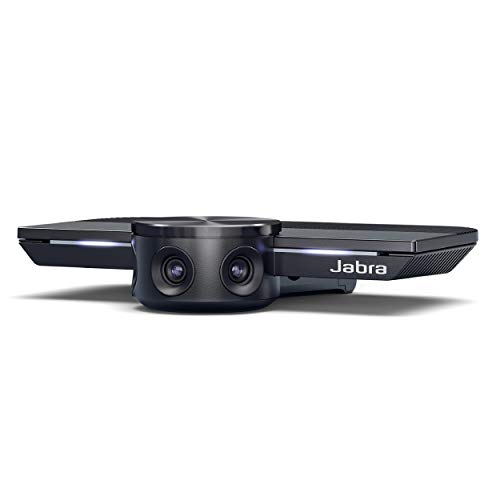
Features: The world’s first intelligent 180° panoramic conference camera with three 13 MP sensors and real-time stitching. Adaptive field of view and automatic zoom ensure inclusive coverage; plug‑and‑play with USB ports.
Best for: Teams needing reliable, scalable coverage for hybrid work environments with varying room sizes and lighting. The 4K output ensures sharp detail on large displays.
Limitation: Some setups may require compatible software for optimal AI features; larger rooms may benefit from higher-end models with more mics or sensors.
PANOCORE360 All-in-One Meeting Camera

Features: Four integrated cameras, mics, and a speaker in a compact 360° design. Auto speaker focus and 1080p output with AI voice isolation. Local recording support and compatibility with Webex, Zoom, Teams, and Meet.
Best for: Hybrid meetings and classrooms needing an all-in-one solution with consistent performance across different platforms. Suitable for compact rooms that still require full-room visibility.
Limitation: The 1080p output may be less crisp on very large displays compared to true 4K options.
Buying Guide
What to consider when choosing an 180° conference camera:
- Room size and seating: For small rooms, 180° views with good auto-framing are often sufficient. Larger huddle rooms may benefit from higher resolution and AI tracking with wider fields of view.
- Resolution and image quality: 1080p is common and adequate for many calls; 4K offers crisper detail, especially on large displays.
- AI features: Facial tracking, auto-zoom, and presenter tracking help keep participants framed, but may require software integration or better lighting.
- Audio integration: Built-in mics or compatibility with external mics can affect clarity—choose a model with good audio pickup for your room.
- Setup and compatibility: Look for plug‑and‑play USB connectivity and compatibility with meeting platforms you use (Zoom, Teams, Meet, Webex).
- Budget vs. features: Higher-end cameras provide flexible views, more mics, and AI, but consider whether those features align with your needs and room constraints.
Frequently Asked Questions
- What’s the advantage of 180° vs 360° cameras? Answer: 180° cameras cover the room while avoiding excessive distortion, making it easier to focus on participants without unnecessary panoramic distortion.
- Do I need software to use AI tracking? Answer: Some models require companion software to access advanced AI features; others work with standard video calls with basic auto-framing built in.
- Can these cameras replace a dedicated speaker system? Answer: They can reduce the need for separate camera hardware, but a quality microphone array is still important for clear audio in larger rooms.
- Are 4K cameras worth it for home offices? Answer: If you frequently share high-resolution presentations or large screens, 4K can deliver crisper video, but 1080p is often adequate for standard meetings.
- Is plug‑and‑play enough for most setups? Answer: For many users, yes. Ensure your computer supports USB connections and that your meeting software recognizes the camera without extra drivers.
- Can these cameras work with conferencing software on macOS and Windows? Answer: Most listed models support both major platforms, but check compatibility notes for any required software.