If you’re converting 35mm slides and negatives into digital copies, these five options offer practical, standalone scanning or digitizing solutions. They’re best for archival hobbyists, scrapbookers, educators, and family historians who want clear, color-accurate results without complex workflows. The following picks cover built-in scanners, LED backlights, and adapter systems to suit different setups and lenses. Use the quick comparison table to identify the right fit for your needs.
| Product | Best For | Key Benefit |
|---|---|---|
| DigitPro 2.4″ LCD Film & Slide Scanner | Standalone users | No computer needed; quick, direct JPEG output |
| JJC 35mm Negative Film Digitizer Adapter Set | Macro-lens users | Precise re-photographing with adjustable brightness |
| JJC LED Light Kit for 35mm Slides | Low-cost backlight | High-CRI LED backlight with 10 brightness levels |
| JJC 35mm Slide/Neg Digitizer With Backlight | Compact kit with mount | 10-level brightness; tripod-ready |
| DigitPro Film & Slide Scanner (22MP) | Versatile formats | Supports 35mm, 126, 110; 5” LCD |
JJC 35mm Negative Film Scanning Copying LED Light Set
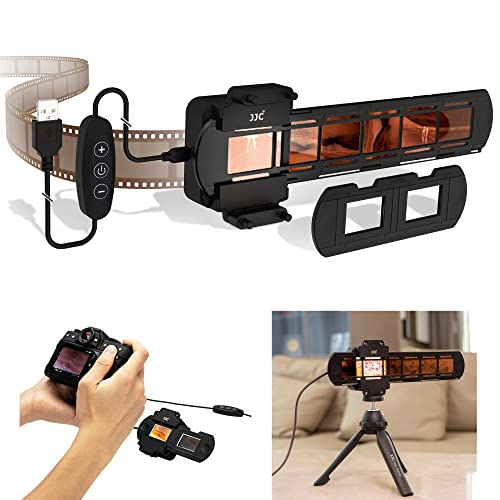
This kit is designed for old negatives and slides, converting film into digital files with a built-in LED array. It uses 42 ultra-bright LEDs and a color-accurate 95+ CRI at 6500K to minimize color shifts. The brightness is adjustable via a remote on the line with 10 levels. Best for hobbyists who want a simple, dedicated light source plus slide/film holders. Note: prolonged use at high brightness may heat the holder area; use moderate levels for longer sessions.
35mm Film & Slide Scanner with 2.4″ LCD Screen

This standalone film scanner converts 135 negatives and slides into JPEGs without a PC. It features a 2.4″ LCD for preview, supports color, negative, and black-and-white modes, and includes a quick slide feeder for efficient processing of large collections. Best for individuals who want a compact, all-in-one solution with immediate viewing on the device. Limitation: larger or framed slides may require removal from frames before feeding.
JJC 35mm Photo Slide and Negative Film Digitizing Adapter Set

This adapter set focuses on precise re-photographing of 35mm negatives and slides using macro lenses. It subjects 135 film and slides to digital capture without frame rotation, providing a stable workflow. Best for users with compatible macro lenses who want consistent frame alignment. Caution: the 6500K/CRI LED backlight is strong; avoid long continuous sessions to preserve film integrity.
JJC LED Light Kit for 35mm Slides
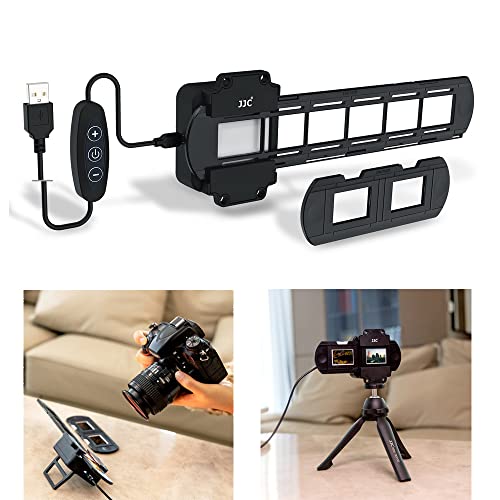
The Negative Converter Light set provides a dedicated backlight with 42 LEDs and 95+ CRI at 6500K. It includes dimming controls on the controller for levels 1–10 and a backkick stand for flat-surface use. Best for users who need a portable, bright, and color-accurate light source to pair with a separate camera or adapter. Limitation: avoid placing film directly in front of the light for long periods while on.
JJC Digitizer Converter with 10 Levels Brightness
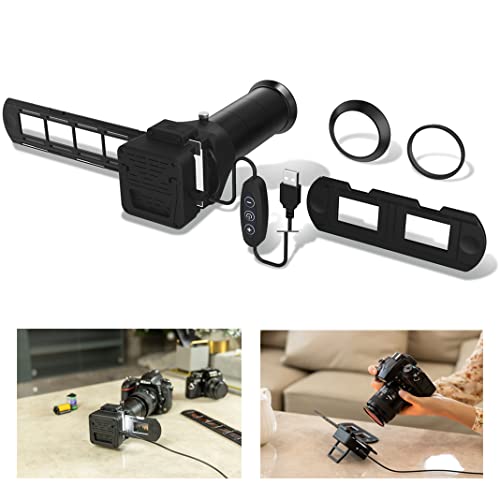
This kit enables re-photographing 35mm slides and negatives with select macro lenses. It supports 10 brightness levels at 6500K with a 95+ CRI LED backlight. It includes mounting options on its back and a 1/4″-20 thread for tripod use. Best for photographers who want to adapt the kit to different camera systems. Caution: certain long-term incandescent lighting can cause film damage; use LED backlight as the primary source.
DigitPro Film And Slide Scanner with 5” LCD

This all-in-one scanner supports 35mm, 126, and 110 film negatives, 50mm slides, and even Super 8 film. It stores images on a built-in 128MB memory or an external SD card (up to 64GB). A 5” LCD provides real-time preview, and one-touch scanning simplifies the workflow. Best for users who want broad format support and a built-in display for quick review. Limitation: external storage capacity may limit large archives without upgrading cards.
Buying Guide: How to Choose the Right 35mm Slide Scanning Equipment
What format do you primarily digitize? If you mostly work with 35mm slides and negatives, consider a dedicated scanner with an LCD preview to speed up archiving. If you own macro lenses, a digitizer adapter kit paired with a flashlight is a flexible route for precise framing.
Do you need stand-alone scanning or computer-based workflows? Stand-alone scanners are convenient for quick digitization, while adapter systems offer flexibility for camera-based digitizing with customizable lenses and lighting.
How important is color accuracy? Look for devices with high CRI (95+) and a consistent color temperature around 6500K to minimize color shifts across your archive.
What about capacity and future-proofing? If you have large collections, prioritize models with fast feeders or support for additional storage cards and larger slide/film formats.
Usability and setup time matter. Choose kits with clear assembly, easy brightness controls, and reliable mounting options to reduce setup friction during batch scans.
FAQ
- What is the easiest way to digitize 35mm slides? A standalone 35mm film scanner with a built-in display and simple one-click scanning is typically the easiest for quick archiving.
- Do I need a special light for scanning slides? Yes. A high-CRI LED backlight (around 6500K) provides accurate color and even illumination for most films.
- Can I use macro lenses with slide digitizer adapters? Many adapters are designed to work with macro lenses; verify compatibility with your camera system before purchase.
- Is color correction built into these devices? Many devices offer color and brightness adjustments; CRI-based backlights support more accurate color rendering.
- Do these tools support 126 or 110 formats? Some models do; check product specs if you plan to preserve older film formats beyond 35mm.
- Will I need a computer to finish digitization? Some options are PC-free, while others transfer files directly to a computer or external storage. Choose based on your preferred workflow.