Capturing the entire 3D printing process through time lapse cameras is essential for monitoring print progress, detecting errors early, and showcasing your projects. This article highlights the best 3D printer time lapse cameras available on Amazon, all designed to provide real-time monitoring, AI detection, and high-definition video to enhance your printing experience. Below is a summary table of five top options with their key features for easy comparison.
| Product | Brand | Key Features |
|---|---|---|
| Creality K1 AI Camera | Creality | Real-time viewing, AI detection, time lapse filming, failure detection, HD quality |
| Chitu Systems Official K1 AI Camera | chitu systems | HD quality, AI detection with pre-print foreign object detection, automatic print pause |
| Creality Nebula Camera | Creality | Real-time monitoring, time-lapse photography, spaghetti detection, WiFi-enabled |
| R QIDI TECHNOLOGY 3D Printer Camera | R QIDI TECHNOLOGY | Remote monitoring, time-lapse function, plug and play, HD video |
| Lokkr Creality Upgraded K1 AI Camera | Lokkr | HD quality video, easy installation, AI detection, automatic time lapse |
Creality K1 AI Camera for Creality K1 Series

The Creality K1 AI Camera is designed specifically for Creality K1 MAX, SE, and K1C 3D printers, featuring real-time monitoring via the Creality Cloud or Creality Print applications. It can detect printing failures during the process and automatically pause the print job to reduce filament waste. The camera also supports automatic time-lapse filming of a print’s progress, allowing easy sharing of your printing achievements. Its high-definition video quality ensures users can clearly view details and status changes during any print job for better quality control.
Chitu Systems Official K1 AI Camera Compatible with Creality K1

This camera by chitu systems boasts HD-quality video for crystal-clear viewing of your 3D print status. It features advanced AI detection to identify foreign objects on the printing platform before printing starts and will pause the printer to avoid collisions. During printing, if any failure or anomaly is detected, it will automatically suspend the job to help save filament and prevent defects. The device is designed for easy installation and is compatible with Creality’s K1 and K1 MAX models, making it an excellent monitoring companion.
Creality Nebula Camera for 24H Real-Time Monitoring

The Creality Nebula Camera offers comprehensive 24-hour real-time monitoring and connects easily with WiFi via the Creality Cloud app on your phone or computer. It excels at capturing stunning time-lapse videos for reviewing and showcasing printer progress. A notable feature is its spaghetti detection, which alerts users to printing errors or misprints that can result in failed prints, helping prevent wasted filament. It supports multiple printers like Sonic Pad, Nebula Pad, Ender 3 V3/Plus, CR-10 SE, and HOLOT-MAGE/PRO.
R QIDI TECHNOLOGY 3D Printer Camera with Remote Monitoring

Designed for QIDI MAX3, PLUS3, and SMART3 models, this R QIDI TECHNOLOGY camera supports remote monitoring through the QIDI Slicer or the Klipper website console and works with third-party remote control apps. The device offers a robust time-lapse function that automatically records print videos, perfect for documenting and analyzing your printing projects. Installation is plug-and-play, enhancing user convenience without needing complicated setups.
Lokkr Creality Upgraded K1 AI Camera for K1/K1 Max
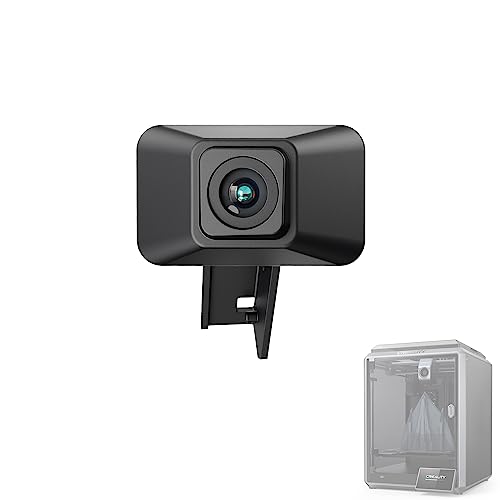
The Lokkr Creality Upgraded K1 AI Camera offers high-definition video quality and a true-to-life viewing experience for K1 and K1 Max 3D printers. It supports automatic time-lapse filming via the Creality Cloud platform and features an easy installation process with reserved interfaces. The AI detection feature enhances print safety by monitoring for print failures. This camera is a solid accessory for users seeking effective print monitoring combined with effortless video creation.
Buying Guide for 3D Printer Time Lapse Cameras
Choosing the right time lapse camera for your 3D printer depends on several critical factors:
- Compatibility: Ensure the camera supports your specific 3D printer model or brand for seamless integration and control.
- Video Quality: Opt for HD or better resolution to clearly monitor print details and accurately spot any issues.
- AI Detection and Failure Alerts: Cameras with AI detection help reduce filament waste by automatically pausing prints during failures or foreign object interference.
- Time-Lapse Features: Check if the camera can automatically generate time-lapse videos and if it requires manual setup or offers cloud-based recording.
- Remote Monitoring Capability: Look for WiFi connectivity and mobile app support that allow monitoring prints from anywhere.
- Ease of Installation: Cameras that offer plug-and-play or reserved interface installation can save time and technical hassle.
- Additional Functionalities: Consider features like spaghetti detection, night vision, or multi-device compatibility that enhance usability and error prevention.
By weighing these aspects, you can select a 3D printer time lapse camera that boosts your printing workflow efficiency, maximizes filament use, and helps create stunning visuals of your 3D printing projects.