Answering the demand for true stereoscopic 3D VR capture, these 3D VR video cameras deliver immersive experiences for creators, reviewers, real estate showcases, and event coverage. The top picks below are selected for different use cases: high-end professional content with robust workflow, portable on-the-go filming, and easy smartphone-enhanced 3D capture. The buyer-friendly table summarizes each option’s best fit, key strengths, and ideal user type.
| Product | Best For | Why It Stands Out |
|---|---|---|
| KanDao QooCam EGO | Content creators and VR enthusiasts | 65mm stereo baseline, 8K photo and 4K video with in-device stabilization |
| SLAM XCAM Professional 3D VR Camera | Professional productions | 8K 3D video, 12K RAW photos, Snapdragon 8 Gen 2, live streaming |
| KanDao QooCam EGO (White) | Travelers and vloggers | Same core capabilities in a portable, user-friendly package |
| OPIC Smartphone 3D Stereoscopic Lens | Smartphone-based 3D capture | Adds stereoscopic depth to existing devices for VR-ready memories |
| Kodak PIXPRO SP360 4K Dual Pro Pack | Two-camera stereo rigs | Back-to-back spherical capture with complete mounting kit |
KanDao QooCam EGO — Viewer-Integrated 3D VR Camera

The KanDao QooCam EGO is designed for true-to-life 3D capture with a 65mm inter-lens distance. It records 60 FPS video at 3840×1080 and up to 8000×3000 photos, delivering sharp imagery suitable for VR headsets, AR glasses, and projectors. This model also includes an IMU-based stabilization system, helping you shoot cinematic footage without a separate gimbal. It’s best for creators who want ready-to-share 3D content directly from the camera to major VR platforms.
Best for: Solo creators and mobile shooters who want high-quality, ready-to-view 3D content with in-camera stabilization.
Why selected: Combines high-resolution 3D capture with simple sharing via QooCam App and compatibility with mainstream VR displays.
Limitation: Requires compatible VR viewing or editing workflow to fully appreciate the 3D output; advanced features benefit from a connected ecosystem.
KanDao QooCam EGO — Viewer-Integrated 3D VR Camera (Variant)

This variant of the QooCam EGO shares the same 3D capture architecture, including 65mm stereo baseline and 4K 60FPS video capability, making it a solid choice for users who want reliable 3D footage without a steep learning curve. The integrated app workflow supports easy editing, exporting, and sharing to VR platforms. It’s best for users seeking a familiar, all-in-one 3D camera experience.
Best for: Visual storytellers who want a compact, all-in-one 3D camera with straightforward app-based editing and sharing.
Why selected: Consistent performance in a portable design with fast workflow for VR-ready content.
Limitation: Fewer advanced on-board features compared to some professional-grade rigs; prioritize simplicity over extensive customization.
SLAM XCAM Professional 3D VR Camera

The SLAM XCAM combines dual 2/3″ CMOS sensors with a Snapdragon 8 Gen 2 processor, delivering 8K/30FPS 3D 180° video and 12K RAW photos. It runs Android with Google Mobile Services, enabling on-device stitching and direct app access without subscriptions. The device supports real-time 6K live streaming via Wi-Fi, RTMP, and SRT, and features a vivid 6.67” AMOLED display for immediate review. It’s best suited for professional VR productions that require high resolution, live capabilities, and robust processing power.
Best for: Professional studios and production teams needing high-end 3D capture and streaming.
Why selected: All-in-one powerhouse with native Android workflow and no subscription lock-in.
Limitation: Higher complexity and cost; suited for experienced users who need top-tier output.
KanDao QooCam EGO 3D VR Camera — White Edition

This model emphasizes the same core capabilities as the standard QooCam EGO, with 24MP photo resolution, 8K photo potential, and 4K 60FPS video capture. It’s a strong option for creators who want a clean, minimalistic design and reliable 3D output ready for VR headsets and projection systems. White variant offers a discreet aesthetic for on-camera work and travel shoots.
Best for: On-the-go creators who value reliability and a clean design for VR-ready media.
Why selected: Consistent 3D performance in an aesthetically varied option.
Limitation: Similar capabilities to standard EGO; choose based on color preference or availability.
OPIC Smartphone 3D Stereoscopic Lens

The OPIC Spatial Lens attaches to smartphones, tablets, or laptops to transform regular cameras into 3D capture devices. It supports stereoscopic photos and videos optimized for VR viewing through software. This accessory is ideal for hobbyists who want to experiment with 3D content without investing in a dedicated camera. It works best when you want to add a 3D dimension to existing mobile content.
Best for: Smartphone users seeking affordable 3D capabilities and VR-ready content creation.
Why selected: Fast way to dip into 3D capture without new hardware investment.
Limitation: Image quality and depth can be limited by phone camera parameters and processing; results vary with device.
XREAL Beam Pro — AR Glasses with 3D Cameras

The XREAL Beam Pro pairs AR glasses with 3D camera capabilities, delivering spatial 3D capture for immersive experiences. It runs Android 14 and provides access to Google Play Store apps, expanding potential workflows for VR/AR content creators. This option is best for viewers who want integrated AR and VR experiences alongside 3D capture in a wearable format.
Best for: Augmented reality creators and enthusiasts seeking wearable 3D capture with broad app support.
Why selected: Combines spatial computing, 3D capture, and broad app compatibility in a wearable platform.
Limitation: Ecosystem is still evolving; performance depends on software integration and app availability.
Kodak PIXPRO SP360 4K Dual Pro Pack
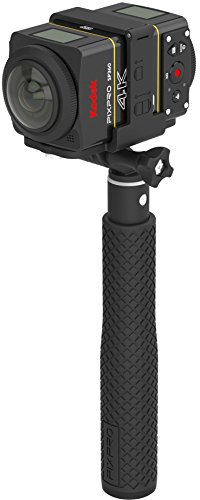
The Kodak PIXPRO SP360 4K Dual Pro Pack provides a back-to-back dual-camera setup, enabling full 360 by 360 VR capture. The bundled mounting kit includes a selfie stick, suction mounts, and a remote, facilitating varied shooting scenarios for spherical VR content. This is a practical solution for creators who want a ready-to-build VR rig without assembling from disparate parts.
Best for: VR content creators who prefer a complete, portable dual-camera rig for spherical capture.
Why selected: True 360-by-360 stitching capability with a comprehensive mounting kit out of the box.
Limitation: Requires post-production stitching and may demand a higher storage footprint for 4K footage.
Buying Guide
Key considerations when choosing a 3D VR video camera:
- Decide between true stereo (two lenses) versus single-lens with depth tricks. Stereo rigs generally offer more authentic 3D but can be bulkier.
- Higher resolutions and faster frame rates yield crisper depth cues but demand more storage and processing power.
- On-board IMU or gimbal-free stabilization helps with smooth footage, especially for action shots.
- Consider app support, on-device stitching, and compatibility with your VR headset or software pipeline.
- For on-the-go content, opt for compact designs and straightforward editing tools.
- If real-time sharing matters, look for devices with built-in streaming support and compatible protocols.
FAQ
- What is a 3D VR camera best used for? Creating immersive VR videos and stereoscopic photos for VR headsets, AR displays, and projection systems.
- Do I need a powerful computer to edit 3D VR footage? Yes, to process high-resolution 3D videos, color grading and stitching typically require capable hardware or cloud-based tools.
- Is a separate gimbal necessary for stabilization? Not always; some cameras include built-in stabilization, while others benefit from a gimbal for dynamic scenes.
- Can I view 3D VR footage on a regular monitor? Many VR formats can be exported as side-by-side MP4 or folded into 2D for standard displays, but depth viewing is optimized in VR headsets.
- Are smartphone-based 3D lenses reliable? They provide affordable entry points but may have more variable results due to phone cameras and processing power.
- What’s the advantage of a dual-camera 360 rig? It enables true spherical capture with seamless stitching for comprehensive VR environments.