If you need smooth, reliable 1080p video at 60 frames per second for professional calls or live streams, these five webcams are strong choices. They’re suited for remote workers, educators, streamers, and gamers who prioritize fluid motion, better auto-focus, and clear audio. Each option offers 60fps at 1080p, with varying benefits such as privacy covers, built-in mics, and software controls to enhance your setup.
| Product | Best For | |
|---|---|---|
| Logitech MX Brio Ultra HD 4K Webcam | Professionals needing top image quality and reliable 1080p60 | 4K sensor, 1080p60, AI-enhanced image |
| NBPOWER 1080P 60FPS Streaming Camera | Budget-friendly 60fps with fill light | Low-light assist, built-in mic, privacy cover |
| VITADE Webcam 1080P 60fps with Microphone | Streaming and conferencing on a budget | Wide lens, dual mics, automatic light correction |
| NexiGo N980P 1080P 60FPS Webcam | Balanced features for home offices | Dual mics, software controls, 120° view |
| NexiGo N60 Pro 4K Webcam | Future-proof with 4K plus 1080p60 | Distortion-free, 3DNR, fast autofocus |
Logitech MX Brio Ultra HD 4K Webcam

The Logitech MX Brio is a premium option with 4K Ultra HD capability and 1080p at 60fps. It uses a large sensor and advanced processing to deliver sharp video in various lighting conditions. It also includes features like auto-exposure and auto white balance, aiding consistent image quality during calls. Best for: professionals who need top-tier image clarity and reliable 1080p60 for meetings or streaming. Caution: higher-end features may require compatible software or hardware, and 4K mode can consume more bandwidth and processing power.
NBPOWER 1080P 60FPS Streaming Camera

The NBPOWER webcam targets budget-conscious users who still want 1080p at 60fps and a built-in microphone. It emphasizes low-light performance with an included fill light and a privacy cover. Best for: students and casual professionals who need dependable 60fps streaming at a wallet-friendly price. Limitation: feature depth is more basic than premium models, and software controls may be limited on some systems.
VITADE Webcam 1080P 60fps with Microphone

The VITADE webcam pairs 1080p60 video with a stereo microphone setup and automatic light correction. It’s a practical pick for webinars, online teaching, and conference calls where stable video and clear voice are essential. Best for: budget-conscious makers of content who need built-in lighting support and straightforward setup. Caution: image quality may be sensitive to extreme lighting changes, so use the light correction feature to optimize results.
NexiGo N980P 1080P 60FPS Webcam

The NexiGo N980P offers true 1080p at 60fps with dual omnidirectional mics and automatic color adjustments for lifelike video. Its wide 120° field of view and software-controlled settings help optimize images for meetings and streaming. Best for: home offices that want dependable 60fps performance with easy software tweaks. Limitation: wider FOV can introduce more background in frame; position the camera carefully to keep attention on you.
NexiGo N60 Pro 4K Webcam
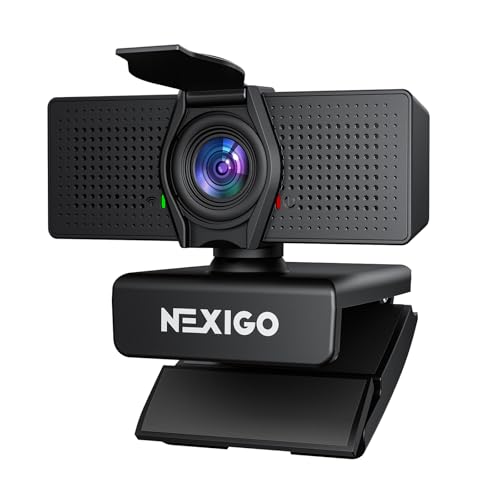
The NexiGo N60 Pro combines a 4K sensor with a distortion-free lens and 1080p60 capability. It features fast autofocus, 3DNR for reduced noise, and privacy protection. Best for: users who want future-proofed capabilities and strong 1080p60 performance, plus the option of 4K output when needed. Caution: true 4K output may depend on software and system compatibility, so check your streaming setup before enabling 4K.
Buying Guide: Key Purchase Considerations
- Resolution and frame rate: If you need 1080p at 60fps, verify that the webcam explicitly lists 1080p60 in its specs and supports your software’s frame rate needs.
- Low-light performance: Look for sensors and features like auto white balance, exposure control, and built-in fill light to maintain clear video in dim environments.
- Audio quality: Decide if you need built-in microphones or if you’ll pair an external mic. Dual mics and noise reduction help reduce background noise in calls.
- Autofocus and distortion: Fast autofocus keeps you in frame as you move. Distortion-free lenses preserve natural proportions, especially in gaming or wide setups.
- Privacy and security: A physical privacy cover adds security when not in use. Consider software features that give quick lens access control.
- Compatibility and setup: Confirm USB compatibility (2.0/3.0) and driver requirements. Plug-and-play models are typically easier for quick setups.
- Use case: Distinguish between meeting-focused needs (auto focus, color accuracy) and streaming or gaming needs (scene-wide FOV, 4K options, software zoom).
FAQ
- Do these webcams require drivers? Most listed models are plug-and-play and work with standard OS drivers, though some may offer optional software for advanced features.
- Is 1080p60 better for video calls than 1080p30? Yes, 60fps provides smoother motion and more natural movement during fast actions or transitions in meetings and streams.
- What’s the advantage of a privacy cover? It provides a physical lens shield for privacy when not using the camera, reducing accidental exposure.
- Can these webcams work with gaming consoles? Some models are designed for PC/macOS; checks on compatibility with consoles like Nintendo Switch or PS5 may be required.
- Do I need a high-end PC to run 1080p60 at 60fps? Most modern systems can handle 1080p60, but performance depends on software, background tasks, and hardware encoding.
- Are built-in microphones enough for professional calls? For most calls, yes, but for noisy environments or high-stakes meetings, an external mic can improve audio quality.