Looking to convert 8mm, Hi8, Digital8, and other legacy tapes to digital formats? This guide highlights five reliable options that cater to different needs—whether you want a simple on-device transfer, a bundled solution with a USB adapter, or an all-in-one film-to-digital scanner. The selections are grouped by best use case: beginner-friendly transfers, bundled digitization kits, standalone converters, and film-to-digital scanners. Each choice includes who it’s best for and why it stands out for easy, accurate digitization.
Summary Table of Selected Products
| Product | Your Best For | Key Benefit | Notable Limitation |
|---|---|---|---|
| Sony Camcorder for 8mm Digital8 | Beginner to intermediate users | All-in-one playback and USB/DVD transfer | Requires compatible tapes for full utility |
| Tech Collector 8mm/Hi8/Digital8 Transfer Bundle | Comprehensive bundle lovers | Includes camcorder, battery, and USB capture | Bulkier setup; more parts to manage |
| ClearClick Video to Digital Converter 2.0 | Simple, no-computer recording | Direct-to-USB/SD recording from analog sources | Requires working tapes and camcorders |
| VIXLW VHS to Digital Converter | VHS and analog-to-digital on a budget | RCA/S-Video to USB transfer | Limited to certain tape formats |
| KODAK REELS 8mm & Super 8 Films Digitizer | Film-to-digital on large reels | 5-inch on-device LCD and frame-by-frame digitizing | Requires SD card and film reels; not a tape transfer |
Sony Camcorder for 8mm Digital8 Hi8 Tape Transfer to Computer USB and DVD
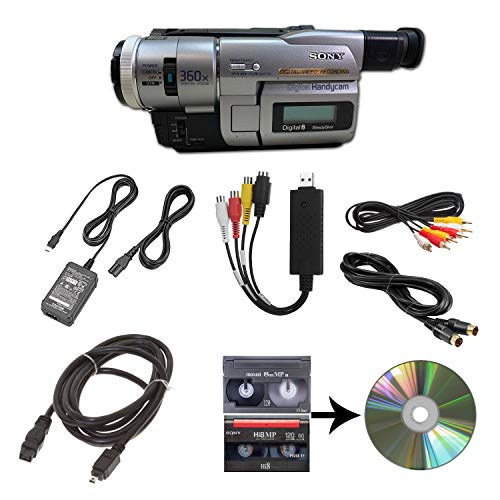
The Sony camcorder is designed to playback 8mm, Video8, Hi8, and Digital8 tapes and transfer them via USB to computer files or DVD. It includes a power supply and AV/S-Video cables for transfer or TV playback. Best for users who want an all-in-one solution with a built-in playback option and a direct USB/DVD transfer path.
Who it’s best for: casual hobbyists who already own or acquire 8mm family tapes and want a straightforward, single-device workflow. Why chosen: it provides both playback and transfer capabilities in one package, simplifying setup for first-time digitizers.
Caution: The device’s utility depends on original hardware compatibility with the tapes; some older tapes may need additional cleaning or head alignment for clean transfers.
Tech Collector 8mm/Hi8/Digital8 Transfer Bundle

This bundle includes a camcorder and a USB capture device designed to playback and transfer 8mm, Hi8, and Digital8 tapes to computer files or DVD. It also includes a battery and AV cables for TV playback or transfer. Best for: users wanting a complete package that reduces the number of separate purchases while offering a broad tape compatibility range.
Why selected: the bundled system minimizes compatibility friction and provides a ready-to-use workflow for immediate digitization. Limitation: more parts mean more setup steps and potential extra storage needs for captures.
ClearClick Video to Digital Converter 2.0

ClearClick 2.0 converts video directly to SD 640×480 or 720×480 on USB flash drive or SD card without a computer. It requires a working VCR/camcorder and tapes and does not upscale to HD. Best for: quick, on-the-go digitization without configuring a PC. Limitation: lower resolution and dependence on compatible tapes and working devices.
VIXLW VHS to Digital Converter

VIXLW provides a USB-based converter that captures video from VHS, VCR, Hi8, DV tapes, or other analog sources using RCA or S-Video connectors. It transfers to PC or Mac and is plug-and-play with no extra power needed. Best for: users digitizing primarily VHS and similar formats on a budget. Limitation: may not cover every 8mm or Digital8 tape without a compatible input signal.
KODAK REELS 8mm & Super 8 Films Digitizer

KODAK REELS digitizes 8mm and Super 8 film reels with a 5-inch onboard LCD screen and a frame-by-frame process that yields 1080p digital video. It supports reels up to 9 inches and saves to an SD card (not included). Best for: film collectors who want a dedicated film-to-digital solution without a computer. Limitation: not suitable for tape-based formats; requires SD storage and proper reels for operation.
Buying Guide: Key Considerations For 8mm To Digital Conversions
What format will you digitize most?
Identify whether your priority is 8mm, Hi8, Digital8, VHS, or Super 8 film. Some devices specialize in one format, while bundles cover multiple formats. Consider whether you need both tapes and film handling in one unit or if a separate film scanner will work better.
Is on-device playback important?
Some options include built-in playback and TV output, which helps verify tape quality before digitization. If you need to preview tapes frequently, a device with quality display and easy controls reduces guesswork.
What about computer-free digitization?
Direct recording to USB drive or SD card without a PC is convenient for quick transfers. However, you may miss advanced editing features. Determine if you prefer direct storage or plan to edit later on a computer.
Resolution and quality expectations
Most tape-to-digital transfers target standard definition (SD) resolutions. If you want HD or higher, you may need a dedicated film scanner or a device that supports higher output. Evaluate the maximum resolution supported by the device and its processing pipeline.
Ease of use and setup
Bundled kits reduce compatibility concerns but may involve more components. Standalone converters are simpler but might require additional cables or adapters. Choose based on your tolerance for setup complexity and ongoing maintenance.
Storage and media considerations
Digital files require storage space. Some devices save directly to SD cards, USB drives, or cloud options. Plan for sufficient storage and redundancy, especially for long-term archiving.
Reliability and maintenance
Look for components known for stable performance, good longevity of cables and connectors, and availability of replacement parts. Regularly check tape health and device heads for cleaner transfers over time.
Best practice for archiving
Digitize tapes to uncompressed or high-quality formats when possible, then back up to multiple storage media. Maintain a catalog or spreadsheet listing tape titles, formats, and transfer dates for easy retrieval.
FAQ
- Which device is best for converting multiple formats? The Tech Collector transfer bundle is ideal for users needing a broad format range and an all-in-one package, while standalone converters suit those who prefer a single-purpose tool.
- Do I need a computer to digitize with these products? Some options transfer directly to USB or SD cards, allowing computer-free digitization. Others require a computer to complete the transfer or editing process.
- What resolution should I expect when digitizing 8mm tapes? Most solutions deliver SD resolution (640×480 to 720×480). If you need higher quality, consider a dedicated film-to-digital scanner for film reels rather than tape-based transfers.
- Are there risks with older tapes? Yes. Damaged tape edges or degraded magnetic layers can affect transfer quality. Inspect tapes and consider cleaning heads before transfer.
- Is a built-in display important for digitization? A built-in display helps verify playback and transfer quality without a computer, which is useful for quick checks during the process.
- What’s the best way to store digital copies? Save to multiple locations (e.g., internal SSD/SD, external drive, and cloud backups) and organize by format, date, and footage to simplify future access.