Answering the need for instant phone uploads, these cameras are designed to transfer photos and videos wirelessly to your smartphone or tablet. They’re ideal for travelers, content creators, teens, and beginners who want quick sharing and on-the-go editing. The list below highlights five options that emphasize WiFi transfer, mobile app control, and reliable image quality. Use this guide to compare which model fits your style—selfies, vlogging, family moments, or travel diaries—and how each one handles the “upload to phone” workflow.
Summary of selected products:
| Product | Best For | Key Benefit | Limitations |
|---|---|---|---|
| 4K Digital Camera for Photography with WiFi (AUREAPIX) | Vloggers; YouTube creators | 64MP stills; 4K video with remote app control | Slower transfer when crowded WiFi |
| 8K Digital Camera with Dual Lens (LOUM) | Travelers; dual-camera lovers | 8K video; 88MP photos; robust stabilization | Higher data sizes require storage planning |
| 4K Digital Camera with WiFi (Bofypoo) | Teens; beginners | 3.0” flip screen; built-in mic; remote shooting | Limited lens flexibility |
| 5K Digital Camera with 3″ Flip Screen (Lacegre) | Families; vlog beginners | 75MP; 18X zoom; quick wireless sharing | Lower low-light performance relative to high-end |
| Kodak PIXPRO C1 (KODAK) | Kids; casual shooters | 13MP; 4x zoom; 180° flip screen | Basic features, fewer high-end modes |
AUREAPIX 4K WiFi Digital Camera with 64MP

This camera supports 4K Ultra HD video and 64MP stills, with a WiFi transfer feature that sends photos to your phone via the Viipulse app. It enables remote control from a smartphone, which is ideal for group selfies or hands-free shooting. The 16x digital zoom helps capture distant subjects, while the 3″ 180° flip screen makes vlog-style framing easy. Best for: aspiring YouTubers or travelers who want easy, app-driven sharing. Caution: higher-resolution files can require more storage and slower transfers on busy networks.
LOUM 8K Digital Camera With Dual Lens

This model features front and rear dual cameras, delivering 8K video and up to 88MP interpolated photos. It combines autofocus with 5-axis anti-shake stabilization to maintain steadiness across movements. A 2.8″ IPS touchscreen supports easy framing, while built-in WiFi enables fast wireless transfers to mobile devices. Best for: creators who want high-resolution content and smooth footage on the go. Limitation: 8K files can be large, demanding more storage and processing power.
Bofypoo 4K Digital Camera With WiFi and 3″ Flip Screen

With 64MP images and 4K video, this camera offers a 3.0″ flip screen for easy self-shooting and vlogging. It supports WiFi sharing via the Viipulse app, and remote shooting is possible for stand-alone capsules or travel diaries. Best for: teens or beginners who want a straightforward, all-in-one device for social media. Caution: the data suggests a limit on low-light performance, so plan lighting accordingly.
Lacegre 5K UHD WiFi Vlogging Camera

This camera records 5K UHD video and 75MP photos, pairing 18X digital zoom with built-in WiFi for instant sharing and remote operation. The 3″ flip screen supports selfies and vlogging, making it a practical choice for family trips or classroom projects. Best for: users who want high-resolution stills and uncomplicated wireless sharing. Limitation: 5K video files are sizable and may require faster memory cards and processing hardware.
KODAK PIXPRO C1 Digital Camera
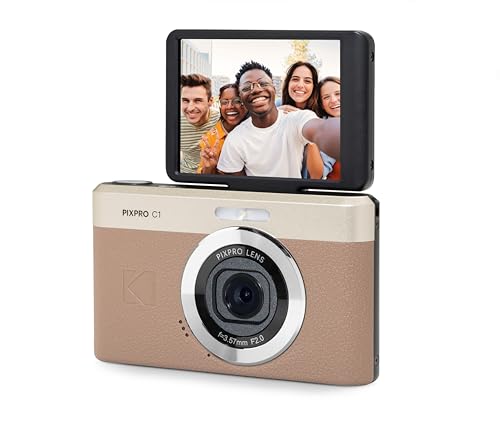
The Kodak PIXPRO C1 offers a 13MP sensor, 4x optical zoom, and a 180° flip screen for selfies and vlogs. It records 1080p HD video, making it a straightforward choice for casual shooters who prioritize ease of use and immediate phone sharing via compatible apps. Best for: beginners or students who want a simple device with a flip screen. Limitation: fewer advanced video features compared to higher-end options.
Buying Guide: How To Choose A Camera That Uploads To Your Phone
What kind of wireless transfer should you expect?
Look for cameras that explicitly advertise built-in WiFi or Bluetooth and a companion app that supports direct transfer to your phone. Consider app reliability, transfer speeds, and whether transfers require an internet connection or work over local WiFi only.
What image and video quality do you need?
If you mainly post on social media, 4K or 8K video is appealing, but 4K with 64MP photos often offers a great balance. For casual sharing, 1080p with 13–16MP stills may be sufficient and more storage-friendly.
How important is a flip screen?
A 180° or 3.0-inch flip screen simplifies self-recording and vlogging, especially for solo creators or teens who frequently film themselves.
How does stabilization affect mobile sharing?
5-axis electronic stabilization or optical stabilization helps maintain steady footage when you move. This reduces post-processing and accelerates sharing quality on your phone.
What should you consider about storage and batteries?
Check the included memory card capacity and the number of supplied batteries. Wireless transfers use battery life; consider extra batteries for longer shoots and faster uploads when you are away from power sources.
FAQ
- Can these cameras upload directly to my phone without internet? Yes, most models support direct WiFi transfers to a connected phone via a companion app. Some also offer Bluetooth as a supplementary transfer option.
- Is 8K worth choosing for social media? For platforms that support high-resolution playback, 8K offers future-proof content, but it requires large storage and powerful processing. If you primarily post on mobile apps, 4K with high-quality 64MP photos is often a better balance.
- Which camera is best for beginners? Models with simple menus, a flip screen, and automatic modes are ideal. The Bofypoo and Kodak PIXPRO C1 offerings emphasize ease of use and straightforward playback for newbies.
- Do these cameras work without an external microphone? Most have built-in mics sufficient for basic vlogs, but external mics improve audio quality for serious content creation.
- What’s the advantage of a dual-lens camera? Dual-lens setups enable more versatile shooting, including different viewpoints for richer content. They’re beneficial for creators focusing on travel and storytelling.
- Can I rely on these for travel photos? Yes, several models combine lightweight design, WiFi sharing, and robust autofocus, making them suitable for vacation albums and quick social posts.