Whether you’re archiving family memories or backing up a professional shoot, a reliable camera-to-PC cable speeds up file transfers and reduces setup hassles. This guide reviews five cables that connect cameras to computers, supporting USB data transfer and charging needs. Each option covers compatibility, speed, durability, and ease of use to help you pick the right match for your gear.
| Product | Brand | Key Benefit | Connection Type |
|---|---|---|---|
| 3ft Mini USB Cable | ULIFTUS | Fast charging and data sync for mini USB devices | USB A to Mini B |
| Camera IFC-400PCU USB Data Cable | ienza | Wide Canon compatibility for data transfer | Mini USB 5-pin |
| SCOVEE Camera USB Cable | SCOVEE | Comprehensive Canon compatibility for transfer | Mini USB 5-pin |
| Excelshots USB Data File Transfer Cable | Excelshots | Broad camera-to-PC compatibility | Mini USB |
| Replacement USB Camera Transfer Cable (Sony) | Draw a dragon | Sony Cyber-shot and many models transfer | USB 2.0 Micro/mini style |
ULIFTUS 3ft USB Cable: Mini USB to USB A

This USB 2.0 Type-A to USB Mini-B male cable connects your PC, hub, or USB charger to devices with a Mini USB port. It provides up to 3A quick charging and supports USB 2.0 data transfer speeds up to 480 Mbps. The durable PVC jacket and copper conductors enhance reliability, while reinforced connectors reduce wear from bending and daily use. Ideal for cameras, MP3 players, dash cams, GPS devices, and action cameras that still rely on Mini USB connections.
Camera IFC-400PCU USB Data Cable for Canon

Designed for Canon cameras, this IFC-400PCU/IFC-200U/IFC-500U compatible USB data transfer cable moves photos and files from compatible Canon models to a PC or Mac. It supports a wide range of Canon PowerShot and EOS models, including popular Rebels and Elphs. The cable supports mini USB 5-pin connections and is intended for reliable data transfer during photo archiving and workflow integration.
SCOVEE Mini USB Cable For Canon and More
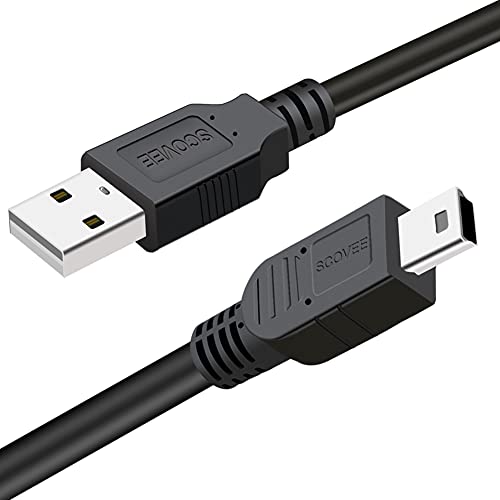
SCOVEE offers a Mini USB 5-pin cable compatible with numerous Canon PowerShot models and other Mini USB devices. It is described as suitable for transferring photos and files from cameras to PCs or Macs. The listing highlights compatibility across a broad Canon mini USB ecosystem, making it a versatile option for photographers who own multiple Canon cameras or older models using mini USB connections.
Excelshots USB Data File Transfer Cable

Excelshots markets a 3-foot USB data transfer cable that’s compatible with Canon PowerShot Rebel series, G7X, SX400is, and many other cameras that require IFC-400PCU, IFC-200U, or IFC-500U connectivity. It emphasizes broad camera-to-PC compatibility for quick file transfers, making it a practical choice for mixed camera ecosystems. The listing notes support for both PC and Mac systems and a range of Canon models.
Replacement USB Cable For Sony Cybershot

This replacement USB data charging cable targets Sony Cybershot and Cyber-shot DSC models. It connects a digital camera to a USB-enabled computer, hub, or photo printer/dock for photo transfer and charging. The listing stresses compatibility with numerous Sony Cybershot variations, while noting not all cameras are supported. The design includes materials intended to minimize EMI/RFI interference and ensure stable data transmission.
Buying Guide: Key Purchase Considerations
- Compatibility: Verify that the cable supports your camera’s model and brand. Some cables are brand-specific (Canon, Sony) or offer broad mini USB compatibility.
- Connector Type: USB Mini-B and Mini-USB 5-pin are common for cameras, while newer models may use micro or USB-C. Confirm the port on both the camera and PC.
- Data Transfer Speed: USB 2.0 cables transfer files up to 480 Mbps. For large RAW files or video, speed consistency and cable durability matter more than raw speed ratings.
- Charging Capability: Some cables offer fast charging alongside data transfer. If you use the cable to power devices, look for higher current ratings (3A or more).
- Durability: Look for reinforced connectors, braided or thick jackets, and bend-tested performance to extend cable life in busy workspaces.
- Length: A 3–6 foot cable typically balances reach and cable management on a desk or in a studio setup.
- Ease of Use: A plug-and-play design with clear labeling helps streamline workflow, especially in environments with multiple cameras and devices.
- Warranty and Support: Check if the seller offers a warranty or replacement policy in case of durability concerns.
- Bundling With Other Cables: If you own multiple camera brands, a kit with multi-brand compatibility can reduce clutter and confusion.