Looking for a reliable cable solution to transfer photos and media from cameras to your phone or tablet? This guide highlights five top USB-C or Lightning camera adapters and cables that are ideal for converting camera card content into on-device storage. Best for mobile shooters, travelers, and hobbyists who want quick, portable data transfer without a computer. The list covers a range of device compatibilities—from iPhone and Android to MacBook—so you can choose the right option for your setup and workflow.
| Product | Best For |
|---|---|
| USB C to USB Camera Adapter, SD Card Reader for iPhone and Android | iPhone and Android users who need fast SD card transfer and USB device compatibility |
| YOFEEPOP USB C to USB Camera Adapter with 30W PD | Android and iPad users needing OTG file transfers plus simultaneous charging |
| 3FT USB C to Micro USB Data & Charge Cable | Older devices with Micro USB ports and newer USB-C devices in one cable |
| Apple Lightning to USB Camera Adapter with Charging Port (MFi) | iPhone and iPad users needing reliable, Apple-approved data transfer with charging |
| [Apple MFi Certified] Lightning to USB 3.0 Camera Adapter with Charging Port | iOS devices requiring fast USB 3.0 transfer and charging while connected |
USB C to USB Camera Adapter for iPhone and Android

This 3-in-1 USB C SD card reader is designed for modern iPhone models (15/16/17 series) and many Android devices with USB-C. It supports reading SD and TF cards and also accepts USB peripherals such as cameras, flash drives, keyboards, mice, and more. The device enables quick copying of camera photos and videos to your iPhone, iPad, or other USB-C devices. It is best for photographers and travelers who want a compact, plug-and-play transfer option without a PC. A limitation: USB 2.0 speeds max out around 60 MB/s, which may be slower on high-bitrate media compared to newer standards.
Best for: iPhone and Android users who need broad card reading plus USB peripheral support in a single adapter.
YOFEEPOP USB C To USB Camera Adapter With PD Charging

This USB-C OTG adapter offers fast data transfer and a 30W PD charging port, making it well-suited for Android devices, tablets, and newer iPad models. Its OTG design allows connection of USB drives, keyboards, and mice, with plug-and-play use—no drivers required. The PD charging feature is a practical plus for editing on the go or backing up media while charging. A potential drawback: charging while transferring requires correctly inserting devices and a compatible power source to realize simultaneous operation.
Best for: Android users and tablet owners who want quick USB transfers and on-the-go charging in one connector.
3FT USB C to Micro USB Data & Charge Cable

This hybrid data-and-charge cable spans Micro USB and USB-C ends, making it useful for older devices with Micro USB and newer devices with USB-C. It covers old Kindles, Sony/Nikon/Canon cameras with micro USB, and a variety of smartphones. The key caveat is that it cannot charge devices with USB-C on the micro end, so use it as a charging data cable only for micro USB devices. Best for mixed-device households needing one shared cable.
Best for: Users with a mix of USB-C and Micro USB devices who want a single cable for charging and data on older cameras or accessories.
Apple Lightning To USB Camera Adapter With Charging Port
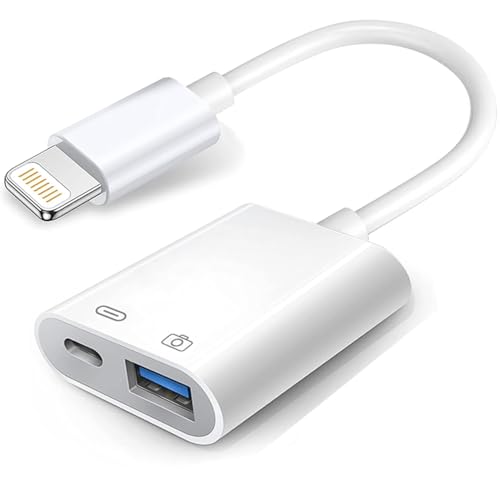
This Apple-certified Lightning to USB adapter supports USB 3.0 data transfer and includes a charging port, enabling data transfer while powering your iPhone or iPad. It’s compatible with a wide range of iOS devices and supports connecting card readers, flash drives, keyboards, and more. The advantage is reliable compatibility within Apple ecosystems. A consideration: performance can vary by device, and some newer iOS features may require specific formats housed in JPEG/RAW or SD/HD video support.
Best for: iPhone and iPad users seeking reliable, Apple-approved data transfer with on-the-go charging capability.
Lightning To USB 3.0 Camera Adapter With Charging Port

This MFi-certified adapter delivers USB 3.0 speeds and charging while connected to Apple devices. It supports SD card readers, MIDI keyboards, USB drives, and more, making it a robust hub for iOS-based photo workflows. The benefit is faster transfer rates for large files. The limitation is that device compatibility can vary with older iOS versions or certain accessory configurations, so verify your model and iOS version before use.
Best for: iOS users who want fast USB 3.0 transfer and continuous charging during use.
Buying Guide: Key Purchase Considerations
What should you check before buying a camera-to-phone cable or adapter? Consider device compatibility, transfer speeds, power delivery, and form factor. If you shoot with cameras that require micro USB, pick a cable that supports micro USB data transfer. For iPhone or iPad users, ensure MFi certification or official Apple compatibility to avoid connection errors.
- Device compatibility: Confirm that the adapter supports your phone or tablet model and the camera card type (SD/TF).
- Transfer speeds: USB 3.0 and USB-C can move data faster than USB 2.0; for RAW photos or 4K videos, higher speeds save time.
- Power delivery: If you need to charge while transferring, choose a model with a charging port (PD or USB-C charging).
- Port availability: Some adapters offer SD/TF card slots plus USB-A or USB-C ports; assess your accessory needs (keyboard, USB drive, etc.).
- App dependency: Most plug-and-play adapters do not require apps, but some features may be limited without official drivers or updated OS.
FAQ
- Do these adapters require an app to work? Most listed adapters are plug-and-play and do not require apps, though some features may depend on the device and OS version.
- Can I charge my device while transferring data? Several adapters include a charging port or PD support, enabling charging during data transfer when using compatible devices and cables.
- Are these Apple MFi certified? Some adapters provide MFi certification, which helps ensure compatibility with iOS devices; check the product listing for certification details.
- Is USB 3.0 faster than USB-C 2.0 for camera transfers? Yes, USB 3.0 generally offers higher transfer rates than USB 2.0, reducing wait times for large media files.
- Will these work with Android phones? Many adapters are designed for USB-C Android devices in addition to iPhones; verify device compatibility in the product features.
- What should I choose for mixed devices? A USB-C OTG adapter with charging capability is a versatile choice for users who own both USB-C and Micro USB devices.