The best camera with AV input monitors provide versatile connections for security systems, PCs, and media devices. This guide highlights five reliable options that balance image clarity, connectivity, and continuous-use design. Ideal buyers include security installers, small-business operators, and home users needing reliable CCTV or NVR/DVR monitoring alongside a PC or media setup. Below is a quick snapshot of the top picks to compare at a glance.
| Product | Screen Size | Key Connectivity | Best For |
|---|---|---|---|
| Eyoyo Security Monitor 22″ | 22″ | HDMI, VGA, AV, BNC, USB | 24/7 surveillance and CCTV monitoring |
| Eyoyo 10.1″ Security Monitor | 10.1″ | HDMI, VGA, AV, BNC, USB | Portable secondary monitor for cameras |
| ZOSHING 17″ | 17″ | HDMI, AV, VGA, USB | Wall-mounted CCTV setups and DVR/NVR |
| CAMWORLD 10.1″ | 10.1″ | HDMI, VGA, AV, USB | Compact surveillance and Raspberry Pi use |
| Eyoyo 17″ Security Monitor | 17″ | HDMI, VGA, AV, BNC, USB | Detailed monitoring with built-in speakers |
Eyoyo Security Monitor 22-Inch: Broad Connectivity for CCTV

This 22-inch Eyoyo monitor is designed for 24/7 surveillance. It delivers 1920×1080 Full HD with 100% sRGB color accuracy and 300 cd/m² brightness, supporting continuous CCTV monitoring with clear, vibrant visuals. The 75 Hz refresh rate and 5 ms response time reduce motion blur in live feeds, making it a solid choice for critical surveillance work. It also offers HDMI, VGA, AV, BNC, and USB inputs to connect DVR/NVR systems or computers. Best for medium-sized CCTV setups or as a primary security-monitor display in workspaces.
Why pick this for your setup: It’s a dedicated surveillance monitor that can run continuously without significant image degradation. Best for security teams or office spaces that rely on steady, consistent feeds. A potential limitation is the absence of built-in battery or wireless options, so it requires a power source and wired connections for all inputs.
Eyoyo 10.1 Inch Security Monitor: Compact Versatility

This small Eyoyo monitor emphasizes portability with a crisp 1366×768 display, wide viewing angles, and strong contrast. Its multi-input connectivity—HDMI, VGA, AV, BNC, and USB—lets it serve as a secondary monitor for cameras, DVR/NVR setups, or even laptops and gaming devices. The mirror flip function adds flexibility for CCTV or video-editing tasks. Choose this if you need a compact, adaptable screen for tight spaces or a portable demo/display monitor. A limitation is the reduced screen real estate for detailed CCTV feeds compared to larger models.
ZOSHING 17-Inch Security Monitor: Built for Wall-Mounted Surveillance
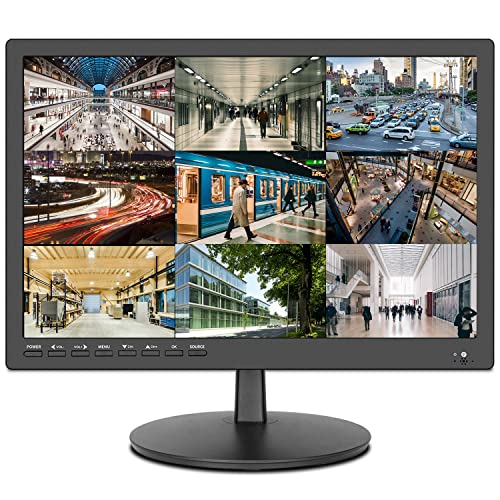
The ZOSHING 17-inch model focuses on a broad viewing angle and robust port selection for CCTV and DVR integration. It has HDMI, AV, 3.5 mm audio in/out, VGA, and USB, making it compatible with many security and PC setups. Built-in speakers simplify room audio needs for monitoring feeds. Best for wall-mounted surveillance rooms or offices where a larger, dedicated monitor is preferred. A caveat is that color accuracy and brightness may be more modest than premium desktop displays, which is typical for budget CCTV-oriented panels.
CAMWORLD 10.1 Inch HDMI Monitor: Multi-Input CCTV Companion

The CAMWORLD 10.1-inch display offers 1024×600 HD resolution with a 300:1 contrast ratio for clear surveillance visuals. It supports HDMI, VGA, AV inputs, and USB, enabling quick connections to security cameras, DVRs, NVRs, Raspberry Pi projects, and PCs. It includes built-in stereo speakers for audio. Best for compact setups where space is at a premium or as a secondary monitor for a small surveillance workstation. Note that it requires a 12V DC power supply; no built-in battery is included.
BOLEVIC 7-Inch Monitor: Small, Flexible Backup Display

The BOLEVIC 7-inch monitor is a compact option designed for backup camera feeds and in-car or desktop use. It offers multiple inputs: HDMI, VGA, and AV, plus USB for media playback or simple DVR/NVR connections. It’s best for quick-reference feeds or as a portable companion screen in vehicles or small desks. A limitation is the small screen size, which can be challenging for detailed CCTV monitoring or long viewing sessions.
Buying Guide: What to Consider When Choosing a Camera With AV Input Monitor
- Screen size vs. space: Larger displays improve detail but require more space. For tight desks or vehicle use, 7–10 inch models are practical; for dedicated surveillance rooms, 17–22 inches offer better workflow.
- Connectivity: Ensure the monitor supports HDMI, VGA, AV, BNC (when needed), and USB. If you use DVR/NVR, confirm BNC compatibility or required adapters.
- Color accuracy and brightness: 24/7 surveillance benefits from stable brightness and color fidelity. Look for at least 300 cd/m² and solid color coverage to distinguish feeds clearly.
- Power and durability: Surveillance monitors should be designed for continuous use. Consider models with fanless cooling or robust mounting options if you plan wall or desk placement.
- Built-in audio: Some models include built-in speakers, which can simplify audio monitoring. If you need higher-quality audio, plan for external speakers.
- Mounting options: Wall-mount compatibility or VESA mounting helps with secure, ergonomic placement in surveillance rooms.
Frequently Asked Questions
- What is an AV input monitor best used for in security setups?
AV input monitors support multiple legacy and modern signals, enabling compatibility with older cameras and DVRs as well as newer IP-based devices.
- Is a larger screen always better for CCTV monitoring?
Not always. Larger screens improve detail, but space, cost, and viewing distance matter. Choose size based on your monitoring desk layout and feed density.
- Do these monitors require special mounting for CCTV rooms?
Most offer standard mounting options (VESA or desk stands). Check weight, VESA compatibility, and available mounting hardware for your setup.
- Can these monitors be used with Raspberry Pi or PCs?
Yes. Most models include HDMI and USB inputs suitable for PCs, Raspberry Pi, or media players, making them versatile for mixed-use environments.
- What should I consider about color and brightness for surveillance?
Higher brightness and accurate color reproduction help distinguish details in video feeds, especially in bright or high-contrast environments.
- Are built-in speakers necessary?
Built-in speakers provide convenience for quick audio checks, but external speakers often deliver better audio quality for critical monitoring.