Whether you need wireless access to CF storage for field imaging or quick transfers to mobile devices, these CF card WiFi adapters streamline workflow. This guide highlights five top picks that balance compatibility, speed, and portability. Best for professional photographers needing on-the-go wireless SD/CF bridge, for tech setups in studios, and for industrial equipment users who require reliable data transfer without cables.
Summary of selected products
| Product | Key Benefit | Best For |
|---|---|---|
| MOPFOL CF Adapter | CF Type I with universal card support up to 2TB | Professional imaging and industrial equipment |
| Mustpoint Double Slot CF/SD Adapter | Double CF slot with WiFi SD card compatibility | Users needing high-speed, flexible card options |
| Abuycs Eye-Fi CF Adapter | CF Type II compatibility with Eye-Fi WiFi cards | Canon/Nikon DSLR workflows requiring wireless sharing |
| Mustpoint Single Slot CF/SD Adapter | Single CF slot with WiFi SD card compatibility | Compact setups needing simple wireless transfer |
| Mimgo Store CF Adapter | SD/SDHC/SDXC and WiFi SD compatibility | Multi-format convenience for field work |
MOPFOL CF Adapter For SD Card Type I Interface

Best for professional imaging devices and industrial equipment that require reliable CF Type I connections and up to 2TB capacity. The compact 43 x 37 x 3.5 mm design prioritizes portability for camera bags and field kits. The device supports standard storage cards, enabling seamless media transfer across multiple devices. Choose this if you need a compact CF reader with broad compatibility and large-capacity support.
Best for: photographers and technicians who frequently switch between cameras and storage workflows while needing stable data transfer in demanding environments.
Caution: Confirm device compatibility with your specific camera model when using non-standard CF cards, as some equipment may have stricter slot requirements.
Mustpoint Double Slot CF/SD Adapter With WiFi Support
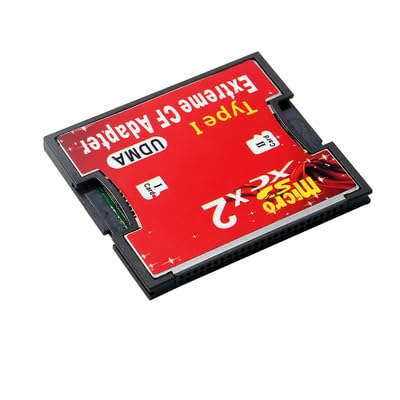
Best for users who need high-speed CF access plus flexibility to work with WiFi-enabled SD cards. The double-slot design supports CF true IDE/memory/IO modes and extends compatibility to WiFi SD cards, enabling wireless transfers from two card formats. This is a solid choice for studios and field ops that rely on rapid, versatile card handling.
Best for: professional workflows requiring fast data access and multiple card formats without swapping adapters constantly.
Caution: The presence of multiple modes can complicate setup; ensure you select the correct mode for your workflow to avoid transfer delays.
Abuycs Extreme Speed SD/SDHC/MMC/Eye-Fi to CF Type II Adapter

Best for photographers who want wireless sharing right from their cameras via Eye-Fi-enabled SD cards. This adapter supports CF Type II slots and works with standard SD/SDHC/SDXC cards, enabling convenient wireless workflows when shooting in the field or on location. It’s especially useful for on-the-go editors who need immediate image delivery over WiFi.
Best for: DSLR users who rely on wireless SD cards and want to bridge to CF storage for longer-term archiving.
Caution: Some Canon bodies (older models) may have compatibility caveats when used with certain CF adaptors; verify camera compatibility before purchase.
Mustpoint Single Slot CF/SD Adapter With WiFi Support
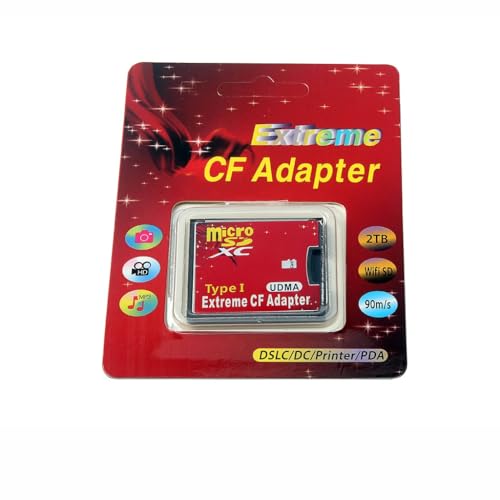
Best for compact rigs and quick wireless transfers from a single CF slot to WiFi-enabled SD cards. The single-slot design keeps the setup minimal while preserving the option to use a WiFi SD card for wireless file sharing. This is ideal for shooters who travel light and need reliable transfer without extra hardware.
Best for: solo shooters and travelers who value portability and straightforward wireless workflows.
Caution: If you require multiple card formats or higher throughput, a double-slot adapter may better suit your needs.
Mimgo Store High Speed CF To SD/SDHC/SDXC Adapter With WiFi SD

Best for cross-format workflows where SD cards with WiFi are desired in conjunction with CF storage. This adapter supports SD3.0 SDHC SDXC and WiFi SD, plus it works with UDMA6 for faster data transfers. It’s a versatile choice for hybrid setups in both photography and field data collection.
Best for: users who routinely move data between CF and SD ecosystems and want wireless access for SD cards.
Caution: As with any multi-format adapter, ensure each card’s format and speed are compatible with your devices and intended transfer speeds.
Buying Guide
What to consider when choosing a CF card WiFi adapter
Card compatibility: Check whether the adapter supports CF Type I or II, and verify your cards (SD, SDHC, SDXC, MMC) if wireless transfer is required.
Wireless feature scope: Some adapters enable only wireless transfer for SD cards, while others bridge to CF slots. Decide if you need direct WiFi from CF to network devices or simply wireless SD card access.
Throughput and modes: Look for mentions of IDE, memory, or IO modes and whether high-speed interfaces (e.g., UDMA) are supported to meet your workflow demands.
Portability and form factor: Field work often benefits from compact, lightweight designs. Consider dimensions and casing materials for durability.
Device compatibility: Some earlier camera bodies may have caveats with certain adapters. Confirm camera model compatibility and any required firmware updates before buying.
How to use these adapters effectively
- Format compatibility: Ensure cards are in compatible formats as specified by the adapter and camera or reader.
- Mode selection: If the device offers multiple modes, select the mode that matches your workflow (e.g., CF native mode vs. SD bridge mode).
- Security: When using WiFi-enabled cards, enable WPA/WPA2 encryption if available and configure secure access for transfers.
- Storage planning: For high-capacity cards (up to 2TB for CF), plan file management to maximize transfer efficiency and organize media.
Frequently asked questions
- What is a CF Type I vs Type II adapter?
Answer: CF Type I and Type II refer to the size and pin layout of CompactFlash cards; Type I is standard, thinner, while Type II is thicker, used by some faster/older devices. Ensure your camera supports the corresponding CF type. - Do these adapters support WiFi transfers from CF cards?
Answer: Some adapters support WiFi-enabled SD cards or Eye-Fi functionality to transfer images wirelessly; verify the exact card compatibility in the product description. - Can I use SD cards in a CF adapter for wireless transfer?
Answer: Yes, several adapters provide SD-to-CF bridging with WiFi support, enabling wireless transfers from SD cards through a CF slot reader. - Are there compatibility caveats with older camera models?
Answer: Yes, older camera bodies may not support certain adapters or modes; check the camera’s compatibility notes or user manual. - Which adapter is best for field photographers?
Answer: A compact, single-slot CF/SD adapter with reliable WiFi SD compatibility is often best for travelers who need lightweight gear and straightforward transfers. - Do I need to install drivers on a computer to use these adapters?
Answer: Most modern adapters are plug-and-play with supported operating systems; some may require minimal driver setup depending on the device and OS.