When you need better video quality for calls, streams, or online classes, a webcam with a built-in light is a smart upgrade. This guide highlights five top options, explaining who each is best for and why. You’ll find practical tips on lighting, autofocus, privacy, and audio features to help you choose the right model for your setup and budget.
Summary of chosen products
| Product | Best For | Key Benefit |
|---|---|---|
| Galyimage 4K Webcam with Ring Light | Remote workers and streamers | 4K/1080p options with adjustable ring light and TOF mics |
| Atatat 2K Webcam with Light | Budget-conscious professionals | 2K resolution with three-level ring light and privacy cover |
| NexiGo N680E Pro 4K Webcam | High-fidelity creators | Sony 4K sensor, PDAF autofocus, tri-tone ring light |
| NexiGo StreamCam N930E | Students and educators | 1080p, three-level ring light, remote control |
| NexiGo N960E | Office setups with privacy needs | 1080p 60fps, three-level light, built-in privacy cover |
Galyimage 4K Webcam With Ring Light

This webcam supports 4K at 30FPS and 1080P at 60FPS, delivering sharp detail for video calls, online classes, or streaming. It includes a built-in ring light with three color temperatures (white, natural, warm) and a touch sensor to adjust brightness, making it ideal for users who work in varying lighting conditions. The TOF autofocus and dual noise-canceling microphones help maintain clear video and audio even during dynamic scenes.
Best for: Remote workers, educators, and streamers needing high-resolution video with reliable lighting.
Why selected: Combines 4K/1080p modes with an adjustable fill light and strong audio pickup, plus privacy features.
Limitation to note: Higher resolution can demand more computer resources; ensure your system can handle 4K streaming if you plan to use that setting.
Atatat 2K Webcam With Light

This camera delivers true 2K resolution for crisper visuals, aided by a three-level ring light that provides flattering illumination. It also includes a privacy cover and dual noise-canceling microphones to reduce background noise during meetings. Autofocus helps maintain sharpness when you move in and out of frame.
Best for: Professionals who want a sharp image without the intensity of 4K.
Why selected: Balanced 2K clarity with practical lighting and privacy features in a compact package.
Caution: Resolution is high but below 4K—adequate for most standard displays, but not the maximum detail seekers may want.
NexiGo N680E Pro 4K Webcam

Equipped with a Sony 1/2.5″ 4K sensor, this model aims for ultra-sharp video and true-to-life color, with 1080p at 60fps as the streaming sweet spot. A PDAF autofocus system helps lock onto faces rapidly, while a tri-tone ring light offers three temperature modes and steady brightness control. Dual noise-canceling mics improve voice clarity in noisy environments.
Best for: Content creators and professionals who prioritize image accuracy and smooth motion.
Why selected: High-end sensor and autofocus deliver premium video; built-in lighting supports consistent results in mixed lighting.
Limitation: 4K output can depend on software settings; verify compatibility with your chosen streaming setup for best results.
NexiGo StreamCam N930E
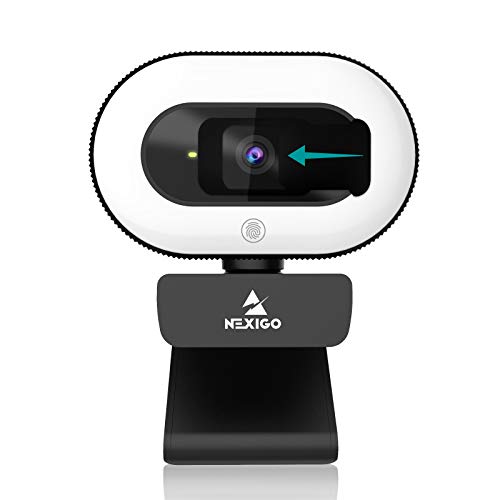
This model offers a three-level adjustable ring light with touch control, a wide 75° angle, and 1080p resolution at 30fps. Autofocus and a built-in microphone help keep you in frame and heard clearly. It’s designed for seamless plug-and-play use with major meeting and streaming platforms. The privacy shutter adds security when not in use.
Best for: Students and teachers who need reliable lighting and easy setup for virtual classrooms.
Why selected: Simple, effective lighting and autofocus at an accessible price point; ideal for education environments.
Caution: 1080p at 30fps may be limiting for fast-moving streams or high-motion gaming scenarios.
NexiGo N960E 1080P 60FPS Webcam

With a three-level adjustable ring fill light and 1080p at 60fps, this webcam emphasizes smooth video; the built-in privacy cover helps protect privacy when not streaming. It’s USB plug-and-play, with dual microphones for improved audio. The warm glow of the ring light helps reduce shadows and enhances facial tone for video calls and conferences.
Best for: Office desks needing privacy controls and steady 60fps video for meetings.
Why selected: A practical balance of frame rate, lighting, and privacy features for day-to-day professional use.
Limitation: 1080p rather than 4K; not ideal if ultra-high detail is required for media creation.
Buying Guide
What to consider when choosing a webcam with a built-in light
- Resolution and frame rate: Do you need 4K for sharp desktop use or is 1080p at 60fps sufficient for your meetings and streaming?
- Ring light options: How many color temperatures do you need, and is touch control preferable to software adjustments?
- Autofocus and image stabilization: Will you move in and out of frame often, or stream while you’re active at your desk?
- Privacy features: Is a physical privacy shutter important for your security and peace of mind?
- Microphone quality: Are dual noise-canceling mics essential to reduce background noise in busy spaces?
- Compatibility and plug-and-play: Do you need USB-C or USB-A support and broad platform compatibility (Zoom, Teams, Skype, etc.)?
- Lighting quality: A brighter, more natural ring light can improve skin tones and reduce grain in low-light conditions.
How to optimize your setup
- Place the light at an angle in front of you to minimize shadows and flatten lighting disparities.
- Use a neutral background and a modest color palette to help the camera reproduce accurate colors.
- Adjust exposure and white balance in your conferencing app if available for the clearest results.
FAQ
- Do all webcams with lights support 4K resolution?
Not all do. Some models offer 4K at 30fps, while others cap at 1080p with higher frame rates. - Is a privacy shutter necessary?
It’s a useful security feature for many users who want quick, physical control over camera access. - Is ring-light brightness adjustable without software?
Most models include touch controls on the ring or outer bezel for convenient, on-the-fly adjustments. - Will a built-in mic replace a dedicated microphone?
Built-in mics are usually adequate for meetings, but a separate microphone can improve audio quality in noisy environments. - Are 60fps webcams better for streaming?
- Do these webcams work with both Windows and macOS?
Yes, 60fps provides smoother motion, which is beneficial for gaming, live streams, and fast-paced presentations.
Most listed models support major OSes, but you should confirm compatibility with your specific software.