The right HDMI cable makes a difference when connecting cameras, camcorders, or action cameras to TVs, monitors, or projectors. This guide highlights five top-grade HDMI cables that support Mini HDMI and Micro HDMI connections, delivering sharp 4K and even 8K-ready performance where applicable. Each option emphasizes bidirectional compatibility, durable construction, and reliable data throughput for photography and videography workflows.
Summary of selected products
| Product | Brand | Connection Type | Length | Key Strength |
|---|---|---|---|---|
| JSAUX Mini HDMI to HDMI Cable | JSAUX | Mini HDMI to HDMI | 6 ft | 4K@60Hz, aluminum shell, braided cable |
| oldboytech Micro HDMI to HDMI Cable | oldboytech | Micro HDMI to HDMI | 6 ft | 4K@60Hz, reversible bi-directional design |
| Highwings Mini HDMI to HDMI Cable | Highwings | Mini HDMI to HDMI | 10 ft | 4K@60Hz, durable braided jacket |
| Silkland Mini HDMI to HDMI Cable | Silkland | Mini HDMI to HDMI | 6.6 ft | 8K/4K support, 48Gbps bandwidth |
| BlueRigger Mini HDMI to HDMI Cable | BlueRigger | Mini HDMI to HDMI | 6 ft | 4K, HDR, Ethernet, AR |
JSAUX Mini HDMI to HDMI Cable 6FT

JSAUX delivers a compact, bi-directional Mini HDMI to HDMI cable suitable for cameras and camcorders with Mini HDMI ports. It supports 4K at 60Hz and is backward compatible with full HD 1080p displays. The aluminum shell and braided construction add durability for field use, and the design accommodates devices like Raspberry Pi Zero, certain Nikon DSLRs, and other mini HDMI-equipped gear. This cable is ideal when you need reliable streaming from a compact device to a larger display without extra adapters.
Features at a glance: Bi-Directional Mini HDMI transmission supports both mini HDMI to HDMI and HDMI to mini HDMI, enabling audio/video streaming from cameras, camcorders, tablets, or laptops to TVs or projectors. Compatible with Raspberry Pi Zero and other mini HDMI devices. 4K@60Hz supported, with backward compatibility to 1080p.
oldboytech 4K Micro HDMI to HDMI Cable

This micro HDMI to HDMI cable prioritizes versatility and high-resolution performance, supporting 4K at 60Hz and 2K at 165Hz for smooth video playback. It is designed for a wide range of devices, including action cameras, GoPro models, Raspberry Pi setups, and several Nikon/Canon cameras that use Micro HDMI. Its bi-directional capability enables flexible use across HDMI-enabled displays, making it a practical option for videographers needing to capture or display footage from micro HDMI devices to larger screens.
Features at a glance: Micro HDMI to HDMI with 4K@60Hz and 2K@165Hz support, plus Audio Return Channel. Bi-directional connections simplify setups. Broad compatibility includes Raspberry Pi devices and camera brands that use Micro HDMI ports.
Highwings Mini HDMI to HDMI Cable 10FT

Highwings offers a longer 10-foot option with a robust build that supports Mini HDMI to HDMI connections. The cable is designed to carry 4K at 60Hz with HDMI 2.0 bandwidth and features a durable aluminum housing with a nylon braided jacket for added protection during on-the-go use. It also lists compatibility with Raspberry Pi Zero models and various cameras and camcorders that utilize Mini HDMI ports, making it a flexible solution for setups requiring extra reach between devices and displays.
Features at a glance: Bi-Directional transmission supports Mini HDMI to HDMI and HDMI to Mini HDMI. 4K@60Hz compatibility, HDMI 2.0 bandwidth, and a durable braided exterior with an aluminum shell. Broad device compatibility extends to Raspberry Pi Zero and select DSLR/mirrorless cameras.
Silkland 8K 4K Mini HDMI to HDMI Cable

Silkland’s cable targets high-end users with 8K and 4K capabilities via Mini HDMI. It supports 8K at 60Hz and 4K at 240Hz/144Hz/120Hz, plus 48Gbps bandwidth and Dynamic HDR. The Mini HDMI port notation is important to verify against devices, as Micro HDMI and Micro USB lookalikes can cause mis-match. The cable is designed for creators and professionals needing to transmit high-resolution footage from cameras or Raspberry Pi setups to monitors or projectors with minimal lag and high color fidelity.
Features at a glance: HDMI 2.1 compliant with 48Gbps bandwidth, supports 8K@60Hz and 4K up to 240Hz, Dynamic HDR, eARC compatibility, and broad device support including DSLR/camcorders and Raspberry Pi Zero. Clear guidance on Mini HDMI versus Micro HDMI ports helps prevent incorrect connections.
BlueRigger Mini HDMI to HDMI Cable
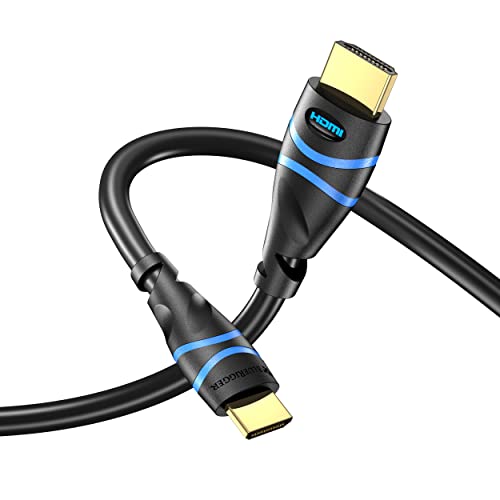
BlueRigger’s 6-foot Mini HDMI to HDMI cable is designed for a variety of devices including DSLR cameras, camcorders, and gaming or graphics systems that use Mini HDMI. The cable is fully shielded and built to support up to 4K resolutions, including HDR and 3D content, with uncompressed multichannel audio support. Its design emphasizes compatibility with devices such as Raspberry Pi Zero W and other mini HDMI-equipped gadgets while maintaining robust signal integrity for high-quality display outcomes.
Buying Guide: Key Considerations for HDMI Cables in Photography and Video
- Port type correctly identified: Mini HDMI vs Micro HDMI vs standard HDMI matters for compatibility. Always verify your device’s port before purchasing.
- Resolution and refresh rate: For camera workflows, ensure the cable supports 4K at 60Hz or higher if you intend to monitor high-frame-rate footage. HDMI 2.0 or higher is typically sufficient; HDMI 2.1 is needed for 8K or very high refresh rates.
- Bandwidth: Higher bandwidth (18 Gbps for HDMI 2.0, up to 48 Gbps for HDMI 2.1) enables smoother 4K/8K content and features like HDR and VRR. Choose cables that meet or exceed the bandwidth your devices require.
- Durability: Look for aluminum shells and braided nylon jackets for field use, especially when cables run between cameras and projectors or monitors in outdoor shoots or on location.
- Length vs. signal integrity: Longer cables can suffer from signal loss. If you need extended reach, select cables rated for long runs and with good shielding to preserve image and audio quality.
- Bi-directionality: Some cables are marketed as bidirectional; this can improve flexibility when using different devices as sources and displays. Confirm this feature if you frequently swap between devices.
- Device compatibility: While many cables advertise broad compatibility, verify specific camera models, camcorders, and accessories you own (e.g., Raspberry Pi, GoPro, Nikon/Canon/Nikon DSLR lines) to avoid mismatches.
- Use case scenario: For field work, prioritize durability and longer lengths. For studio setups, prioritize high bandwidth for 4K/8K displays and compatibility with monitors or capture cards.
- Brand reliability and warranty: Choose reputable brands with positive reviews and consider warranty or return policies for peace of mind in professional setups.
The selection above covers a range of Mini HDMI and Micro HDMI solutions suitable for cameras, camcorders, Raspberry Pi projects, and compact computing devices. Each option provides a balance between compatibility, performance, and durability to support typical American photography and video workflows.