Looking for a 32-inch digital photo frame that blends size, clarity, and smart sharing? These 32-inch frames are ideal for living rooms, offices, and gift-giving, offering large viewing areas, easy wireless sharing, and expandable storage. This guide highlights five standout models across popular brands, focusing on who each frame suits best, key features, and practical tradeoffs. Whether you want no-subscription storage, app-based sharing, or robust local memory, there’s a fit here for households, seniors, or tech-savvy families alike.
| Product | Storage | Display | Connectivity | Best For |
|---|---|---|---|---|
| Uhale 32″ Extra Large Digital Picture Frame | 64GB | 1920×1080 IPS | 2.4G/5G WiFi, USB, SD | Families wanting quick wireless sharing |
| 64GB 32″ Large Digital Picture Frame (FANGOR) | 64GB | 1920×1080 IPS | 2.4G/5G WiFi, USB, SD | Easy setup with auto-rotate for wall mounting |
| 32-Inch 64GB Extra Large (Nethgrow) | 64GB | 1920×1080 IPS | 2.4G/5G WiFi, SD, USB | Wall-friendly, crowd-pleasing display |
| Frameo 32″ Extra Large (BIGASUO) | 64GB | 1920×1080 IPS | 2.4G/5G WiFi, USB, SD | Private sharing via Frameo app |
| Cozyla Frame 32″ WiFi | Unlimited cloud storage (no subscription) | 1920×1080 high-contrast | WiFi, Google Photos, Email, Web | No-subscription convenience with long video support |
Source features listed below reflect each model’s strengths. The following sections expand on who should consider each frame and why they stand out in real-world use.
Uhale 32 Inch Extra Large Digital Picture Frame

The 32-inch IPS FHD display (1920×1080) provides a wide 178-degree viewing angle, ensuring images stay crisp from most seats. It supports JPG, JPEG, BMP, PNG, and MP4 videos, making it versatile for photo slideshows and short videos. Dual-band WiFi (2.4G/5G) enables quick sharing via the Uhale app on iOS and Android, which is useful for families who want to post updates remotely. Built-in 64GB memory handles large photo libraries, with expansion via USB and SD cards for additional storage. This frame is best for households that value secure, app-based sharing without a touchscreen interface. A potential limitation is the non-touch design, which can slow on-device navigation for some users who prefer direct control on the panel.
FANGOR 64GB 32″ Large Digital Picture Frame

This model features a 32-inch Full HD (1920×1080) IPS screen with a no-touch design, paired with 64GB of built-in storage and support for SD cards and USB drives up to 128GB. It advertises a quick setup via the Uhale app and remote control, with dual-band WiFi for faster transfers. It’s well-suited for buyers who want straightforward setup, reliable local storage, and the option to mount on a wall with auto-rotate. Note that the no-touch interface may feel less convenient for users who prefer direct physical screen interaction.
Nethgrow 32-Inch 64GB Digital Frame

The Nethgrow frame emphasizes an expansive 180-degree viewing angle with auto-rotation for portrait or landscape displays, making it ideal for wall mounting in living areas. It includes a free “VPhoto” app for private sharing and supports SD cards and USB drives for expanded memory beyond the built-in 64GB. This frame suits households that want robust cloud-enabled sharing alongside flexible physical media support. A limitation is that larger external cards (64GB/128GB) may require formatting considerations for best compatibility.
Frameo 32″ Extra Large Digital Picture Frame (BIGASUO)
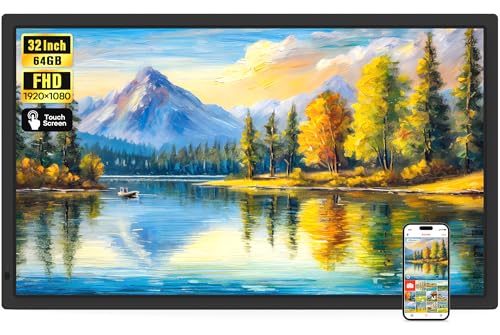
Frameo offers instant sharing via its own app, with 2.4G/5G WiFi and a 64GB built-in memory. The 32-inch IPS touchscreen supports easy local navigation, and the device accepts USB and SD Card inputs for expanded storage. It’s best for families who want a private, invite-only sharing experience and straightforward touch control for everyday use. A potential caveat is the app’s specific privacy model, which may differ from generic cloud-sharing services.
Cozyla 32″ WiFi Digital Frame With Unlimited Storage

Cozyla emphasizes no subscription fees and unlimited cloud storage, backed by AWS encryption for privacy. The frame supports long videos and offers sharing through Google Photos, email, or a web interface. It’s a strong pick for users who prefer not to manage local memory limits and want easy cross-platform sharing. A limitation to note is that unlimited storage relies on cloud infrastructure; users with limited internet access may experience slower updates or larger media uploads.
Buying Guide
- What is your preferred storage model? Local storage (64GB) vs. unlimited cloud storage affects cost, accessibility, and performance. If family sharing is frequent, a cloud-backed system can be more convenient.
- Do you need a touchscreen? Frames with touch screens provide direct control on the panel, while non-touch designs rely on remote controls or apps for navigation.
- How important is wall mounting and viewing angle? A wide 178° or 180° viewing angle helps ensure clear photos from multiple seating areas, and wall-mount compatibility can save desk space.
- What media formats and video length matter? Check compatibility for common image formats and MP4 video support; consider whether longer videos are needed beyond the typical 15-second app limit.
- How critical is transfer speed? Dual-band WiFi (2.4G/5G) helps with faster photo/video sharing, especially when uploading large albums or long videos.
- Is privacy a priority? Apps with invited-family sharing and private accounts can reduce exposure to unintended viewers.
FAQ
- What is the main advantage of a 32-inch frame? A larger display provides more immersive viewing for family photos, art displays, and gallery-like showcases in living spaces.
- Can you load photos without using cloud storage? Yes, most frames support USB drives or SD cards for local transfers and playback.
- Is a touchscreen necessary for everyday use? Not necessarily; many users prefer remote or app-based control, especially when the frame is mounted on a wall.
- Are longer videos supported? Some frames support longer videos via SD/USB or cloud uploads; others may cap video length within the app.
- How secure is shared content? Look for frames with private sharing, invitation-based access, and encryption for data in transit and at rest.
- What matters for gift-giving? Consider a frame with easy setup, clear display quality, and sample preloaded photos for a smooth unboxing experience.