Top digital photo frames that wirelessly receive images from your phone are ideal for families, grandparents, and friends who want to stay connected without email or file transfers. This guide highlights five versatile frames that emphasize easy sharing, privacy, and reliable performance. Each pick is best for different use cases—whether you want a privacy-first experience, simple setup for seniors, or expansive storage for large photo libraries. Below is a concise buyer’s table to compare the key options.
| Product | Key Benefit | Best For | Storage |
|---|---|---|---|
| Aura Carver 10.1″ | Direct sharing from anywhere; strong gifting reputation | Gift value, easy sharing | Unlimited storage (cloud-based) |
| Skylight Frame – 10″ | Very easy setup; email-driven sharing | Non-tech-friendly users | Local photos via transfer |
| AEEZO Digital Picture Frame | AiMOR app sharing; bright IPS display | Privately shared moments | 32GB built-in, expandable |
| Frameo 10.1″ MaxAngel | Secure, invite-based sharing | Private family memories | 32GB built-in, SD/USB support |
| BIGASUO 64GB Frameo Frame | Large memory; Frameo ecosystem | Large photo libraries | 64GB built-in, expandable |
Aura Carver 10.1″ HD Digital Picture Frame

Aura Carver is highlighted for its ease of sharing from anywhere to a high-contrast 10.1″ display. The model emphasizes a seamless setup, private transfers, and a robust gifting reputation. Best for: households seeking a simple, private sharing experience with strong image quality and minimal setup.
Limitations: Aura’s messaging emphasizes direct sharing; if you need extensive local file management or very large local storage without cloud reliance, consider other options.
Skylight Frame – 10 Inch

Skylight offers a plug-and-play experience with a dedicated email address for each frame. This makes it convenient for grandparents or family members who aren’t comfortable with apps. Best for: users who want a straightforward, email-based sharing workflow and quick setup.
Limitations: Requires Wi-Fi and the Skylight email system; for users who need broad app-based sharing beyond email, other frames may be better fits.
AEEZO Digital Picture Frame, 10.1″

AEEZO emphasizes versatile sharing through the AiMOR app and a bright, responsive 10.1″ IPS touchscreen. Best for: families that want flexible user access, privacy controls, and a strong 32GB internal memory with room for expansion via SD/USB.
Limitations: Photos/videos cannot play directly from SD cards unless imported first; plan to manage media through the app for best experience.
Frameo 10.1″ MaxAngel Digital Frame

Frameo-based sharing is central to this frame, with emphasis on privacy and easy invitation to family and friends. Best for: households that want secure, private, friend-and-family photo sharing with a familiar app experience.
Limitation: Some users report that larger media libraries may benefit from the 32GB storage and SD/USB options, which this model provides as well.
BIGASUO 10.1″ Frameo Digital Frame
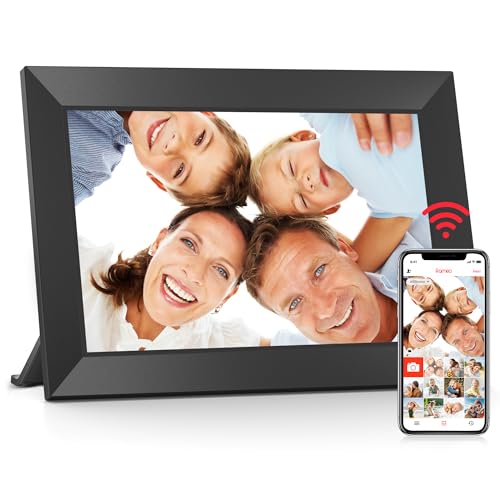
This 10.1″ frame combines a solid Frameo backend with 32GB memory and optional SD/USB expansion, making it suitable for families who want private sharing with proven Frameo technology. Best for: those who want a reliable Frameo-based frame with straightforward app-based sharing.
Limitation: The USB port supports flash drives but not direct photo transfers from a computer; plan to import into the frame first for best results.
Buying Guide: Key Purchase Considerations
- Sharing method: Do you prefer app-based sharing (Frameo, AiMOR) or email-based sharing (Skylight)? Choose the ecosystem that matches your family’s tech comfort.
- Storage and expandability: Look for built-in memory (32GB typical) and SD/USB support to accommodate growing photo libraries.
- Display quality and size: A higher resolution and IPS panel provide better viewing angles; consider 10.1″ to 15.6″ depending on space and viewing distance.
- Privacy and security: If privacy is a top concern, prioritize frames with invitation-based sharing and local control over who can send content.
- Setup and ease of use: For seniors or less tech-savvy users, frames with simple plug-and-play setup and intuitive touch controls are ideal.
- Multiple users: If you want several family members to contribute, ensure the frame supports multiple accounts or invited access without complex steps.
Frequently Asked Questions
- How do I send photos to a digital photo frame from my phone? – Most frames use a companion app (Frameo, AiMOR) or a unique email address; install the app, connect the frame to Wi-Fi, and share from the app or email.
- Is private sharing possible with these frames? – Yes, many frames emphasize private sharing by inviting specific people and restricting access to only invited users.
- Can I store all my photos directly on the frame? – Many frames offer built-in storage (32GB) and expandability via SD cards or USB drives; large libraries may require external storage or cloud options.
- Do all frames require constant Wi-Fi? – Most frames work with Wi-Fi for sharing, but some basic features may function offline once content is on the frame.
- What’s the best frame for grandparents? – Frames with simple setup, email-based or simple app sharing, good photo display, and reliable customer support tend to be preferred for seniors.
- Can I display videos on these frames? – Several frames support short video clips (commonly up to 15 seconds); check each model’s supported formats for compatibility.