In a world full of digital screens, instant-print cameras offer a tangible way to capture memories. This guide highlights five kid-friendly instant-print options that print on the go, helping children and families enjoy physical photos without leaving the moment. Each pick focuses on durability, safe materials, easy operation, and reliable printing for hours of creative fun.
| Product | Brand | Printing Type | Key Benefit |
|---|---|---|---|
| ESOXOFFORE Instant Print Camera | ESOXOFFORE | Instant Thermal Print | Color + black & white prints, kid-friendly design |
| Kids Color Instant Print Camera (Black) | orantronx | Color Inkless Print | 5 color print options, creative effects |
| Instant Print Camera for Kids – Classic Black | MYSTILUCK | Instant Thermal Print | All-in-one camera with games and 372 prints |
| Sevenat Kids Camera Instant Print | Sevenat | Color + Black & White Print | Dual-lens, 48MP photos, 32GB card |
| HiMont Kids Instant Print Camera | HiMont | Thermal Print | Paper rolls included, 1080P video |
Note: All products above are designed for children and families seeking tangible prints, with varied features such as color printing, filters, video capabilities, and kid-safe builds. The list prioritizes safety, ease of use, printing reliability, and value in terms of included paper or memory capacity.
ESOXOFFORE Instant Print Camera For Kids

The ESOXOFFORE instant print camera targets young creators with a quick 1-second black-and-white print right after capturing a moment. It also stores color photos on an included SD card and offers 15 scene filters plus 16 stickers for customization. The camera prints 372 photos with three printing paper rolls, extending playtime. A 2.4-inch screen, 1080P video, 16x digital zoom, and features like flash and time-lapse support diverse photo opportunities. The shell is shockproof and built with child-safe materials, reducing the risk of minor drops during play.
What to know: This option emphasizes instant physical prints paired with digital storage. It’s designed for kids ages roughly 3–12, balancing safety with interactive creativity. Consider the printed paper cost and the thermal printing process when planning ongoing use in classrooms or family activities.
Kids Color Instant Print Camera – Black

This camera lets kids print photos in five colors, expanding beyond the standard monochrome output. In addition to color prints, it offers 21 photo effects, a comic mode, two color filters, and three print density options. The device captures 48MP stills and 1080P HD videos, combining image and video capture in one kid-friendly package. It’s pitched as a versatile gift for children aged 3–12 and includes a 32GB card to store digital copies, providing both printed and stored memories for families to cherish later.
Strengths include vibrant print options and creative effects that encourage experimentation. Consider how often your child might want to switch prints and whether the included storage supports your family’s photo-sharing habits in both digital and print formats.
Polaroid Go Generation 2 Mini Instant Camera + Film Bundle

The Polaroid Go Generation 2 brings a compact aesthetic with the classic Polaroid printing experience. The bundle includes a dual color film pack (16 photos), and the Go format film keeps printing simple and accessible. The camera is USB-C rechargeable and designed for easy carry in bags or pockets, making it ideal for travel or quick family events. Polaroid emphasizes using recycled materials in the Go Generation 2, aligning with eco-conscious users who value sustainability alongside instant prints.
Considerations include the cost per print, the fit of mini frames into photo albums, and whether your family prefers the Polaroid look. If you already own Polaroid film in Go format, you’ll benefit from consistent paper size and color reproduction across prints.
Instant Print Camera For Kids – Classic Black

This classic black instant print camera is built for durability and kid-friendly operation. It features 1080P video recording, a 32GB SD card for substantial storage, and a printing system designed to deliver quick black-and-white prints while preserving colorful digital copies. The device emphasizes easy operation, making it suitable for beginners and younger children who want immediate results. Durable construction helps withstand the occasional drop, while the included memory ensures that kids can revisit memories after printing.
Potential drawbacks include the balance between print volume and paper cost, as well as ensuring there is adequate space on the SD card for long play sessions. It’s a strong option for families who want a straightforward, reliable instant-print experience without fuss.
Kids Color Instant Print Camera – Pink
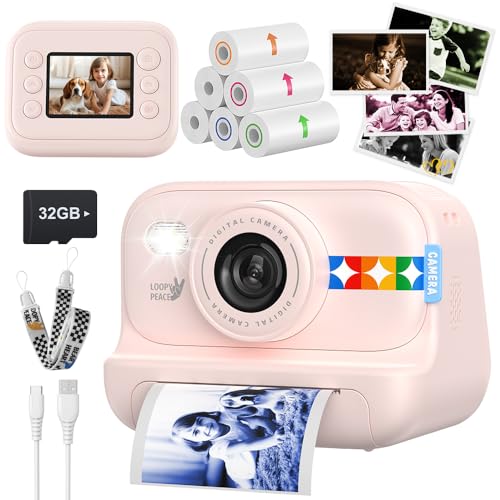
This pink variant mirrors the color-print benefits with 5 color options for prints, plus 21 creative effects and a 32GB memory card. The camera targets kids who enjoy vibrant visuals and creative customization. It emphasizes the same balance of instant prints and digital storage, making it suitable for parties, classrooms, or family trips where multiple prints are desirable. The included features encourage experimentation with frames and filters, helping children turn snapshots into personalized keepsakes.
As with similar models, consider whether the color printing needs align with your printing budget and how often you’ll use the color options versus standard black-and-white prints. The device offers a compelling blend of artistry and ease for young photographers.
Buying Guide: Key Purchase Considerations For Instant-Print Cameras
- Printing technology and paper availability: Thermal versus ink-based printing affects print quality, odor, and cost. Some devices come with multiple paper rolls; verify how many prints you can obtain per pack and whether replacement paper is readily available.
- Image quality and storage: Look for devices offering high-resolution digital capture (such as 48MP stills or 1080P video) alongside reliable printing. A larger storage card (like 32GB) helps store more photos before printing.
- Durability and safety: For kids, a rugged, shockproof body and non-toxic materials are important. Check for rounded edges, secure latches, and safety certifications where applicable.
- Ease of use: Simple one-click operations, intuitive menus, and clear preview screens reduce frustration for younger users. Features like time-lapse, burst mode, and built-in games can extend engagement.
- Creative features: Filters, frames, and stickers enhance play value. Consider whether the camera offers both color and black-and-white printing, plus print density or frame options to suit different projects.
- Power and charging: USB-C or micro-USB charging is common; confirm battery life and whether you need to buy rechargeable batteries or an external power source for extended sessions.
- Safety and eco-friendliness: Look for cameras with safe printing processes and materials. Some models emphasize non-toxic printing and reduced odor, which can be important for children’s use.
- Bundle value: Some offers include multiple paper rolls, extra memory, or color film options. Weigh bundles against the price of replaceable paper and future prints to gauge overall value.
- Intended user and age range: Ensure the device is designed for children within your child’s age range and skill level. Some models provide more advanced features that may suit older kids or families who want more creative control.
- For families seeking a compact, travel-friendly option with instant prints, prioritize models with durable casing and reliable thermal printing that doesn’t require messy ink.
- If your goal is a wider creative toolkit, pick a camera with more effects and frames, plus a higher-resolution digital capture for posts or scrapbooks.
- Budget-conscious buyers may prefer disposable-style options bundled with multiple paper rolls and basic features, ensuring ongoing printing without frequent replacements.
Across these picks, the common thread is easy access to physical prints while maintaining kid-friendly usability. The right choice depends on how much printing you expect to do, whether color prints matter to your family, and how much emphasis you place on video capture alongside stills.