Answering the needs of professional and enthusiast photographers, this guide highlights the fastest SD cards for high-speed capture and reliable 4K video. The selections focus on read-heavy performance, sustained write speeds, and ample capacity for large shoots. Best for: action shooters needing rapid burst rates, videographers working with 4K, and editors who require quick transfers from card to computer.
| Product | Read Speed (MB/s) | Write Speed (MB/s) | Best For |
|---|---|---|---|
| Sandisk 128GB Extreme PRO SD UHS-I | Up to 250 | Up to 120 | 4K bursts, high-res stills |
| Sandisk 256GB Extreme PRO SD UHS-I | Up to 250 | Up to 170 | Pro videography, fast transfers |
| Lexar 128GB Professional 1800x UHS-II | Up to 280 | Up to 260 | Rapid file workflows, 4K |
| PNY 256GB Elite-X PRO60 UHS-II | Up to 280 | Up to 180 | Professional capture, lengthy 4K |
| PNY 128GB Elite-X Class 10 U3 V30 | Up to 100 | Up to 100 | Budget-friendly fast entry, burst mode |
SanDisk 128GB Extreme PRO SD UHS-I

Read speeds reach up to 250 MB/s with write speeds up to 120 MB/s, meeting the needs of 4K video and rapid-fire stills. This card uses UHS-I with a V30/U3 video speed class, enabling consistent performance in professional photography and video workflows. Best for: photographers who shoot 4K video and rely on quick card-to-computer transfers. Limitation: slightly lower write performance compared to higher-capacity UHS-I options, which can affect long bursts.
SanDisk 256GB Extreme PRO SD UHS-I

Offers blazing read speeds up to 250 MB/s and write speeds up to 170 MB/s, providing strong performance for 4K UHD recording and high-resolution bursts. With capacities up to 2 TB mentioned in product materials, this line supports extended shoots. Best for: professionals who need both fast readouts for quick previews and high sustained writes for video. Caution: higher-paced workflow may benefit more from UHS-II cards for even faster transfers.
Lexar 128GB Professional 1800x UHS-II SDXC
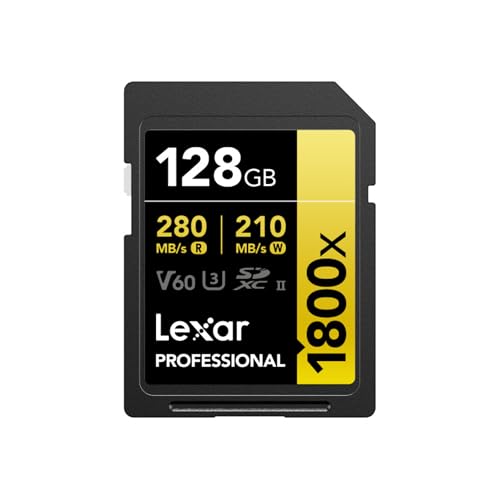
Read speeds up to 280 MB/s and write helps support 4K UHD with V60 and U3 classes. The UHS-II interface delivers faster data transfers, expanding post-production speed for professionals handling large RAW files and high-bitrate video. Best for: editorial photographers and videographers who require quick offload speeds and reliable 4K capture. Limitation: UHS-II cards are generally more expensive and require compatible readers for peak performance.
PNY 256GB EliteX-PRO60 UHS-II SDXC

Extreme performance for professionals, with read speeds up to 280 MB/s and write speeds up to 180 MB/s, plus V60 for higher-end video. This card is well-suited for continuous shooting, high-frame-rate bursts, and lengthy 4K footage. Best for: users who demand robust burst performance and solid transfer rates. Caution: UHS-II requires compatible card readers and devices to realize maximum speeds.
GIGASTONE 1TB SDXC 4K Pro Series

Storage-centric option with up to 150 MB/s transfer speeds and 4K UHD recording support. While not the fastest read/write in this list, it offers massive capacity for extended shoots and archive storage. Best for: photographers needing large on-card capacity for long sessions or back-to-back shoots. Limitation: lower sustained write performance may affect high-bitrate video or rapid-fire bursts compared to top-tier UHS-II cards.
PNY 128GB Elite-X Class 10 U3 V30 SDXC

Class 10 U3 V30 performance with read speeds up to 100 MB/s, suitable for burst photography and 4K video on a budget. Best for: entry-level photographers or backup cards who need reliable, affordable performance. Limitation: speeds do not keep pace with high-end UHS-I/II cards, which may hinder demanding workflows.
Buying Guide
What speeds matter most? For stills, high read speeds help with quick previews and offloading. For video, sustained write speeds (V30, V60, or V90) ensure continuous capture without dropping frames. Consider UHS-I vs UHS-II: UHS-II generally offers higher sustained transfer rates, but requires supported devices and readers. Capacity matters: 128 GB to 1 TB covers most workflow sizes, from single-day shoots to multi-night events.
Which card is best for action or sports photographers? The Lexar 128GB Professional 1800x (UHS-II) and PNY EliteX-PRO60 (UHS-II) provide higher read/write rates and better offload times, especially with 4K workflows. For videographers focused on 4K, the Sandisk Extreme PRO lines (UHS-I) offer solid performance with broad compatibility and proven reliability.
What about price and future-proofing? UHS-II cards tend to be more expensive but offer faster transfers and better long-term value for demanding editors. If your camera supports UHS-II, prioritize those cards to maximize workflow speed; otherwise, top-tier UHS-I options still deliver strong performance for many professional tasks.
FAQ
- What SD card is fastest for photography? High-end UHS-II cards with read speeds around 280 MB/s and write speeds near 180–260 MB/s offer the fastest overall performance for heavy bursts and 4K video.
- Do I need 1 TB cards for photography? Large capacity cards reduce the need to swap cards but can be heavier on cost. Choose capacity based on shoot length and backup plans.
- Which is better: UHS-I or UHS-II? UHS-II typically provides faster offload when used with compatible readers and cameras, but UHS-I cards can be sufficient for many workflows and offer broader compatibility.
- Can I mix brands? Yes, but ensure you have a mix of high-speed cards that match your camera’s write requirements to avoid bottlenecks during bursts or 4K recording.
- Are these cards compatible with all cameras? Most professional cameras support SDXC cards, but check your device’s maximum speed class, capacity, and compatibility before purchase.
- Should I buy multiple cards? Yes, for reliability and efficient workflows, have spare cards and use a reliable backup strategy during shoots.