Answer: A webcam cover or privacy filter is the easiest, most practical way to block unauthorized access to your laptop camera. This guide identifies five top options, explains who each is best for, and compares key factors like thickness, adhesion, and installation. Ideal for remote workers, students, and frequent travelers who want simple privacy controls without impacting device usability. Below, you’ll find quick recommendations and a buyer’s guide to help you choose the right cover for your laptop, tablet, or desktop setup.
| Product | Best For | Why We Selected |
|---|---|---|
| Yilador Webcam Cover (3 Pack) | Thin laptops, MacBooks with protruding cameras | Ultra-thin (0.03 inch) design; reliable privacy capture; cautions for newer MacBooks |
| Gadget Ray Webcam Cover Slide (6 Pack) | Multiple devices on desktop setups | No adhesive; two sizes per pack; USA-made and reusable |
| Vanjua Laptop Camera Cover Slide | Budget-minded multi-pack users | 10-pack of ultra-thin covers; easy installation; strong adhesive |
| Brvlsoc Webcam Cover Slide (6-Pack) | Broad compatibility and extra shielding | Double shielding design; slim; wide device compatibility |
| CloudValley Camera Cover Slide (2 Packs) | Blue-design flair with privacy | Blue color; easy install; visual privacy protection |
Yilador 3 Pack Ultra-Thin Webcam Covers

Product Overview: Yilador offers a 0.03-inch ultra-thin webcam cover set designed to slide over your laptop camera. It emphasizes privacy with a simple, physical barrier when not in use. The pack is targeted at users who want an affordable, discreet solution that preserves the aesthetics of their device. Best for users with standard, non-protruding front cameras and those who want multiple covers for several devices.
Who It’s Best For: Individuals who want a compact, inexpensive option for laptops and tablets, especially those who frequently use shared spaces and want quick camera-blocking access.
Strengths: Extremely thin profile; easy to slide open and closed; keeps the device looking clean.
Caution: Not suitable for MacBooks released after 2023 or devices with a protruding front camera; not compatible with certain full-screen or notch-style tempered glass screen protectors; avoid using on rear cameras.
Gadget Ray Webcam Cover Slide – 6 Pack
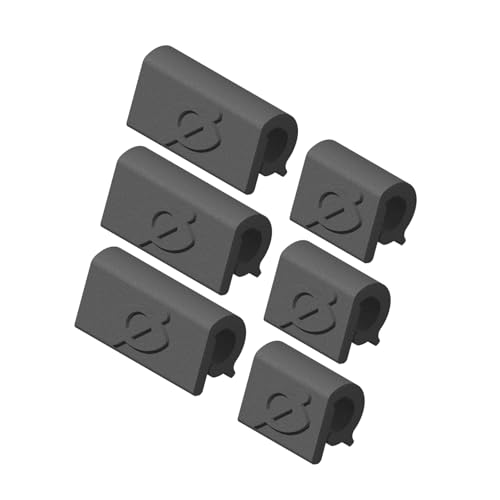
Product Overview: Gadget Ray’s 6-pack uses a no-adhesive sliding mechanism to cover cameras on laptops, tablets, and other devices. The dual-size approach helps users fit various bezel widths without sticky residue or damage from tape. The design emphasizes clean removal and reusability on multiple devices.
Who It’s Best For: Multi-device environments where owners want a residue-free, reusable option across several laptops or tablets. Suitable for users who prefer no glue on screens.
Strengths: No adhesive required; two sizes per pack; easy to switch devices without reapplying tape.
Caution: Some devices with unusually thick bezels may require the larger size, and users should verify bezel compatibility before purchase.
Vanjua 10-Pack Ultra-Thin Privacy Covers

Product Overview: Vanjua offers a 10-pack of ultra-thin webcam covers with a flexible ABS body. The kit emphasizes privacy protection, with an adhesive-backed design that sticks to the bezel and remains unobtrusive when the camera is closed. It is designed for quick, tool-free installation on laptops, tablets, and smartphones.
Who It’s Best For: Users who want a high-volume supply for a family or classroom setting, or those who frequently switch devices but prefer consistent, low-profile covers.
Strengths: Ultra-thin at 0.022 inches; durable, flexible material; quick setup with upgraded adhesive.
Caution: Adhesive-based; ensure screen edge is clean before applying to prevent misalignment over time.
Brvlsoc Webcam Cover Slide – 6 Pack

Product Overview: Brvlsoc’s 6-pack features a double shielding approach to block unauthorized access more effectively than standard covers. The ultra-thin profile ensures the device lid can close without interference, while the broad compatibility covers laptops, tablets, and smartphones.
Who It’s Best For: Users seeking stronger privacy shielding for varied devices across personal and work setups, especially when far more protection is preferred.
Strengths: Double shielding boosts privacy safeguards; slim design supports seamless closure; wide device compatibility.
Caution: Not intended for curved displays or full-screen edge-to-edge cameras; check your device shape before buying.
CloudValley Blue Camera Cover Slide – 2 Packs
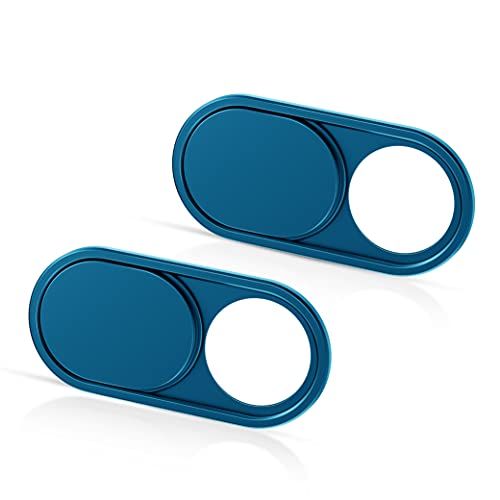
Product Overview: CloudValley’s blue-themed covers come in a two-pack, combining a stylish look with straightforward privacy protection. The ultra-thin design minimizes interference with screen use or the camera’s indicator light, while providing quick open/close action.
Who It’s Best For: Style-conscious users who want a visible, fun accent for their devices and reliable privacy in one compact package.
Strengths: Visually distinctive; easy alignment and peeling; does not obstruct camera indicators when open.
Caution: Ensure the thickness and bezel shape match your device; not recommended for curved or edge-to-edge cameras on some models.
Buying Guide
- What thickness should you choose? Ultra-thin covers (0.02–0.03 inches) minimize interference with laptop lids and indicator lights, while offering adequate privacy. If you often close lids hard, ensure the cover remains flush and unobtrusive.
- Adhesive versus non-adhesive? Adhesive covers stay put but can leave residue or be harder to reposition. Non-adhesive, sliding covers avoid residue and are reusable, but may be less secure on small bezels if not fitted tightly.
- Device compatibility Consider bezel width, camera location, and whether your device has a protruding or notch camera. Some products note limited suitability for certain MacBook or curved-screen designs.
- One device or many? If you own multiple gadgets, a multi-pack option can simplify purchases and ensure you have a cover for every screen. Two-size packs help you tailor fit across devices.
- Installation considerations Look for easy installation with minimal tools. Adhesives should allow clean removal, especially for frequent device changes or school/work environments.
- Durability and reuse Durable ABS or plastic materials extend life. Reusable covers are cost-efficient for households or offices and reduce waste.
Frequently Asked Questions
- Do webcam covers affect camera performance? They block light to the lens when closed; when open, they do not affect camera operation beyond standard use.
- Are adhesive webcam covers safe for screens? Reputable brands use gentle adhesives that minimize residue; always clean the bezel before applying.
- Can these covers be used on tablets and phones? Yes, most designs fit a range of devices, but check bezel size and mounting method for phones and tablets.
- Will a cover interfere with indicator lights? Well-designed covers are positioned not to block indicator lights when closed; verify design if this matters to you.
- What is the best option for families? A multi-pack with two sizes and no adhesive is ideal for households with multiple devices and shared spaces.
- How do I remove a cover without damage? Gently peel or slide off; some covers use adhesives that remove with light pressure and a cleaning wipe.