Finding the right internal hard drive for video surveillance depends on workload, camera count, and how long you need to store footage. This guide highlights five top options suited for home and small-to-medium business setups. Each product is chosen for reliability, 24/7 operation, and compatibility with DVR/NVR workflows. Read on to see who should buy each and why. A quick buying table is provided below for a side-by-side snapshot.
| Product | Capacity | Best For | Why Selected | |
|---|---|---|---|---|
| Seagate Skyhawk AI 16TB (ST16000VE004) | 16 TB | Large surveillance systems with many cameras | AI processing, health management, RAID RapidRebuild | High capacity and AI-friendly for multi-stream workloads |
| Seagate Skyhawk 2TB (ST2000VX007) | 2 TB | Small to mid-sized DVR/NVR setups | Designed for 24/7 recording, multi-camera support | Reliable, compact option for steady workloads |
| Seagate Skyhawk AI 12TB (ST12000VE003) | 12 TB | Extended storage for many cameras | AI streams up to 32, bulk capacity | Balanced capacity and AI capabilities |
| Seagate Skyhawk AI 10TB (ST10000VEZ01/001) | 10 TB | Reliable mid-to-large surveillance | Earth AI features, health management | Strong performance with 10 TB footprint |
| Western Digital 3TB WD Purple (WD30PURZ) | 3 TB | 24/7 surveillance for small networks | AllFrame technology, 64-camera support | Budget-friendly, proven 24/7 reliability |
Seagate Skyhawk AI 16TB Video Internal HDD

Capacity and AI-centric performance make this drive ideal for larger surveillance systems. It supports up to 64 HD video streams and 32 AI streams. SkyHawk Health Management focuses on prevention and recovery, and RAID RapidRebuild delivers faster rebuilds. Best for operators running several cameras or AI analytics in real time. Caution: Higher-capacity drives can draw more power; ensure your NAS or DVR/NVR power supply supports sustained heavy use.
ANNKE 8CH 3K Lite DVR with 1TB Drive

Note: This option is included for comparison because it demonstrates hybrid DVR/NVR capabilities and AI-based detection. It supports mixed analog/IP setups and has smart detection features. Best for small homes or offices needing hybrid compatibility. Caution: Limited 1TB drive capacity may not suffice for longer retention or higher camera counts.
Seagate SkyHawk 2TB Internal HDD for DVR/NVR
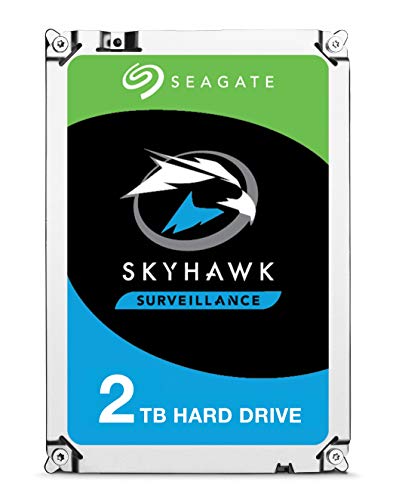
Built specifically for surveillance systems, this 2TB drive emphasizes continuous operation and multi-camera support. It is a compact option for basic DVR/NVR setups and reliable recording with minimized dropped frames. Best for small deployments or upgrades in existing surveillance layouts. Caution: 2TB may not be enough for extended retention on many cameras without compromising capacity.
Seagate Skyhawk AI 12TB Video HDD

This 12TB option balances large storage with AI processing for surveillance tasks. It supports up to 64 HD cameras and 32 AI streams, enabling robust video capture and analytics. Best for mid-to-large installations needing substantial retention and AI-driven insights. Caution: Higher workload may demand adequate cooling and power supply.
Seagate Skyhawk AI 10TB HDD

With similar AI and health management features as the 16TB model, this 10TB drive is well suited for larger DVR/NVR setups without the extreme capacity. It supports substantial camera counts and AI workloads. Best for expanding storage in existing AI-enabled surveillance systems. Caution: 10TB may be overkill for tiny installations with few cameras.
Western Digital 3TB WD Purple Surveillance HDD

WD Purple drives are designed for continuous, 24/7 surveillance workloads. AllFrame technology aims to reduce frame drops and improve overall performance in monitoring systems. Best for budget-conscious setups with up to 64 cameras. Caution: Lower capacity means more frequent overwrites or shorter retention on higher camera counts.
Buying Guide: Key Considerations for Surveillance HDDs
- Workload and camera count: Choose capacity and a workload rating aligned with your number of streams and AI analysis needs.
- 24/7 operation: Look for drives marketed for continuous recording and optimized firmware to minimize dropped frames.
- AI and analytics: If you run AI features, prioritize AI-enabled drives with efficient data handling and health management.
- Reliability and rebuild times: Features like RAID RapidRebuild can reduce downtime after drive failures.
- Power and cooling: High-capacity or AI-driven drives can require adequate power and cooling to maintain performance.
- Compatibility: Ensure the drive is compatible with your DVR/NVR model and supports your camera protocol (analog, IP, or hybrid).
- Retention needs: Plan storage duration; higher capacities enable longer retention for many cameras at higher resolutions.
Frequently Asked Questions
- What is the best hard drive for 24/7 DVR use?
Drives labeled for surveillance and 24/7 operation, such as Seagate SkyHawk and WD Purple, are designed for continuous recording and reliability.
- Do AI-enabled surveillance drives improve video performance?
Yes, AI-enabled drives help handle multiple streams and analytics more efficiently, reducing dropped frames in busy systems.
- How much storage do I need for a multi-camera setup?
Consider the number of cameras, resolution, frame rate, retention period, and whether AI processing is used to estimate capacity.
- Is refurbished storage a good option for surveillance?
Refurbished models may save money but should be evaluated for warranty coverage and expected reliability in 24/7 workloads.
- What maintenance helps extend drive life in surveillance?
Regular health monitoring, proactive rebuilds, and ensuring stable operating temperatures can extend drive life in always-on systems.