The best HD monitor for camera setups balances image clarity, reliable video input options, and portability. This guide highlights five top Amazon picks that excel for CCTV monitoring, field video work, or studio camera feeds. It helps buyers decide who each monitor is best for—security setups, on-location shoots, or office conferencing. Below is a quick summary table to compare core attributes at a glance.
| Product | Best For | Key Strength | Notes |
|---|---|---|---|
| Real HD 22″ Monitor | Security DVR/NVR monitoring | Full HD clarity with wide viewing angles | Slim design, edge-to-edge display |
| FEELWORLD FW759 | On-the-go filming | Portable 7″ IPS with 4K HDMI support | Lightweight for stabilizers |
| JINSWY 10.1″ Monitor | Compact security and DIY projects | Multiple inputs including BNC | Small footprint, versatile inputs |
| NEEWER F700 | Professional field monitoring | 2000 nit brightness and LUT support | Battery power option |
| ASUS BE279QSK | Video conferencing and office use | Built-in webcam and speakers | Frameless IPS with wide inputs |
Real HD 22-Inch CCTV Monitor With Built-In Speakers

Best for: Security surveillance setups requiring sharp Full HD images and reliable 24/7 performance. This Real HD monitor emphasizes a 1080p display with a 3000:1 contrast ratio and 16.7 million colors, delivering clear details for CCTV feeds. Its 75 Hz refresh rate and 4 ms response foster smoother motion when monitoring live camera streams from multiple DVR/NVR brands. The ultra-slim, edgeless design pairs well with multi-monitor configurations in control rooms or small offices.
Why selected: The combination of Full HD clarity, wide viewing angles, and a compact form factor makes this monitor a practical fit for security monitoring walls or desktop workstations. It emphasizes stability and image fidelity over extra frills, aligning with the needs of continuous camera feeds.
Limitation: It does not support Bluetooth or WiFi built-in connectivity, which means network-enabled features rely on external devices or recorders.
FEELWORLD FW759 7″ DSLR Field Monitor
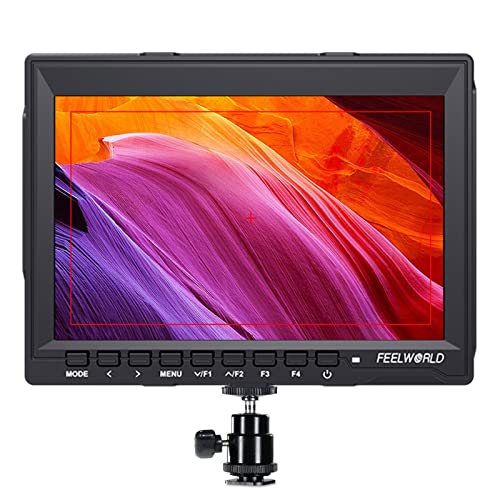
Best for: On-location filming and run-and-gun shoots where a compact, flexible monitor is essential. The FW759 offers a 1280×800 IPS display, 400 cd/m2 brightness, and robust HDMI 4K support, making it suitable for most DSLRs and camcorders. Its ultra-slim profile (17 mm) and light weight (about 300 g) simplify stabilization rigs and gimbals.
Why selected: The combination of 4K HDMI compatibility, portable form, and dependable color accuracy suits filmmakers and videographers who need a secondary monitor on camera rigs or in travel shoots.
Limitation: Built-in brightness is solid but not as high as field-specific high-bright monitors; may require additional lighting considerations in bright outdoor scenes.
JINSWY 10.1-Inch Security Monitor

Best for: Security-focused installations requiring multiple inputs and a compact display. The JINSWY monitor provides HDMI, VGA, BNC, AV, and USB ports, enabling flexible connections with CCTV systems, Raspberry Pi projects, PCs, and media devices. Its 1024×600 resolution and 300 cd/m² brightness offer clear day-to-day monitoring with reliable contrast.
Why selected: The breadth of inputs and an integrated speaker system let it serve as a dedicated security camera monitor in busy control rooms or home setups without needing extra adapters.
Limitation: Smaller screen size may be less ideal for detailed image analysis when compared to larger 1080p displays.
NEEWER F700 7″ Camera Field Monitor

Best for: Professional field work needing high brightness and advanced monitoring tools. The F700 features a 2000 nit brightness 7″ IPS panel with 1920×1080 resolution and 4K HDMI loop-in/out, plus a 3.5 mm headphone jack for audio monitoring. It supports LUTs and HDR-like tools for precise color grading on-site.
Why selected: High brightness ensures readability in sunny outdoor conditions, while the 3D LUTs and waveform tools support more demanding production workflows with accurate color representation.
Limitation: The feature set targets professionals; beginners may find some functions non-essential or require additional training to leverage fully.
ASUS BE279QSK 27-Inch Conference Monitor

Best for: Office conferencing and online learning with built-in video communication capability. The ASUS BE279QSK integrates a Full HD 27″ IPS display with a built-in adjustable webcam, microphone array, and speakers. This makes it convenient for video meetings without external peripherals.
Why selected: The bundled webcam, mic, and speakers simplify conferencing setups in small studios or home offices, reducing cable clutter while delivering clear video and audio.
Limitation: Audio and video performance depend on the webcam’s quality; upgrades may be desirable for high-end broadcast needs.
Buying Guide
What to consider when choosing an HD monitor for camera use:
- Size and resolution: Larger screens with 1080p (or higher) provide easier monitoring of fine details. Field monitors often favor 7″ to 10″ sizes for portability, while security setups can benefit from larger displays for wider views.
- Input options: Look for HDMI compatibility as a baseline. Additional inputs like VGA, BNC, and USB expand compatibility with CCTV systems, Raspberry Pi projects, and cameras.
- Brightness and contrast: Field environments may require bright panels (thousands of nits) for outdoor visibility, while indoor deployments can use standard brightness with solid contrast (2000 nit in some models).
- Color accuracy and tools: For professional video work, features like LUT support, histogram, waveform, zebras, and peaking assist help ensure accurate monitoring during shoots.
- Power and portability: Battery-powered options and lightweight designs are ideal for on-location use. Consider whether the monitor supports external power or camera power options.
- Built-in audio and mounting: Some monitors include speakers or built-in webcams for conferencing, while others rely on external audio. Check VESA or stand compatibility for mounting in your setup.
FAQ
- What is the benefit of a field monitor with LUT support?
It allows quick color matching and previewing graded looks on-site, helping ensure footage matches post-production expectations. - Are larger monitors always better for CCTV?
Not necessarily. Larger screens improve detail visibility and multi-camera layouts, but security desks may prioritize fit and coverage area over size. - Do I need built-in speakers on a camera monitor?
Built-in speakers are convenient for quick checks, but many professionals rely on external headphones or studio monitors for accurate audio assessment. - Is 4K HDMI loop-out important on a monitor?
Loop-out enables feeding the same signal to multiple displays or recorders, which can simplify multi-view setups in studios or control rooms. - Can these monitors work with Raspberry Pi or small PCs?
Yes, most support HDMI or other inputs suitable for Raspberry Pi projects and compact computing devices. - What should I avoid when selecting a monitor for surveillance?
Avoid models with limited input options or poor viewing angles, as these can hinder clear monitoring from various positions.