Find the right high-definition PC camera for your setup with options optimized for online classes, video conferences, live streaming, and gaming. This guide highlights five top HD webcams, each chosen for a distinct use case: classroom learning, professional meetings, streaming, and desktop documentation. Read on to see who each camera is best for and why.
| Product | Brand | Best For | Key Feature | Link |
|---|---|---|---|---|
| Xweiryn Webcam | Xweiryn | Online classes, meetings | 1080P HD, plug-and-play | Amazon |
| NexiGo N660P | NexiGo | OBS/gaming, streaming | 60fps, dual mics, privacy cover | Amazon |
| Stopmotion Explosion 1080p | Stopmotion Explosion | YouTube, video recording | Full HD 1080p, noise-canceling mic | Amazon |
| IPEVO V4K | IPEVO | Live demos, distance learning | 8MP, up to 3264×2448 | Amazon |
| ZSEEWCAM Document Camera | ZSEEWCAM | Document capture, remote teaching | 5MP, HD 1920×1080 capture | Amazon |
Xweiryn Webcam for PC

The Xweiryn USB webcam provides 1080P HD video for PCs, desktops, and laptops. It is designed for online classes, video conferences, and live streaming. It supports up to 30 frames per second and works with major platforms like Zoom, Teams, FaceTime, Google Meet, and YouTube. Best for students, remote workers, and casual streamers who want plug-and-play simplicity. A potential limitation is that it relies on a standard USB connection without bundled microphones or advanced lighting enhancements.
NexiGo N660P 1080P 60FPS

The NexiGo N660P delivers full 1080p at 60fps with intelligent white balance and exposure control. Built-in dual stereo microphones offer noise-cancelling performance for teaching, conferencing, and streaming. A privacy cover adds security when the camera isn’t in use. Choose this if you want high frame-rate video for gaming or fast-paced content, and value a ready-to-use setup with a cover. It may be less ideal in extremely bright or dim rooms without lighting adjustment.
Stopmotion Explosion USB 2.0 1080p Pro
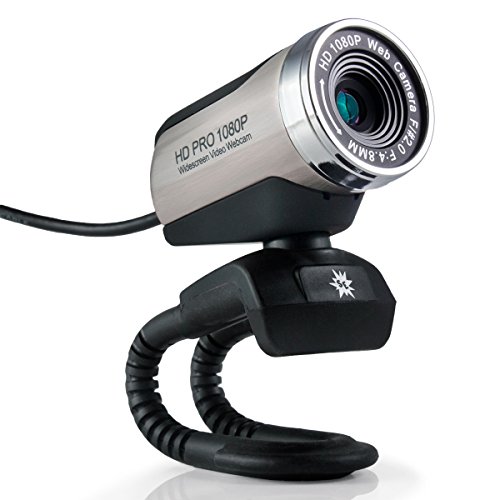
This webcam offers full 1080p output with an internal noise-canceling microphone and a user-friendly manual focus lens. Its five-element heat-resistant lens helps maintain image clarity across long sessions. It’s best for creators who need a fixed focus with adjustable sharpness and a reliable mic. A caveat is that it uses a manual focus design, which may require occasional readjustment during dynamic scenes.
IPEVO V4K Ultra HD 8MP

The IPEVO V4K provides an 8MP camera with up to 3264 x 2448 resolution and smooth 30 fps streaming. It uses a Sony CMOS sensor for improved noise reduction and color reproduction, making it suitable for live demos, distance learning, and web conferencing. Best for educators and presenters who require sharp document capture and bright, clear visuals. The higher resolution may demand more bandwidth for live streams.
ZSEEWCAM 5MP Document Camera

The ZSEEWCAM document camera captures up to 1920×1080 at 30fps with a 5MP sensor. It includes a movable bracket and an adjustable shooting area, plus a bundled LED light and anti-glare sheet to improve visibility in challenging lighting. Best for teachers and presenters who need flexible desk setup and easy document capture. Limitation: at 5MP, it may be less sharp than higher-megapixel options for distant objects.
Buying Guide for High-Definition PC Cameras
What should you consider when buying an HD webcam for a PC?
- Resolution and frame rate: 1080p at 60fps is ideal for smooth motion, gaming, and streaming; 1080p at 30fps is common and sufficient for video calls.
- Microphone quality: Built-in mics reduce clutter, but external mics or headsets can improve voice clarity in noisy environments.
- Frame consistency and lighting: Look for cameras with automatic exposure or white balance, and consider an upgrade to a light source or ring light for dim rooms.
- Mounting and privacy: A swiveling mount and privacy shutter protect your privacy when off-camera.
- Compatibility: Ensure compatibility with your operating system and preferred software (Zoom, Teams, YouTube, OBS, etc.).
- Special features: Some models offer document capture, wide-angle lenses, or manual focus for specific tasks like teaching or streaming.
What setup matches your needs?
- Online classes or meetings: A camera with reliable 1080p, clear audio, and easy plug-and-play setup is ideal. Consider models with privacy covers.
- Live streaming or gaming: Higher frame rates (60fps) and dual mics can improve on-camera motion and voice capture.
- Document-heavy presentations: A document camera or a camera with good macro or close-up capture is beneficial.
- Budget-conscious setups: Look for reliable 1080p cameras with essential features and solid compatibility, avoiding overly complex hardware.
FAQ
- What is the difference between 1080p and 4K webcams?
Answer: 1080p provides full HD resolution suitable for most tasks; 4K offers higher detail but requires more bandwidth and processing power, and not all platforms support 4K streaming. - Do I need a separate microphone with a webcam?
Answer: Not always. Many webcams include built-in mics, but external mics improve audio quality, especially in noisy rooms. - Is a privacy shutter important?
Answer: Yes. A privacy cover helps prevent unwanted camera access when not in use. - Can I use a webcam with Mac and Windows?
Answer: Most modern webcams are plug-and-play on multiple operating systems; ensure native UVC support or platform compatibility. - What lighting makes a webcam look best?
Answer: Even, soft lighting from the front reduces shadows. A ring light or desk lamp can significantly improve image quality in darker rooms. - Is a higher frame rate always better?
Answer: Higher frame rates improve motion smoothness, especially for gaming and fast-paced content, but require more bandwidth and faster hardware.