Answering buyers seeking top-tier precision, ease of use, and industrial-grade scanning performance, this guide highlights five high-end handheld and desktop 3D scanners. These models are best for professionals in reverse engineering, metrology, automotive modeling, and high-accuracy prototyping. Each pick balances accuracy, speed, and workflow features to fit demanding applications.
Summary table of selected products:
| Product | Best For | Key Feature | Notes |
|---|---|---|---|
| Revopoint MetroY Ultra | Industrial teams needing ultra-precise measurements | 0.01 mm single-frame precision; 90 FPS | Blue laser, multiple modes |
| Revopoint INSPIRE 2 | On-the-go outdoor and reflective surfaces | 11 IR laser lines; dual scanning modules | WiFi 6, markerless depth |
| Revopoint MetroX Pro | Industrial metrology and reverse engineering | 0.01 mm precision; 62-line full-field light | Real-time PC-to-mobile streaming |
| Revopoint MetroY Pro | High-detail parts and automotive modeling | 0.01 mm precision; 62-line full-field | Full-color scan; built-in Wi‑Fi 6 |
| Creality CR-Scan Ferret Pro | Professionals needing fast, color scans | 0.1 mm accuracy; 30 FPS; WiFi 6 | Outdoor usability; OBJ/STL/PLY export |
Revopoint MetroY Ultra Laser 3D Scanner

Best for: Industrial teams needing ultra-precise measurements with fast scanning. Why selected: It offers up to 0.01 mm single-frame precision and 90 FPS in suitable modes, powered by blue laser for high-detail capture across various surfaces. The 5 scanning modes cover small parts to larger assemblies, supporting reverse engineering and metrology workflows. A caution: complex setup may require calibration and familiarity with mode selection for optimal results.
3DMakerpro Fox Entry-Level Medium-Format Scanner
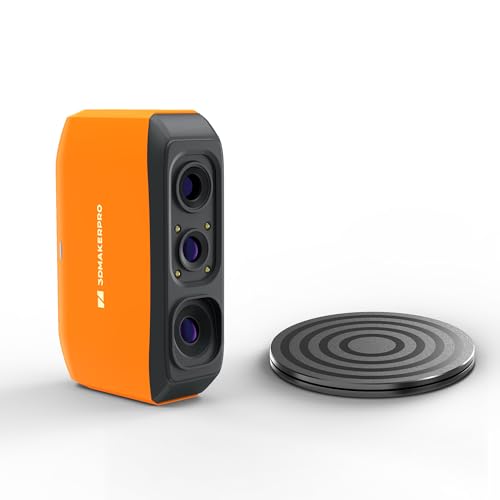
Best for: Beginners and hobbyists who want a capable mid-range handheld option. Why selected: It offers 0.07 mm accuracy and 0.10 mm resolution, delivering usable 3D scans for printing and modeling while staying accessible. Limitations: entry-level class may require careful lighting and steady handling to achieve consistent results.
Revopoint INSPIRE 2 3D Scanner

Best for: Fieldwork requiring mobile, versatile scanning with color capture. Why selected: It combines wireless scanning, 11 infrared laser lines, and dual modules for robust performance on challenging surfaces. Caution: reflective materials can still require surface treatment for optimal results.
Creality CR-Scan Ferret Pro 3D Scanner

Best for: Professionals needing fast, color-rich scans with reliable wireless transfer. Why selected: It offers up to 0.1 mm accuracy, 30 FPS, and strong 2D/3D color texture capture plus WiFi 6. Limitation: outdoor lighting conditions may affect visibility without proper setup.
Buying Guide
What to consider when choosing a high-end 3D scanner
- Accuracy and resolution: Match the required tolerances for your application, such as 0.01 mm single-frame precision for metrology or 0.1 mm for color captures.
- Surface compatibility: Consider laser vs structured light and how reflective, dark, or shiny surfaces will be scanned.
- Scanning modes: Look for multiple modes (cross-line, parallel lines, full-field, auto-turntable) to handle diverse geometries.
- Data workflow: Check for real-time streaming, wireless options, and compatibility with common formats (OBJ, STL, PLY).
- Portability vs stability: Handheld units offer mobility; desktop or auto-turntables improve repeatability for inspection.
- Color capture: If texture and color are essential, ensure a capable color capture system accompanies geometry.
- Software ecosystem: A robust companion software suite can simplify alignment, meshing, and export.
Choosing by use case
- Reverse engineering and metrology: Prioritize 0.01 mm precision, multi-mode scanning, and stable data capture.
- Industrial inspection: Favor scanners with fast scan speeds, full-field light, and reliable offline processing.
- 3D printing and modeling: Color texture plus straightforward export formats help quick prototyping.
- Outdoors and reflective surfaces: Look for wireless capability, infrared or multi-line lasers, and surface-friendly modes.
Practical tips for best results
- Room lighting: Moderate ambient light often yields better scans; avoid direct bright sunlight for laser-based devices.
- Surface prep: For difficult finishes, consider a temporary matte spray or powder, unless the device supports markerless capture.
- Calibration: Regular calibration improves accuracy, especially with high-precision workflows.
- Data management: Plan file naming, project folders, and standard export formats to streamline collaboration.
FAQ
- What is the most precise handheld 3D scanner?
Standouts include models with 0.01 mm single-frame precision and multiple scanning modes, designed for metrology and reverse engineering. - Can these scanners scan shiny or dark objects without spray?
Many offer multiple laser or structured-light lines that handle a range of surfaces, but reflective or highly transparent materials may still require surface prep or smarter mode selection. - Do these scanners support real-time streaming?
Several models provide PC-to-mobile streaming and WiFi 6 connectivity for on-the-go workflows. - What file formats do they export?
Common exports include OBJ, STL, and PLY, which fit most 3D printing and CAD pipelines. - Are color scans useful for engineering?
Color can enhance texture fidelity, aiding visual inspection and presentation, but geometry precision is typically the primary factor for engineering tasks. - Do high-end scanners require extensive setup?
Some models offer turnkey scanning with presets, while others benefit from manual mode selection and calibration for peak accuracy.