Finding the right hot shoe to PC adapter helps you trigger external flashes and studio lights reliably from your camera. This guide highlights five compatible options, clarifying who each is best for and where to avoid common pitfalls. Whether you’re a hobbyist shooter, a semi-pro studio operator, or a filmmaker seeking simple light control, these adapters translate camera hot shoes into dependable PC sync or accessory connections.
| Product | Brand | Best For |
|---|---|---|
| JJC Standard Hot Shoe Adapter with Extra PC Sync Connection Port & 3.5mm Mini Phone Connection Port | JJC | Best for cameras with standard ISO hot shoes needing PC sync and external audio-accessory compatibility |
| Nikon AS-15 Sync Terminal Adapter Hot Shoe to PC AS15 | Nikon | Best for Nikon bodies lacking a dedicated sync terminal |
| Pixel TF-322 Hot Shoe Sync Adapter with Extra PC Sync Port | Pixel | Best for Nikon DSLR users needing easy third-party flash integration |
| ProMaster Standard Hot Shoe to PC Sync | ProMaster | Best for quick, straightforward PC sync for standard hot shoes |
| PIXEL Standard Hot Shoe Adapter with Extra PC Sync Port & 3.5mm | PIXEL | Best for off-camera flash setups relying on PC sync and 3.5mm control |
Introduction to top picks: The JJC and PIXEL adapters offer dual ports for PC sync and a 3.5mm mini jack, useful for wired control of both strobes and small studio lights. The Nikon AS-15 focuses on Nikon cameras without a sync terminal, while the Pixel TF-322 emphasizes compatibility with Nikon flash systems. ProMaster provides a simple, no-fruss setup that suits photographers who want a straightforward PC sync solution. The following sections describe each option in detail to help you choose based on camera brand, hot shoe type, and desired port configurations.
JJC Standard Hot Shoe Adapter

The JJC adapter uses a standard ISO hot shoe on top and a standard ISO shoe mount bottom. It adds a PC sync port and a 3.5mm mini phone socket on the side for additional connections. Best for photographers with cameras that have a standard ISO hot shoe and who need both PC sync and a small audio/remote control conduit. This is a sensible choice for off-camera lighting setups that require minimal extra gear. A potential limitation is compatibility with cameras that use non-standard or multi-function hot shoes.
Who it’s best for: Photographers with standard ISO hot shoes who want both PC sync and a 3.5mm remote or audio connector. Why chosen: Dual ports increase versatility without complicating the mount. Caution: Not compatible with cameras lacking a standard ISO hot shoe or with multi-function hot shoes.
Nikon AS-15 Sync Terminal Adapter

The Nikon AS-15 is designed for Nikon cameras that use standard ISO-type accessory shoes without a sync terminal. It provides a direct path to PC sync connections, simplifying flash triggering for Nikon shooters. A key limitation is that it does not offer high-voltage sync protection and is not recommended for flash units with more than 6V, which can be a risk with certain strobes.
Who it’s best for: Nikon DSLR or mirrorless users with no sync terminal on their hot shoe. Why chosen: Clean integration with Nikon bodies that lack built-in sync terminals. Caution: Avoid with high-voltage flash units or equipment needing robust protection.
Pixel TF-322 Hot Shoe Sync Adapter

The Pixel TF-322 is a hot shoe converter for Nikon cameras, easily slides into the camera’s hot shoe and enables connection to third-party flashes via standard hot shoe or PC sync cord sockets. It works with most flash units in auto or manual modes and is designed to complement Nikon’s i-TTL system. Its main strength is straightforward operation for Nikon users who want reliable third-party flash control. A possible drawback is limited compatibility with non-Nikon flashes or modern Nikon i-TTL-specific features beyond basic sync.
Who it’s best for: Nikon DSLR users needing simple third-party flash integration. Why chosen: Easy installation and broad compatibility with standard flashes. Caution: Limited compatibility with non-Nikon flash features beyond basic sync.
ProMaster Standard Hot Shoe to PC Sync

ProMaster’s standard hot shoe to PC sync adapter offers a straightforward path from a standard hot shoe to a PC sync port. It is a practical choice for photographers who want a minimalist, reliable interface for triggering off-camera strobes or studio lights through a PC cord. The simplicity is its strength, but it may lack the extra ports found on some dual-port adapters. It is best for quick setups where only PC sync is required.
Who it’s best for: Photographers who want a no-fruss adapter for basic PC sync. Why chosen: Clear, dependable performance with minimal components. Caution: Fewer ports may limit future expansion.
PIXEL Standard Hot Shoe Adapter
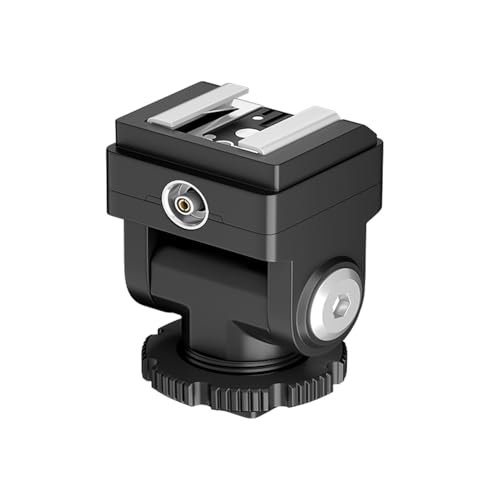
The PIXEL adapter mirrors the dual-port approach with a PC sync port plus a 3.5mm mini jack, making it suitable for photographers using off-camera lighting and needing wired control. It is described as easy to install by sliding into the camera’s hot shoe and compatible with third-party flashes via standard hot shoe or PC sync sockets. It’s a strong pick for GODOX IM20/IM30 and similar compact flash setups. A limitation is that features beyond basic sync may depend on the specific flash used.
Who it’s best for: Off-camera flash users needing PC sync plus a 3.5mm control path. Why chosen: Flexible compatibility with small studio lights and popular compact flashes. Caution: Some advanced flash features may not be supported.
Buying Guide
What should I consider when choosing a hot shoe to PC adapter?
Key factors include hot shoe compatibility (standard ISO vs multi-function), available ports (PC sync, 3.5mm, or both), and whether you need compatibility with Nikon, Canon, or other brands. A dual-port adapter can simplify wiring by providing both PC sync and a manual control path. Consider whether your flashes require high-voltage protection or if basic sync is sufficient.
Which adapter is best for Nikon cameras?
For Nikon shooters using a standard ISO hot shoe, the Pixel TF-322 and Nikon AS-15 provide straightforward PC sync options. The Pixel TF-322 supports third-party flashes and is easy to install. The Nikon AS-15 targets bodies without a sync terminal but lacks high-voltage protection, so ensure your flash is within safe limits.
Which option offers the best value for standard studio lighting?
Adapters that pair a PC sync port with a 3.5mm jack tend to offer the most flexibility for studio setups. The JJC and PIXEL options are strong candidates because they enable both PC sync and a separate control path. If you need the simplest setup with minimal components, a basic ProMaster solution may be sufficient.
Are there any safety considerations I should know?
High-voltage protection is a consideration when using older or more powerful flash units. Check your flash’s voltage rating and avoid adapters that don’t specify protection if you’re using high-intensity strobes. Ensure proper mounting to avoid accidental disconnection during shoots.
What’s a practical way to test a new adapter?
Test with a known good flash in manual or auto mode, using the PC sync cord or hot shoe as applicable. Confirm that the flash fires reliably when triggered from the camera’s trigger, and verify any remote control via the 3.5mm port if you plan to use it for off-camera lighting control.
Which adapter should I choose if I want future expansion?
Choose a dual-port adapter (PC sync and 3.5mm) as it offers greater future compatibility with different lights and controllers. This setup minimizes the need for additional adapters as your gear grows.
FAQ
- What is a hot shoe to PC adapter used for?
- Do all hot shoe adapters support 3.5mm control?
- Is high-voltage protection important?
- Can I use these adapters with any camera?
- Are dual-port adapters worth it?
- What’s the risk of using an adapter not designed for my flash?
It converts a camera’s hot shoe into a PC sync connection, enabling external flashes or studio lights to be triggered from the camera.
No. Some models offer a 3.5mm mini jack for remote control or audio paths, while others focus only on PC sync. Check the product features to confirm.
Yes, if you use high-power strobes. Look for adapters that specify high-voltage protection or verify the flash’s output and the adapter’s voltage tolerance before connect.
Not all adapters fit every camera. Some require standard ISO hot shoes, while others are designed for Nikon or Canon systems. Always confirm compatibility with your camera model.
Yes, for flexibility. A PC sync port plus a 3.5mm port lets you manage multiple lights or remote controls, simplifying studio workflows.
Using the wrong adapter or exceeding voltage ratings can cause misfires or damage. Stick to recommended configurations and test carefully.