Looking for an infrared camera to check water evaporation and moisture leaks? This guide highlights five practical options that help identify hidden moisture behind walls, under floors, or around HVAC components. Each model is evaluated for moisture detection sensitivity, storage, analysis capabilities, and field suitability. This makes it easier to choose the right tool for home inspectors, contractors, and property managers. The top picks cover dual-lens overlays, high-resolution thermal imagery, and PC analysis to transform thermal data into actionable insights. See the quick summary table below to compare core capabilities at a glance.
| Product | Best For | Key Advantage | Limitations |
|---|---|---|---|
| FOXWELL RT280 | Electrical panels, HVAC, and machinery inspections | High-resolution thermal data with robust PC analysis | Windows PC only for analysis |
| ANXTECH DP25 | Hidden water leaks behind walls | Dual-lens visual overlay for precise localization | Premium features may require learning curve |
| Firecore FI160S | HVAC and plumbing moisture checks | Dual camera modes and expansive storage | Mac compatibility not provided |
| AIOMEST DP15L | Wall moisture, moisture mapping, and reports | 512×384 TISR resolution with 8GB storage | Requires USB transfer for full analysis |
| HABOTEST HT821A | General moisture and electrical hotspots | Wide temperature range and multiple palettes | On-device analysis limited compared to PC tools |
Each product listed below focuses on moisture and water-evaporation indicators, such as subtle temperature differences caused by dampness, insulation gaps, or evaporating water. The sections compare best-use scenarios, highlight who benefits most, and point out practical cautions based on the features described by the manufacturers.
FOXWELL RT280: Clear Thermal Imagery For Inspections

The FOXWELL RT280 uses a 2.8-inch LCD with 320×240 resolution and TISR enhancement, boosting effective resolution to 240×180. This helps reveal small temperature gradients that indicate moisture behind walls or under structural members. Its 50°×38° field of view and 25Hz frame rate provide steady views of damp areas as you scan. Best for electrical checks, home inspections, and HVAC assessments where moisture signals appear as subtle heat patterns.
Best for: Inspectors who need precise thermal detail and reliable PC analysis. The device includes PC analysis software with 2D/3D visualization, temperature insights, and automatic report generation. Caution: Mac users may face compatibility limitations with the included software, which concentrates on Windows platforms.
ANXTECH DP25: Dual-Lens Clarity For Hidden Moisture

The ANXTECH DP25 combines 256×192 infrared with a 512×384 super resolution and a visible-light lens. This dual-lens approach helps pinpoint water intrusion behind walls by overlaying heat patterns onto real-world images. It’s especially useful when moisture is near plumbing or in hidden cavities where line-of-sight is limited. Best for contractors needing quick, concrete localization of leaks and moisture sources.
Best for: Professionals who want a fast, overlay-enabled diagnosis. Caution: The device relies on high-definition thermal images; complex scenarios may require additional evaluation or infrared mapping for full confirmation.
Firecore FI160S: Large Storage With Multi-Mode Imaging

The Firecore FI160S delivers 320×240 Super Resolution with a 160×120 IR core enhanced to 320×240 via Super Resolution. It supports four imaging modes—Thermal, Visible, Picture-in-Picture, and Thermal Mix—helping you compare heat patterns against visible components. With 32GB storage, it’s suitable for documenting moisture checks across larger sites. Best for HVAC and plumbing moisture assessments where both heat signatures and context matter.
Caution: Not listed as Mac-compatible for PC analysis; Windows-based software is required for full reporting.
AIOMEST DP15L: Onsite Thermal Mapping And Reports

With 512×384 TISR resolution and 8GB storage, the DP15L is designed for moisture inspection and wall mapping. It generates 2D/3D thermal analysis on PC, enabling precise localization of evaporating moisture and heat loss. Real-time temperature alarms help identify hot spots that can indicate water intrusion or insulation gaps. Best for technicians who want robust wavelet-like visualization and structured reports.
Caution: On-device analysis is supported, but deeper reporting is often performed on a connected PC.
AIOMEST Wireless Thermal Imager: Mobile Inspection Power

This wireless Android/iOS-compatible camera provides 256×192 IR resolution with mobile-based offline analysis and reporting. The app enables one-click image capture and offline report generation, ideal for quick on-site moisture checks during home inspections or HVAC service calls. It supports four imaging modes (thermal, fusion, PiP, visible) and 6 color schemes for easier moisture spotting. Best for mobile technicians who need field-ready, report-ready outputs.
Caution: Wireless integration depends on app support and mobile device compatibility; ensure your device is on the supported OS version.
MAXRIENY BSIDE 240×240: Palettes For Clear Moisture Views
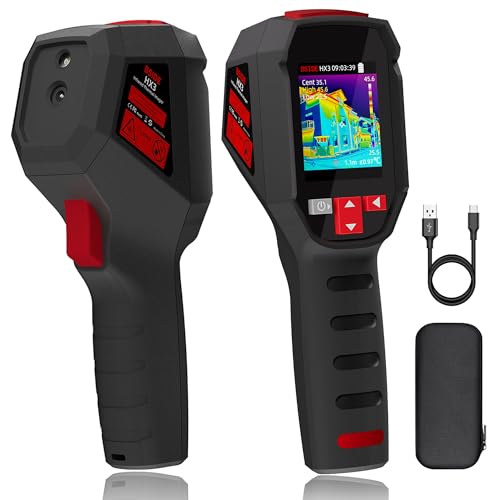
The BSIDE camera offers 240×240 resolution with 15 color palettes and a 50° FOV. It covers a wide temperature range from -20°C to 550°C (-4°F to 1022°F) and runs at 25Hz. The combination helps identify moisture pockets and heat losses in walls and HVAC components. Best for home inspections where color-coded heat maps aid quick interpretation.
Caution: While feature-rich, ensure the device’s interface and palettes align with your preferred workflow for moisture documentation.
Buying Guide: Choosing The Right Infrared Camera For Water Evaporation And Moisture
What resolution Do I Need For Moisture Detection?
Higher IR resolution improves the ability to detect small temperature differences caused by moisture. Look for cameras offering at least 320×240 or better. Models with 512×384 data provide sharper detail for hidden leaks behind walls.
Should I Choose Dual-Lens Or Single-Lens Systems?
Dual-lens cameras with a visible-light sensor help you correlate heat patterns with real-world components, making it easier to locate moisture sources pinpointedly. If you frequently document in cluttered environments, a dual-lens approach adds clarity.
Is PC Analysis Or On-Device Reporting Important?
PC analysis enables 2D/3D visualization, area/line temperature analytics, and professional reports. On-device reporting is convenient for quick field notes, but PC-based workflows are preferred for thorough moisture documentation and client reporting.
What About Storage And Data Transfer?
On-board storage (8GB or more) supports sizable image and video libraries. Check whether the camera allows easy USB or USB-C transfers to Windows or Mac for analysis. If you work offline often, look for models with ample storage or reliable cloud-enabled workflows.
What Field Scenarios Are Common For Water Evaporation Tests?
Look for wide field-of-view (FOV) and rapid frame rates to sweep larger areas (walls, floors, ceilings) efficiently. Features like emissivity adjustment, multiple color palettes, and temperature alarms help tailor inspections to concrete materials (concrete, wood, metal) and moisture types (damp spots, evaporative cooling zones, hidden leaks.
What Are Practical Cautions To Expect?
Some models emphasize Windows PC software, which may limit Mac users. Others rely on mobile apps for reporting, which can depend on OS compatibility. Be mindful of the learning curve for dual-lens overlays and the need for professional reports to document moisture findings clearly.
Quick Reference: Who Should Buy Which Model?
- FOXWELL RT280: Best for professionals needing detailed PC-based analysis for electrical, HVAC, and mechanical inspections.
- ANXTECH DP25: Best for moisture behind walls with precise localization via dual-lens overlay.
- Firecore FI160S: Best for combined modes and strong on-device storage for HVAC and plumbing moisture tasks.
- AIOMEST DP15L: Best for structured onsite mapping and 2D/3D analysis when moisture mapping is critical.
- HABOTEST HT821A: Best for versatile color palettes and broad temperature range to identify hotspots and leaks.
FAQ
Q: Can infrared cameras directly measure water evaporation rates? A: Infrared cameras detect temperature differences caused by moisture and evaporation but do not measure evaporation rate directly. They indicate where evaporation effects are active and guide further analysis.
Q: Do these cameras work well for walls with plaster or drywall? A: Yes, cameras with high thermal sensitivity and adequate resolution can detect moisture behind common wall materials when scanning methodically.
Q: Are Mac users supported? A: Some models rely on Windows PC software for analysis and reports. Check compatibility if you use a Mac before purchase.
Q: Is dual-lens imaging worth the extra cost? A: Dual-lens systems provide better context by overlaying heat patterns on visible images, which improves accuracy in locating moisture sources.
Q: What is NETD and why does it matter for moisture detection? A: NETD (noise equivalent temperature difference) measures thermal sensitivity. Lower NETD (e.g., ≤50 mK) means finer detection of small temperature differences typical of moisture-related anomalies.