Answering the need to convert old film into accessible digital files, these innovative technology film scanners are designed for different types of users. Whether you’re a casual memory keeper, a hobbyist, or a small archive caretaker, the right scanner can simplify preserving 35mm negatives, slides, and photos. Below, five top options are evaluated for compatibility, ease of use, and output quality. The best picks cover standalone operation, large displays, and multi-format support to suit various workflows.
| Product | Brand | Key Strength | Notes |
|---|---|---|---|
| ITNS-500 The Ultimate Film and Negative Scanner | innovative Technology | 5 MP sensor; converts 35mm film, slides, photos, and business cards | Not compatible with macOS; Windows support ends at Windows 7 |
| KODAK Slide N SCAN Film & Slide Scanner | KODAK | 5” LCD display; supports 135/126/110 film and slides; SD card save | Includes adapters; needs SD card not included |
| Mobile Film Scanner for 35mm Slides & Negatives (DGODRT) | DGODRT | One-device digitization with phone app; portable and simple | Requires smartphone for viewing and editing |
| 35mm Film Scanner & Slide Scanner (DigitConvert) | DigitConvert | 2.4″ LCD; standalone, no PC required; supports 35mm and 135 | Compact screen limits on-device editing |
| Photo Scanner and Film Digitizer (DigitPro) | DigitPro | 5″ large screen; converts slides, negatives, and photos; includes SD | Standalone operation; check card compatibility |
Note: The table shows a snapshot of capabilities. For detailed product specifics, refer to each product section below. The following sections present a buyer-oriented view to help you choose the best fit for your needs.
ITNS-500 The Ultimate Film And Negative Scanner
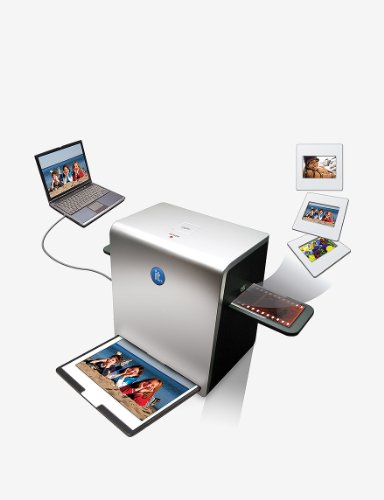
The ITNS-500 uses a 5 MP image sensor to convert 35mm film, negatives, slides, photos, and business cards to JPEG. It includes USB connectivity and internal software. Best for users who want an all-in-one, budget-friendly option with basic digitization needs. A key limitation is lack of compatibility with macOS and newer Windows systems, which may affect setup for some buyers.
- Best for: Windows-centric users who need a simple, dedicated film-to-digital solution.
- Why selected: Solid entry-level option with multi-format conversion.
- Caution: Not compatible with macOS or Windows beyond Windows 7.
KODAK Slide N SCAN Film & Slide Scanner

KODAK’s model features a 5” LCD screen for direct viewing and editing, plus SD card storage support. It handles 135, 126, and 110 formats, and can convert scans into JPEGs with a gallery-style viewing mode. It’s ideal for families digitizing old slides and negatives who want a larger built-in display for quick previewing without a computer.
- Best for: Users who want an onboard display for immediate review and editing.
- Why selected: Versatile format support with an intuitive gallery mode.
- Caution: SD card (not included) is required for saving scans.
Mobile Film Scanner For 35mm Slides & Negatives (DGODRT)
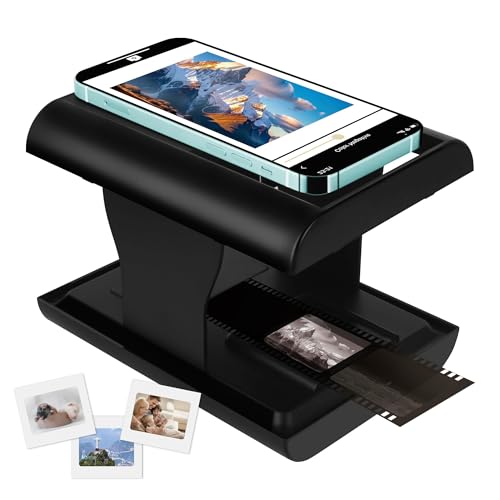
This portable device digitizes 35mm color and black-and-white negatives and slides directly to a smartphone. It emphasizes one-click digitization and sharing via a dedicated app. It’s best for travelers or casual users who want a lightweight, smartphone-centric workflow without a computer.
- Best for: On-the-go digitization with minimal setup.
- Why selected: Direct phone-to-digital workflow simplifies sharing.
- Caution: Requires a compatible smartphone and app usage for viewing and editing.
35mm Film Scanner & Slide Scanner with 2.4″ LCD (DigitConvert)

DigitConvert offers a 2.4” LCD for on-device preview and brightness/color adjustment. It supports 35mm film and slides, with batch scanning for 135 formats. It’s a plug-and-play device that captures directly to an SD card, making it convenient for those who prefer a standalone scanner without a computer.
- Best for: Quick, standalone scanning with simple controls.
- Why selected: On-device editing at a compact price point.
- Caution: On-device screen is small for precise color tweaks; use external viewing if needed.
35mm Film & Slide Scanner with 2.4″ LCD (DigitPro)

DigitPro’s model provides a standalone 2.4” LCD, with fast-loading slide feeder support for continuous scanning. It handles 35mm film, slides, and photos, making it suitable for households with mixed media collections needing quick digitization without a computer.
- Best for: Families digitizing mixed media collections.
- Why selected: Quick feeder and standalone operation simplify workflows.
- Caution: Smaller screen may limit detailed on-device edits; plan for external review if needed.
Buying Guide: Key Considerations for Film Scanners
Mini-guides and practical questions help you choose the right scanner for your needs. Consider format support, display size, and stand-alone versus computer-dependent use.
What formats do you need to scan?
If you have 35mm negatives or slides from multiple brands, choose a scanner with broad format support (135, 126, 110, and slide formats). Standalone units are convenient when you don’t want to connect to a PC, while kits with adapters work well for mixed media.
Is a built-in display important?
A large LCD helps with quick previews and color adjustments. Models with 5″ displays offer the most comfortable editing experience, while smaller screens are more portable and budget-friendly.
Do you need standalone operation or PC connectivity?
Standalone scanners save time and space but may have limited software options. PC-connected devices can provide advanced editing and batch processing, but require an external computer and software compatibility.
What about storage and sharing?
Look for SD card support or built-in memory and HDMI or TV-out options. Cards up to 128GB are common, and HDMI or TV-out lets you view scans on a larger screen without a computer.
Best practices for preserving old memories
Regularly back up digital files to multiple locations. Use consistent file naming and metadata. Calibrate color to maintain accurate tones, and consider archiving in both JPEG and RAW-like formats when possible.
Buying FAQs
- Q: Do film scanners require a computer to work?
A: Some models are standalone with built-in displays, while others require a PC or smartphone app to view and edit scans. - Q: Can I digitize 35mm negatives and slides with the same device?
A: Yes, many scanners support both negatives and slides, along with photos in some models. - Q: How should I store digital scans after digitizing?
A: Back up to an external drive and cloud storage, and maintain a consistent folder structure for easy retrieval. - Q: What is the advantage of a built-in LCD versus viewing on a separate screen?
A: An LCD enables immediate preview and basic edits without a computer, improving workflow speed. - Q: Are there risks with older film being scanned?
A: Handle originals gently and store scans in formats that preserve color and detail for long-term use.