Choosing the right long USB cable for cameras can dramatically improve placement options, reduce clutter, and maintain reliable power and data transfer. Whether you’re wiring a security camera, webcam, or live-stream setup, a well-built long USB cable balances distance with durability and signal integrity. This guide spotlights five long USB cables that excel in camera applications, covering length, construction, and compatibility. Use these options to extend your camera’s reach without sacrificing performance or reliability in everyday environments.
| Product | Brand | Length | Key Benefit |
|---|---|---|---|
| Ainope USB Extension Cable | AINOPE | 10 ft | Durable SR joint and all-metal shell for long life |
| SCOVEE 2-Pack 10ft USB Power Extension Cable | SCOVEE | 10 ft each | Flat design for easy routing and broad compatibility |
| Smays USB Extension Cable Replacement | Smays | 25 ft | Extra-long power extension for remote cameras |
| LARRITS 15ft USB 2.0 A to Micro B | LARRITS | 15 ft | Power-only cable with durable construction |
| ANLINK 10ft USB A to USB C Cable | ANLINK | 10 ft | USB A to USB-C extension for versatile devices |
AINOPE 10ft USB 3.0 Extension Cable

The AINOPE 10ft USB extension cable is designed for flexible camera setups that require extra reach without sacrificing data integrity. At 10 feet, it provides ample distance for cameras positioned away from a computer or power source, making it suitable for indoor surveillance or desktop streaming arrangements. The cable features a reinforced SR joint, which tests indicate withstands thousands of bends, reducing the risk of failure where cables bend near the connectors. The nylon braided sheath adds durability and resistance to everyday wear, ensuring the extension can endure routine handling in home offices or storage closets.
Constructed with an all-metal shell and aluminum alloy connector, this extension offers improved tactile feedback and durability. The multi-layer shielding helps minimize electromagnetic interference, supporting stable data transfer for webcams and other USB 3.0 devices. Gold-plated connectors further guard against corrosion and improve signal clarity, which can matter for high-definition webcam feeds or external hard drives used in camera workflows. Included buckles help you tidy length and prevent tangling, making this option practical for streaming desks, camera rigs, or temporary setups where flexibility matters.
SCOVEE 10ft USB Power Extension Cable Pack

The SCOVEE 2-pack delivers two 10-foot USB power extension cables, designed to extend the reach of camera power connections. The flat cable design allows easier routing under furniture, through narrow gaps, or behind walls where a rounded cable might be obstructive. This configuration is especially convenient for indoor security cameras, Wyze Cam variants, YI cameras, and similar devices that require a longer power lead without adding bulk. Having two cables provides a backup or allows powering multiple devices from a single power source while reducing the need for extra adapters or extensions.
These cables emphasize broad device compatibility, including Wyze Cam V4, Wyze Cam Pan, Nest Cam Indoor, Blink cameras, and other popular models. The micro USB version aligns with many older and non-USB-C cameras, while the flat form factor keeps installation neat in closets, attics, or mounted camera housings. While primarily a power extension, the design minimizes strain on devices by avoiding frequent plug-replug cycles through longer reach, which can reduce wear over time in camera installations with fixed placements.
Smays 25ft USB Extension Cable

The Smays 25-foot extension cable provides a longer range option for cameras located farther from the power source or data hub. As a charging-focused extension, it’s well-suited for powering surveillance cameras, outdoor cams, or areas where outlets are distant. The extended length supports greater flexibility in camera placement, reducing the need to relocate power sources or install additional outlets. The white cable is designed for indoor use and keeps cable runs tidy in longer setups where aesthetics and organization matter.
Compatibility notes indicate broad use with various camera systems, including indoor and outdoor security cameras. The cable’s construction prioritizes durability for extended runs, and while it is tailored for charging, users should confirm their devices’ power requirements to ensure the extension delivers sufficient current without overheating. The 25-foot length makes it a strong option for rooms, garages, or backyards where a camera needs a stable power supply far from a wall outlet.
LARRITS 15ft USB 2.0 A to Micro B Cable

The LARRITS 15-foot USB 2.0 A to Micro B cable is a robust option for power-only applications such as car dash cams, GPS devices, and certain security cameras that rely on Micro B connectors. The length provides flexibility for routing behind dashboards or along vehicle interiors without running short. It includes five wiring clips to help secure the cable in place, supporting cleaner installations in vehicles or fixed surveillance setups. It’s designed for power delivery rather than data transfer, so it’s best paired with devices that do not require high-speed USB data syncing.
Designed to be routed out of sight, this 5-meter cable focuses on practical durability and easy concealment. The copper conductors and shielding contribute to reliable power delivery over distance, while the 90-degree Micro B contacts help reduce strain where the cable meets the device. This option is particularly useful for dash cameras, compact security cams, and other devices that prioritize power delivery over data performance in a discreet installation.
ANLINK 10ft USB A to USB C Cable
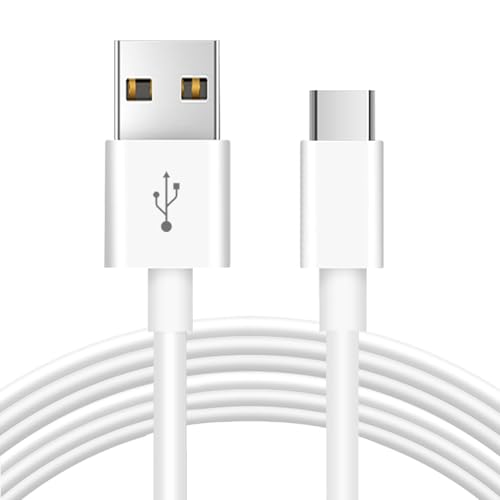
The ANLINK 10-foot USB A to USB-C extension is designed to bridge devices that use USB-C inputs with standard USB-A ports elsewhere in the chain. This cable supports charging and data transfer, offering a practical solution for cameras that require occasional data syncing or firmware updates from a USB-A hub or computer. The 3-meter length balances reach with manageability, and the USB A to USB C design supports a wide range of cameras, security devices, and peripherals that rely on USB-C power or data lines via an older host port.
Key features include a durable build with wide compatibility and a 5V, 2A power rating, which covers many consumer cameras and security devices. The cable supports both charging and data transfer, enabling firmware updates or camera control through a USB-C device connected via USB-A power sources. This makes it a versatile choice for mixed-device environments where USB-C cameras are paired with USB-A hubs or power adapters.
Buying Guide
Choosing the right long USB cable for cameras involves balancing distance, power needs, data transfer, and installation practicality. Here are essential considerations to help you compare options and select the best fit for your setup.
- Distance versus signal integrity: Longer cables increase placement flexibility but can introduce signal degradation, especially for high-speed data. Prioritize USB 3.0/3.1 or higher when you need fast transfers, such as high-resolution webcam feeds. For simple power delivery to cameras, USB 2.0 extensions can suffice, but verify device requirements.
- Power delivery and device type: Cameras often rely on a stable power supply. If the camera is power-hungry or far from a power outlet, choose cables explicitly described as power extensions or those paired with reliable power adapters. Some cables are designed as power-only; use them accordingly to avoid incompatibility with data streams.
- Connector compatibility: Cameras come with various ports (USB-A, USB-C, Micro USB). Ensure the extension supports your device’s connector type and that any adapters or anchors won’t introduce too much resistance or wear.
- Durability and build quality: Features such as reinforced joints, metal shells, shielding, and braid protect cables in daily use. If the setup involves frequent movement or outdoor exposure, look for weather-resistant or ruggedized designs and consider longer replacement cycles for connectors.
- Cable geometry: Flat versus round cables influence routing options. Flat cables can be easier to tuck under baseboards or along walls, while round cables may offer stronger shielding and flexibility around corners.
- Installation convenience: Cable management features such as buckles, clips, and wiring kits help keep runs tidy and reduce tripping hazards. This is especially important in multi-camera setups or desk-based streaming rigs.
- Compatibility with additional devices: For mixed environments, a single longer extension that supports multiple device types (USB-C, USB-A, Micro USB) reduces clutter and the need for adapters.
- Environmental suitability: Indoor installations differ from outdoor or garage conditions. If exposure to dust, moisture, or temperature changes is likely, look for products rated for such conditions or plan protective routing.
In practice, align the cable choice with your primary use case. For surveillance cameras located far from outlets, a longer power extension or a combination of USB-A to USB-C with appropriate power delivery may be ideal. For webcams or live-stream rigs, prioritize higher data-transfer-capable extensions (USB 3.x) to maintain smooth video and audio quality. Consider routing ease, potential for tangling, and the need to organize cables in your workspace to create a reliable, unobtrusive setup.