Answering buyers looking for a microscope camera that connects to a computer, this guide highlights five well-rounded choices. Each option balances image quality, ease of use, and compatibility with Windows, Mac, or Android/iOS ecosystems. Ideal buyers include students, hobbyists, educators, and professionals needing field-ready or desktop-grade inspection. The table below summarizes each pick and their best-fit use cases to help you compare at a glance.
| Product | Best For |
|---|---|
| Wireless Digital Microscope, Skybasic 50X-1000X | Mobile-friendly wireless use, casual teaching |
| USB Digital Microscope 40X-1000X, Bysameyee | Windows/Linux enthusiasts, OTG-enabled devices |
| Bysameyee 1080P USB Digital Microscope | Cross-platform, USB-C ready setups |
| Plugable USB Digital Microscope 250x | Education and maker projects, flexible stand |
| LCD Digital Microscope, PalliPartners | Self-contained viewing with built-in screen |
Wireless Skybasic 50X-1000X Wireless Microscope

Best for mobile-first inspection and classroom demos. This wireless handheld microscope works with Android and iOS devices by connecting to the microscope’s own WiFi hotspot, while also offering USB connectivity to Windows or Mac computers. It features 8 adjustable LED lights for improved detail and captures 1080p images on phones and 720p on computers. The 2MP CMOS sensor supports instant photo or video capture with a simple press or app trigger. Choose this if you want a versatile, portable option that minimizes cables and setup for on-the-go observation. Caution: performance and resolution differ between mobile and computer connections, depending on the device and app used.
Bysameyee USB Digital Microscope 40X-1000X
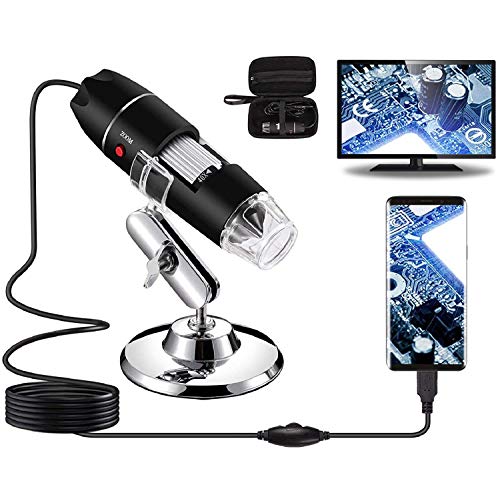
Best for Windows-leaning setups and OTG-enabled devices. This 40X-1000X USB endoscope is compatible with Windows, Linux, and Android devices with OTG, but not compatible with iPhone/iPad. It supports image capture and video recording through the supplied software. It’s well-suited for hobbyists and students exploring coins, skin, PCB work, or natural specimens. Limitation: not compatible with iOS devices; ensure your computer software supports the device’s webcam chipset.
Bysameyee 1080P USB Digital Microscope with Stand
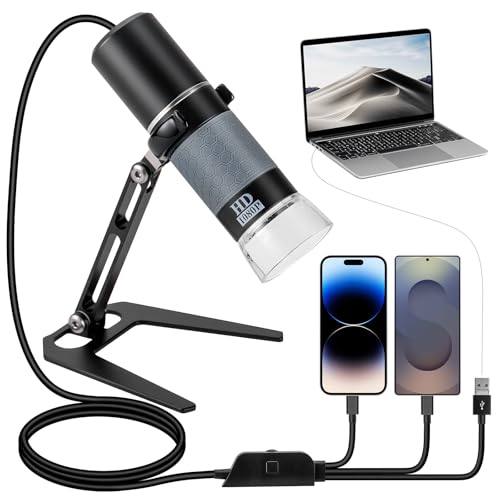
Best for universal USB connectivity with broad compatibility. This model includes a metal stand and a 1080P sensor, delivering clear, true-to-color images. It supports 50X-1000X magnification and uses a USB cable that integrates camera and brightness controls. Ideal for classrooms, labs, or makerspace work where a stable viewing setup is desirable. Choose this if you want straightforward plug-and-play use across Windows, Mac, and most OTG-enabled devices. Caution: ensure the OTG function is activated on your device for proper operation.
Plugable 250x USB Digital Microscope with Flexible Arm

Best for education and portable analysis. The 250x magnification with a flexible arm stand makes it suitable for on-desktop demonstrations, electronics inspection, or coin examination. It is compatible with Windows, Mac, ChromeOS, Linux, Android, and iPad using standard webcam software, with USB and USB-C/Thunderbolt connectivity options. It’s a practical choice for users who want a compact, versatile microscope that can adapt to various devices. Limitation: ChromeOS compatibility may require updated software or drivers on some devices.
LCD Digital Microscope With Built-in Screen

Best for independent viewing without a computer. This 4.3-inch LCD digital microscope offers 50X-1000X magnification with a built-in 1080p/720p camera and a rechargeable battery that can last several hours. It records directly to its internal storage. Use this when you need a self-contained device for fieldwork, teaching demonstrations, or where laptop access is limited. Caution: built-in screen reduces portability compared with fully USB-connected models, and image editing capabilities may be limited compared with computer-based software.
Buying Guide
What to consider when choosing a microscope camera for a computer
- Connectivity: Decide between USB, USB-C, OTG-capable, or wireless. Wireless options offer cable-free use, while USB-friendly models tend to have broader software support on desktops.
- Magnification and resolution: Look for magnification ranges that cover your typical subjects (50X-1000X is common). Resolution (1080p or higher) affects image detail.
- Compatibility: Check operating system support (Windows, macOS, Android, iOS, Linux). Some devices require OTG or specific apps.
- Ease of capture: One-click photo/video capture and on-device controls simplify workflows in classrooms or fieldwork.
- Illumination: Adjustable LED lighting improves detail, reduces shadows, and enables better imaging of reflective or dark samples.
- Stability and accessories: A stand or arm helps steady the view and makes measurements easier. Carrying cases add portability for travel.
- Storage and software: Consider built-in storage or the need for external apps. Windows-only measurement software can be a limitation for some users.
Which setup matches which use case?
- Education and demonstrations: Wireless Skybasic or Plugable with a stand.
- Hobbyist coin and mini-inspection work: Bysameyee USB models with wide compatibility.
- Mobile fieldwork: LCD screen model for on-site observations without a computer.
- Mac and Windows cross-compatibility: 1080P USB models from Bysameyee and Plugable with multi-OS support.
Questions to ask before buying
- Do you need wireless operation or a tethered USB connection?
- Will you be using a PC, Mac, or mobile device primarily?
- Is built-in image storage or on-device recording important to you?
- What magnification and light control are essential for your subjects?
Quick FAQ
- Can I use these microscopes with iPhone and iPad?
- Is a stand necessary for high magnification?
- Do these connect to Chromebooks?
- What is the typical maximum magnification?
- Do they require special software to take pictures?
Some models support iOS via wireless or USB, but several picks exclude iOS compatibility. Check product notes for specific device support.
A stand or arm is recommended at higher magnifications to reduce hand shake and improve measurement accuracy.
Many work with ChromeOS using webcam-compatible software, but compatibility may vary by model and ChromeOS version.
Most consumer microscop es offer 50X-1000X; some advanced units reach higher ranges but may require specialized software.
Several models use bundled software on Windows or Android; others rely on generic webcam apps. Confirm software availability before purchase.