Choosing the right monitor is essential for accurate photo editing. This guide targets photographers, retouchers, and design professionals who need reliable color, sharp detail, and comfortable viewing for long sessions. The top five picks below balance color accuracy, resolution, and practical features like USB-C, calibration readiness, and portability. Each product includes who it’s best for and a clear limitation to consider.
Summary of recommended models
| Product | Best For | Key Benefit | Notable Limitation |
|---|---|---|---|
| BenQ SW272U | Professionals needing 4K and strong color | 4K UHD, Nano Matte, 16-bit 3D LUT | Higher price tier |
| BenQ SW272Q | Editors preferring 2K with superb color | 2K QHD, Nano Matte, 16-bit 3D LUT | Lower resolution than 4K options |
| INNOCN PU15 Portable OLED | On-the-go editors | 4K OLED, 100% DCI-P3, 10-bit | Smaller screen; portability trade-off |
| ASUS ProArt PA148CTV | Mobile studios and field work | 15.6″ Full HD touch, Calman Verified | Portable, smaller panel |
| ASUS ProArt 27″ WQHD | Workstations and studios | 27″ WQHD, 100% sRGB, Calman Verified | Requires desk space |
BenQ SW272U 27″ 4K Photographer Monitor

The BenQ SW272U is designed for photographers who require 4K UHD clarity with color precision. It features a Nano Matte panel with TUV anti-reflection certification to minimize glare, and 16-bit 3D LUT for smooth color grading across scenes. The display supports 99% Adobe RGB and 98% DCI-P3/Display P3 coverage for broad color workflows. Best for studio editors who need deep color accuracy and a glare-free surface. A potential limitation is the higher price tier and larger desk footprint.
BenQ SW272Q 27″ 2K Photographer Monitor

The SW272Q offers a 2K QHD resolution with a Nano Matte panel and anti-reflection coating, making it a strong choice for color-critical edits in bright rooms. It covers 99% Adobe RGB and 98% DCI-P3/Display P3, delivering broad color accuracy. This monitor is best for photographers who want detailed color nuances without needing the highest 4K resolution. Consider its 2K resolution if your workflow prioritizes color accuracy and glare reduction over pixel density.
INNOCN 15.6″ Portable OLED for Photo Editing
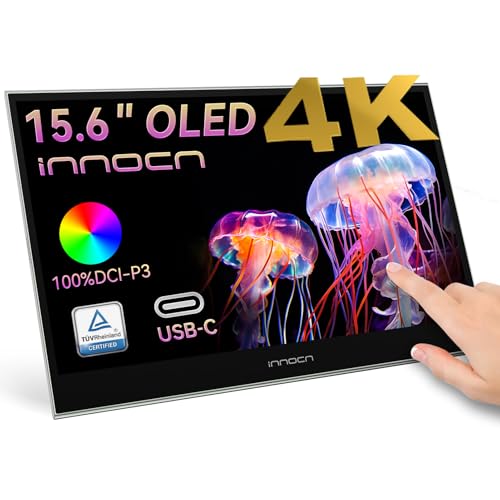
The INNOCN PU15 is a compact portable OLED monitor suited for editors who need a secondary reference display with precise color and deep contrast. It offers 4K capability, 100% DCI-P3, and 10-bit color with USB-C connectivity. This is ideal for field work or editors who want a secondary on-the-go screen to compare tonal range. A limitation is its small size, which reduces on-screen real estate for detailed edits.
ASUS ProArt PA148CTV 14″ Portable Touch Monitor

The ASUS PA148CTV is a 14″ portable touchscreen monitor with full color coverage andCalman Verified accuracy. It’s designed for photographers who need a compact reference or field editing companion. Best for mobile workflows and quick color checks away from the main workstation. It’s not a full-size desktop editing monitor, which can limit critical-detail work on small screens.
ASUS ProArt 27″ WQHD Monitor

The ASUS ProArt 27″ WQHD monitor provides a balance of workspace and color accuracy with a 27″ IPS panel. It delivers 100% sRGB and Rec. 709 color spaces and is Calman Verified with Delta E less than 2 for precise color rendering. Best for studios needing a large, accurate editing display without going to 4K. A limitation is the 2560×1440 resolution which is lower than 4K options but can still meet many color-critical tasks effectively.
Buying Guide: Key Considerations For Color-Critical Editing
- Color accuracy and color space coverage: Look for monitors that cover 99% Adobe RGB and 99% DCI-P3 or Display P3, plus a validated Delta E target.
- Resolution and panel type: 4K offers more detail; 2K can be sufficient for color work with less desk space. Nano Matte or anti-reflection coatings reduce glare in bright environments.
- Calibration readiness: Built-in LUTs or hardware calibration support helps maintain long-term accuracy.
- Connectivity: USB-C with power delivery simplifies desk setup; HDMI/DisplayPort should be available for compatibility with laptops and desktops.
- Color workflow features: Look for 10-bit or 12-bit panels, wide gamut coverage, and uniformity compensation if available.
- Size and ergonomics: Choose a size that fits your workspace and allows comfortable viewing angles; consider tilt/swivel height adjustments.
- Portability vs. desktop use: Portable monitors are great for field editing but typically smaller and may trade off some calibration robustness.
Frequently Asked Questions
- What is the most important spec for photo editing monitors?
– Color accuracy and color space coverage are typically the most critical for faithful edits. - Do I need a 4K monitor for photo editing?
– Not strictly required; 4K offers more detail, but high-quality 2K and WQHD options can be sufficient for most workflows. - Should I calibrate my monitor regularly?
– Yes. Regular calibration maintains color accuracy over time and can be done with hardware calibrators or built-in tools. - Is a portable monitor good for editing?
– Portable monitors are convenient for on-the-go checks and field work, but may not replace a high-end desktop display for primary editing. - What panel coating is best for bright studios?
– Nano Matte and anti-reflection coatings help reduce glare and fingerprint visibility, improving color perception in bright rooms.