Looking to mount a camera on your computer monitor for hands-free video calls, streaming, or content creation? This guide highlights five top options that fit a variety of monitor setups and devices. Each product is evaluated for compatibility, stability, and ease of use, helping you choose the right mount for your needs. Ideal buyers include remote workers, content creators, livestreamers, and students who want a stable, adjustable camera angle without clutter.
| Product | Best For | Key Benefit | Limitations |
|---|---|---|---|
| Stouchi Continuity Mount | Mac desktops and iMacs | Mag-Safe compatibility for quick mounting | Requires Mag-Safe case compatibility |
| RAUBAY CM01 Clamp | Desktop monitors with top-edge space | Simple, space-saving clamping | Limited to clamp-on mounting |
| Itramax Magnetic Holder | Mac/iMac setups with external displays | Rear-camera-friendly for clearer video | Heavier phones may affect balance on thinner laptops |
| LenTok Gooseneck Stand | Flexible positioning on desks | 360° rotation and tall reach | Clamp stability varies by desk |
| Svcouok 1/4″ Clip | Broad webcam compatibility | Universal 1/4″ screw interface | May not fit cameras without 1/4″ bottom mount |
Stouchi Continuity Camera Mount For Desktop Monitor

The Stouchi Continuity Camera Mount is crafted from lightweight, durable aluminum alloy. It is compatible with iMac and most external displays or monitors, including 2017 and newer desktops running macOS Ventura. It supports Mag-Safe-enabled iPhone models (17, 16, 15, 14, 13, and 12) and allows easy magnetic attachment for hands-free streaming. Best for Apple ecosystem users who want quick, stable camera setup on a Mac desktop or display. A note: use with Mag-Safe-friendly cases or remove non-compatible cases before mounting. The mount adjusts from vertical to about 30 degrees downward for versatile viewing angles.
Who it’s best for: Mac users with Mag-Safe iPhones seeking simple, secure, cable-free mounting for FaceTime, video calls, or streaming.
Why selected: It offers a clean magnetic attachment, stable hold, and easy angle adjustments, ideal for Mac setups where desk space is a priority.
Caution: Ensure your phone case is Mag-Safe compatible; non-compatible cases may require removal for secure mounting.
RAUBAY CM01 Monitor Top Camera Mount Clamp

RAUBAY’s CM01 clamps to the top of flat-screen monitors, offering a simple 1/4 inch screw interface compatible with cameras, webcams, microphones, and lights. It is designed to save desk space while providing stable support without a separate tripod. The mount is easy to use—just place it on the monitor top and secure. This option is best for users who want a compact, clamp-on solution that doesn’t attach to the stand or require a separate arm. A potential limitation is that it may not fit very thick monitors or non-standard edges.
Who it’s best for: Content creators or professionals needing a quick, space-saving monitor-top camera setup.
Why selected: It’s a straightforward clamp-on solution with low profile and flexible 1/4″ compatibility.
Caution: Check monitor edge thickness and shape to ensure a secure fit; not ideal for all curved or ultra-thin displays.
Itramax Continuity Camera Mount For Desktop Monitors

The Itramax Continuity Camera Mount transforms a phone into a high-quality webcam for video calls, streaming, and remote work on iMac, Mac mini, Apple TV 4K, or external displays. It’s built from durable aluminum alloy with silicone pads to protect screens. It is designed for monitor setups, offering a magnetic phone holder for continued use with MagSafe devices. Note that heavier phones on thinner laptops may affect balance; using an external monitor is recommended for best stability. It supports rear-camera usage for crisper video in conferencing and streaming contexts.
Who it’s best for: Users who want to repurpose a high-end iPhone as a webcam on an external display.
Why selected: Emphasizes clearer video with rear-camera capability and a sturdy monitor-friendly design.
Caution: Heavier iPhones can imbalance thinner laptop setups; external monitors are preferred for balance.
LenTok Flexible Webcam Stand For Monitor Or Desk
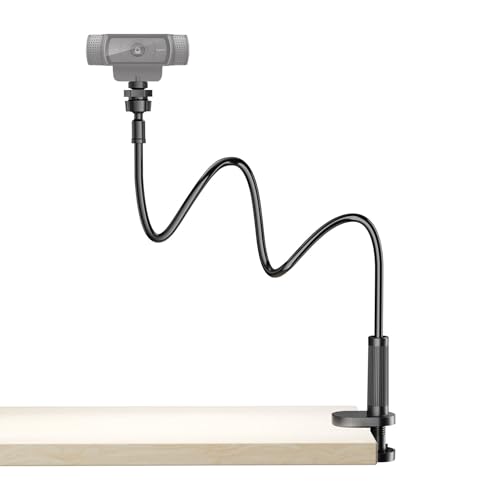
The LenTok stand uses a long, flexible gooseneck arm and a strong clamp to mount a webcam over a monitor or desk. The arm reaches to the perfect eye level for streaming or calls and rotates 360 degrees for flexible framing. A solid metal base provides stability, while anti-slip padding protects furniture. Best for users who need adjustable height and angle with a broad range of monitor thicknesses. A possible limitation is clamp compatibility with unusually thin or thick desks depending on the build.
Who it’s best for: Individuals needing versatile, tall reach with stable framing for dynamic shots.
Why selected: Combines flexibility with stable construction, suitable for varied desk environments.
JCWINY ScreenBar Halo Mount For Monitor Light

The JCWINY ScreenBar Halo mount is designed for monitor-light setups, compatible with monitor lamps from brands like BENQ and Quntis. It uses a nano-adhesive attachment that is strong yet removable without residue, enabling clean positioning of a webcam for video calls or streaming. It provides 360-degree rotation and 180-degree tilt for flexible angles. This option is ideal when you already use a ScreenBar Halo or similar lamp, offering a compact stand that doesn’t obstruct the monitor. Caution: use as directed to avoid adhesive residue on delicate surfaces.
Who it’s best for: Users with ScreenBar Halo or similar desk lighting who want integrated light and webcam positioning.
Why selected: Combines lighting and webcam positioning for cohesive desk ergonomics.
Buying Guide: Key Factors To Consider
Choosing the right monitor-mounted camera involves evaluating compatibility, stability, and adjustability. Here are practical questions to guide your decision:
- What is my monitor type and edge thickness? Some mounts clamp only to flat-top edges or certain monitor sizes.
- Do I need a MagSafe-compatible phone mount or a universal 1/4″ screw attachment?
- Is rear or front camera quality more important for my setup (phone as webcam vs. dedicated webcam)?
- What desk space do I have, and how much reach and tilt do I need for optimal framing?
- Will I use external lighting with the webcam, such as a ScreenBar Halo or desk lamp?
Comparison tips: For clean aesthetics and minimal desk clutter, choose a magnetic or clamp-on mount that keeps the monitor edge accessible. If you plan to use a phone as a webcam, ensure the mount provides a stable gravity-free hold and protects the screen. For heavier phones or larger cameras, prefer mounts designed for external monitors with robust bases and silicone padding to avoid scratches.
FAQ
- Can I use any phone as a webcam with these mounts? Yes, but compatibility depends on the mount and whether it supports MagSafe or a secure clip for the phone. Check the device’s weight and magnetic compatibility requirements.
- Will these mounts damage my monitor? Reputable mounts use padding or non-slip materials to protect surfaces. Always verify edge compatibility and avoid excessive torque on the display.
- Are these mounts suitable for laptops? Some mounts are designed for external monitors and desktops. Heavier laptops may require a dedicated stand or external monitor setup for balance and stability.
- Do these mounts support 360-degree rotation? Many do, offering tilt and swivel adjustments. Confirm the joint type and range before purchase.
- Which mount is best for a busy desk? Choose a compact clamp-on or magnetic mount with minimal footprint if desk space is at a premium. For flexible framing, gooseneck arms offer greater adjustability.
- Is there a risk of camera shake? Stable bases with weighted or clamp-supported designs reduce shake. Avoid overly long goosenecks on uneven surfaces unless stabilized.