Choosing a first camera for a child blends safety, simplicity, and a touch of creative magic. The options below are designed for little hands and growing curiosity, with durable bodies, clear controls, and kid-friendly photo opportunities. Each model supports beginner-friendly features like instant viewing, easy printing or simple digital storage, and age-appropriate design. The table summarizes key aspects of the five picks, helping you compare at a glance before diving into deeper details.
| Product | Brand | Key Feature |
|---|---|---|
| Paw Patrol My First Instant Camera | Canal Toys | Ink-free instant printing; Paw Patrol design |
| PlayGo My 1st Camera | Play&Go | Mini beginner camera for ages 12 months+ |
| CAMKORY 1080P Kids Digital Camera | CAMKORY | 1080P video, 44MP photos; simple interface |
| MYSTILUCK Instant Print Camera for Kids | MYSTILUCK | Instant prints; 15 scene filters; non-ink printing |
| CHAKEYAKE Kids Camera With Rotating Zoom | CHAKEYAKE | Rotating zoom lens; 3.5″ screen; multiple effects |
Paw Patrol My First Instant Camera

This instant camera is designed for children aged around four and up, combining a kid-friendly Paw Patrol design with simple, color-based navigation on a clear LCD display. It supports instant photo printing, enabling quick tangible memories after a moment with family or friends. The device emphasizes ink-free printing technology, reducing ongoing costs and mess while preserving the magic of bringing photos to life in seconds.
In addition to still images, the camera offers video functionality through a compatible interface and the option to insert a micro-SD card to save recordings. The simple controls and a cartoon-inspired interface promote independent exploration, helping children learn sequencing, framing, and storytelling as they review captured moments with caregivers. The 3-in-1 design focuses on immediate photo, video, and memory storage, encouraging repeat creativity without complicated setup.
Overall, this model balances accessibility with a beloved character theme that motivates kids to practice photography. Its durable form and recognizable branding make it a popular entry point for early-year photographers who want instant results and a familiar, cheerful design to accompany their first steps in imaging.
PlayGo My 1st Camera

This mini camera is designed for babies and toddlers older than 12 months to begin exploring photography in a safe, approachable way. The emphasis is on play and pretend photography, with a compact, easy-to-handle design suitable for little hands. The product description notes that young children will enjoy pretending to take photos, helping to develop early hand-eye coordination and visual exploration while keeping operation simple and intuitive.
Given its age range and toy-like construction, the camera serves as a developmental starter tool rather than a high-end device. Parents can observe how a child interacts with the camera at a basic level—pressing a button, looking through a view, and engaging with cause-and-effect moments—before progressing to more feature-rich models. This option prioritizes simplicity and imaginative play.
Overall, PlayGo’s first camera provides a gentle introduction to the concept of photography, offering a safe, affectionate way for toddlers to imitate adults behind the lens and build early confidence in visual storytelling.
CAMKORY 1080P Kids Digital Camera
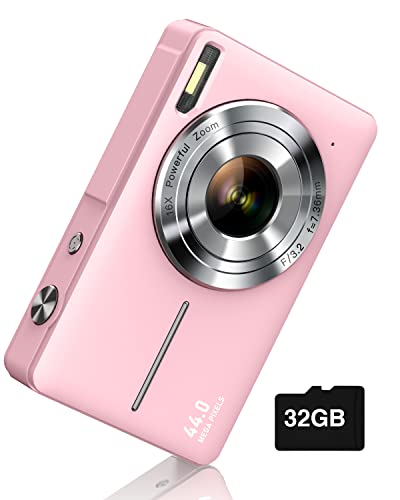
The CAMKORY digital camera is a practical option for children beginning with photography. It delivers Full HD 1080P video and 44MP photos with an automatic metering system that produces natural color images without requiring manual adjustments. The design emphasizes ease of use, enabling a child to press the shutter and capture moments quickly while enjoying reliable, clear results.
Ergonomically designed for young users, this camera features a large LCD display and simple menus. It’s portable, with long-lasting battery life supported by two larger capacity batteries, making it suitable for family trips or everyday use. An automatic turn-off function helps conserve energy during vacations, and the device is targeted at children roughly aged 5 to 13, balancing accessibility with room to grow as skills develop.
Operational simplicity, combined with durable construction and clear results, makes this CAMKORY model a sensible choice for new photographers who want dependable performance without complex settings.
MYSTILUCK Instant Print Camera for Kids

This instant print camera is designed for children aged 3 to 10, blending a compact form with an engaging feature set. It prints black-and-white photos in under a second and saves color digital copies to the included SD card, offering a quick, safe way to view and share memories. The device includes 15 creative scene filters, 16 stickers, and enough paper for hundreds of prints, supporting ongoing creative exploration without frequent replacement of consumables.
In addition to printing, the camera records 1080P video and supports 16X digital zoom, time-lapse, burst modes, and a music player for play-along creativity. The product emphasizes a non-ink printing experience with safe, child-friendly materials, plus rugged, shock-resistant construction intended to withstand typical kid-led usage. This combination supports both imaginative play and basic digital capture in a kid-friendly package.
CHAKEYAKE Kids Camera With Rotating Zoom

The CHAKEYAKE camera introduces a rotating zoom lens, giving a child a sense of exploring perspective. The lens can rotate 360°, offering up to 10x zoom to capture details at a distance. This model also provides built-in features like 20 photo frames, 7 filters, and 8 mirror effects, broadening the creative toolkit for small photographers while keeping the device manageable for beginner use.
In addition to still photos, the camera supports a dual-camera setup for easier selfies and a larger 3.5-inch LCD screen with wide viewing angles and color accuracy. It emphasizes eye safety with anti-blue-light considerations and includes selfie mode, music playback, time-lapse, and other child-friendly features. This makes it a versatile step up for kids ready to experiment with more control over their shots while maintaining a robust, kid-safe design.
Buying Guide
Age and safety considerations
Choose a model whose recommended age aligns with your child’s development stage. Younger children benefit from simple, one-button operation and shock-resistant shells, while older kids can handle more features like adjustable zoom and video modes. Look for non-toxic materials and rounded edges to reduce injury risk during play.
Ease of use and interface design
Beginner-friendly cameras use large buttons, intuitive menus, and clear displays. Ensure the device has a straightforward way to view photos, whether instantly on a screen or by transferring to a computer or app. Avoid devices with overly complex menus or many mode switches for younger children.
Printing vs. digital storage
Some models offer ink-free printing or instant printing for tangible keepsakes, while others rely on digital storage with SD cards. Printing features can be rewarding for kids but may require ongoing consumables or cleanup. Consider whether you prefer instant physical prints or a purely digital photo collection for easy sharing.
Memory, power, and durability
Assess battery life and charging options, especially for outdoor outings. Cameras with two batteries or rechargeable power packs are convenient. Check memory options (SD card capacity) and whether the package includes memory or printing supplies. Durability matters when little hands drop or mishandle devices.
Image and video capabilities
Entry-level models typically offer HD or Full HD video and modest still-image resolution. If your child shows interest in colors, frames, or filters, a device with preset scene filters and fun effects can nurture creativity without requiring technical knowledge.
Connectivity and data transfer
Some cameras support WiFi transfer or USB connections for quick sharing with family and friends. If you want simple sharing to a phone or computer, verify available transfer options and compatibility with your devices.
Value and longevity
Consider how long a camera will remain engaging as a child’s skills grow. A model that balances entry-level simplicity with an upgrade path—such as rotating lenses, filters, or a larger screen—offers better long-term value than a device with only basic features.