When searching for a narrow field of view webcam, the goal is to keep the subject centered while minimizing background distraction. This guide highlights five compact options that emphasize tighter framing, strong low-light performance, and clear audio for professional calls. The best pick depends on your setup: small home offices benefit from compact form factors, while conference-style spaces may prefer wider but still controllable frames. The table below compares the five selected models to help you choose quickly.
| Product | Best For | Key Benefit | Notable Limitation |
|---|---|---|---|
| Anker PowerConf C200 | Small desks, video conferences | Adjustable field of view with AI noise-canceling mics | Requires USB connection; some users may prefer higher resolution |
| EMEET C950 | Budget-conscious learners | 70° view with privacy cover and auto light correction | Fixed focus; performance improves with good lighting |
| Logitech Brio 4K | Professional remote work | Multiple FOV presets including tighter framing | Premium option, larger footprint |
| Logitech C930e | Mobile setups | 1080p with wide 90° view for group calls | Not the tightest field of view among options |
| IFWATER 12MP USB Camera | Specialized capture (fast motion) | 16° ultra-narrow FOV for precise framing | Specific use cases; may require setup experimentation |
Anker PowerConf C200 2K Webcam

The Anker PowerConf C200 emphasizes a adjustable field of view and AI-enhanced audio. It is designed for small to mid-sized meeting spaces where a tight frame helps keep participants focused on the speaker. The 2K resolution provides sharper details suitable for professional calls, while dual AI-powered mics help reduce ambient noise. Best for desk setups where room lighting is variable but privacy is important thanks to a built-in cover. A potential limitation is that some users may prioritize higher frame rates over 2K clarity in very fast-moving scenes.
EMEET C950 1080P Webcam

The EMEET C950 is a budget-friendly option with a 70° fixed field of view and a privacy cover. It includes auto light correction to improve exposure in uneven lighting and two built-in mics for clearer voice pickup. This model is best for students or remote workers who need a straightforward, privacy-conscious solution without extra features. A potential limitation is fixed focus; users should position themselves within the recommended distance for optimal sharpness.
Logitech Brio 4K Webcam

The Logitech Brio 4K is a professional-grade option with adjustable field of view presets, including tighter frames for focused shots. It provides excellent color, autofocus, and RightLight 3 exposure adjustments for varied lighting. This model is ideal for seasoned remote workers or creators who need flexible framing across different meeting formats. The higher price point reflects its advanced features, and some users may prefer a simpler setup with fewer options for everyday tasks.
Logitech C930e 1080P Webcam
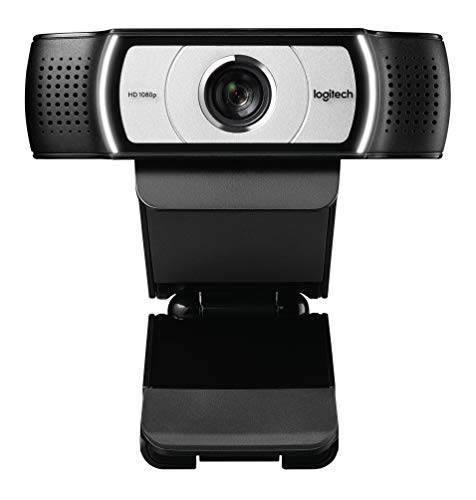
The Logitech C930e delivers reliable 1080p video with a 90-degree field of view, suitable for group calls where you want a bit more environmental context. It is a solid choice for mobile or mixed setups where a compact, plug-and-play device is important. The wider angle compared to ultra-narrow options may not be ideal for very tight desk spaces, but it balances background visibility with user presence well.
Webcam HD 1080p By ZIQIAN

The ZIQIAN webcam offers a broad 110° view, making it suitable for wide-room capture rather than tight personal framing. For buyers specifically seeking a narrow field of view, this model is less ideal, though it can be useful in scenarios where the audience needs to see more of the surroundings. Consider this option only if your priority is showing more of the environment around you.
Buying Guide: Key Purchase Considerations
- Field of view: Narrow FOV minimizes background; consider fixed vs. adjustable presets. If you need a configurable frame, choose models like Anker PowerConf C200 or Logitech Brio 4K with multiple presets.
- Resolution and image quality: Higher resolution (2K/4K) provides crisper detail but may require more bandwidth and processing power. For most video calls, 1080p with good lighting suffices.
- Low-light performance: Look for cameras with automatic exposure and noise reduction to maintain clear faces in dim rooms.
- Audio performance: Dual mics and AI noise cancellation help keep voices clear in busy environments.
- Privacy features: A physical shutter or cover is valuable for on-and-off privacy during calls.
- Compatibility: Ensure the camera works with your operating system and preferred apps (Zoom, Teams, etc.).
- Plug-and-play vs. software features: Some webcams include companion apps that enhance noise reduction, color correction, or framing but may require installation.
Frequently Asked Questions
- What is considered a narrow field of view for a webcam? A field of view of 70° or less is typically considered narrow, keeping focus tightly on the speaker.
- Do narrow FOV webcams work well in small rooms? Yes, they minimize background distractions and work best when you sit at a standard desk distance from the camera.
- Is 4K overkill for video calls? For most meetings, 1080p is sufficient, but 4K can improve detail if your display and bandwidth support it.
- Are privacy covers necessary? They add a simple layer of security when the camera is not in use and are common on many models.
- Can these webcams work with macOS and Windows? Yes, all listed models are designed for cross-platform compatibility with common conference apps.