Answering your search for reliable negative film to photo scanners, these picks convert old 35mm, 126, and 110 film and slides into clear digital images without a computer. Best suited for families, hobbyists, and archivists aiming to preserve memories, each model offers a different balance of ease, screen size, and output quality. Below you’ll find five top options with clear strengths and notable caveats to help you choose.
| Product | Best For | Key Benefit | Limitations |
|---|---|---|---|
| KODAK Slide N SCAN | All-in-one family archives | 5” LCD, fast load, multiple film formats | Requires SD card (not included) |
| DigitPro Film & Slide Scanner | Casual collectors | All-in-one, supports many formats, built-in memory | Built-in memory is small |
| DGODRT Mobile Film Scanner | On-the-go digitization | Phone-connected, easy handling | App reliability may vary |
| DigitPro Photo Scanner With 5” Screen | Home use, seniors | Standalone, easy-load, clear large display | External storage required for larger libraries |
| Portta Film Scanner | Versatile home archivists | High-res 22MP option, HDMI output | Requires SD card for storage |
KODAK Slide N SCAN Film & Slide Scanner

KODAK’s Slide N SCAN is designed for quick digitization of 135, 126, 110 film and slides, with a 5” LCD for direct viewing and editing. It’s best for buyers who want a self-contained unit with a large viewing screen and simple loading, without needing a separate computer. The scanner saves files to an SD card (not included) and includes adapters for multiple film formats, plus a cleaning brush and HDMI/USB outputs for versatile playback. This model is well-suited for families and small archives seeking a straightforward, all-in-one solution. Caution: SD card is not included, so there is an extra first-step purchase to start saving your scans.
Film and Slide Scanner – Convert 35mm, 126, 110 Film Negatives & Slides to 22MP

DigitPro’s all-in-one scanner supports 35mm/126/110 negatives and 50mm slides, plus Super 8, with a 5” LCD for instant preview. It can save images to built-in memory or external SD cards up to 64GB (not included). This makes it ideal for casual users who want a simple, one-device workflow from physical film to digital files. Best for: beginners who value a straightforward, single-device experience. Limitation: built-in memory is modest, so larger libraries will require SD expansion.
Mobile Film Scanner for 35mm Slides & Negatives
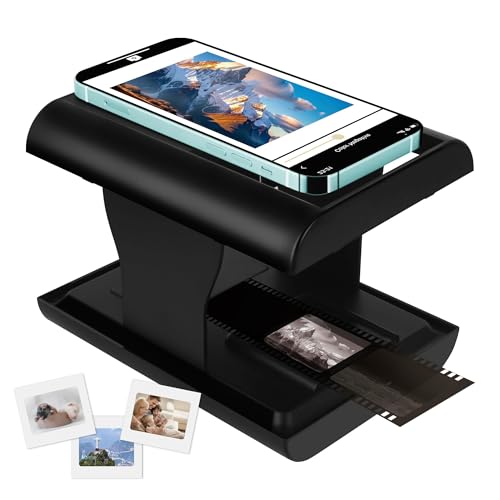
DGODRT offers a portable, phone-connected solution for digitizing dusty 35mm negatives and slides. One-click digitization stores JPEGs on your phone, enabling instant sharing with family. It supports all standard 35mm formats and is excellent for on-the-go archiving or quick social-media-ready files. Choose this if you want high portability and minimal setup. Caution: scanning relies on a compatible app and smartphone alignment, which may affect results for very large or high-detail archives.
DigitPro Photo Scanner With 5” Large Screen

This standalone DigitPro model emphasizes a large 5” display and an all-in-one approach for 35mm slides, 135/110 negatives, and printed photos (3R-5R). It includes an 8GB SD card (external card storage possible) and requires no computer. It’s best for users who want an easy, screen-first experience with straightforward color and brightness adjustments. Limitation: you’ll want additional SD storage if you have a significant backlog of photos to digitize, as the included card is modest in size.
PORTTA Film Scanner With 5″ LCD Screen

Portta’s scanner provides a 5” LCD and two high-resolution output options. It supports 135, 126, 110 film and slides, with HDMI output and SD storage. The 22MP option offers sharper details for archival projects, making it a solid choice for home archivists who want crisp digital files and easy HDMI sharing. Best for: users who want both high-quality scans and easy TV-based viewing. Caution: high-resolution 22MP mode may require more processing time per image.
Buying Guide
- What formats do you need to scan? If you have a mix of 35mm, 126, 110 negatives and slides, prefer a scanner that explicitly lists all supported film sizes and includes adapters.
- Is a built-in screen important? A large LCD helps with real-time preview and color adjustment. If you rarely preview on-device, a compact model may suffice.
- Storage and transfer options Consider SD card capacity and whether the device supports USB or HDMI output for viewing on a bigger screen or computer-free workflow.
- Portability vs. archival scale On-the-go scanning suits DGODRT-like devices, while larger home scanners (with 5” screens) suit larger collections and longer sessions.
- Ease of use Standalone scanners with one-touch scanning and guided loading are best for beginners, while more advanced users may prefer apps offering extensive edits.
- Future-proofing If you anticipate expanding your archive, choose a model with expandable SD storage and reliable file formats (JPEG/ TIFF) to preserve image quality over time.
Frequently asked questions
- Do these scanners require a computer? Most listed models offer standalone operation, with optional SD card storage and some USB/HDMI outputs. Check each model’s description for computer-free capabilities.
- What resolution do these scanners produce? Many models target around 22MP equivalent output, which balances file size and detail for typical photo archiving.
- Can I digitize Super 8 film? Some scanners include Super 8 support; verify the model’s format list before purchasing.
- Is an external SD card necessary? For most devices, yes. An SD card (not included) is typically needed to store scans beyond internal memory.
- Will the scans look good on a TV or monitor? Models with HDMI output or TV-out provide a convenient way to view or present your digitized memories on larger screens.
- Which model is best for beginners? Look for one-click scanning, clear instructions, and a built-in screen to minimize setup steps and confusion.