Answering the common question, a network video recorder (NVR) system is best for users who want reliable PoE camera management, straightforward plug-and-play setup, and scalable storage. This guide highlights five top NVR options that work with common IP cameras, explains who each is best for, and outlines key buying considerations. Ideal buyers include homeowners seeking simple, expandable kits, small business owners needing reliable 24/7 recording, and tech-minded users who want future-proof features like AI detection and easy integration.
Quick overview of top picks: these five NVR systems cover a range of needs—from compact 8-channel setups with integrated hard drives to larger 32-channel systems that scale as your surveillance needs grow. The table below summarizes core aspects to help you compare at a glance.
| Product | Brand | Channel Count | Storage Notes | Best For |
|---|---|---|---|---|
| REOLINK 8CH NVR with 2TB HDD | REOLINK | 8 | Pre-Installed 2TB | Small homes needing complete, ready-to-use kit |
| REOLINK 8CH NVR (HDD Not Included) | REOLINK | 8 | Supports internal HDD up to 8TB | Flexibility to choose storage capacity |
| Amcrest NV4108E-A2 4K NVR | Amcrest | 8 | HDD up to 10TB options noted | High-resolution recording with AI-friendly features |
| ANNKE 8CH 3K Lite NVR | ANNKE | 8 | Supports up to 8TB with 1TB included | Hybrid compatibility and AI-driven alerts |
| 32-Channel NVR (ONVIF Compatible) | OOSSXX | 32 | Requires separate cameras; no included HDD listed | Large installations needing expansive coverage |
REOLINK 8CH NVR With 2TB HDD RLN8-410

The RLN8-410 is designed to work exclusively with Reolink PoE IP cameras. It handles up to eight cameras and includes a pre-installed 2TB hard drive. The plug-and-play PoE setup enables a single Ethernet run for power and data up to 330 feet. This model is best for homes that already own or plan to purchase multiple Reolink PoE cameras and want a turnkey, self-contained system with DHCP-driven independence from the internet.
Best for: Homeowners who want a ready-to-use kit with integrated storage and strong on-brand compatibility. Limitation: Only compatible with Reolink IP cameras.
REOLINK 8CH NVR (HDD Not Included) RLN8-410
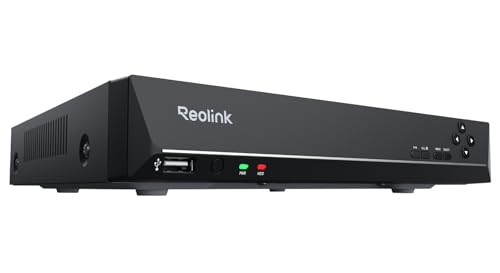
This version supports up to eight cameras and accepts an internal HDD up to 8TB, plus an external eSATA option. It is ideal for users who prefer to customize storage capacity or already own a separate drive. The device remains PoE-based with plug-and-play capability and integrates well with Reolink cameras for smart features like human/vehicle detection and playback.
Best for: Tech-savvy buyers who want storage flexibility. Caution: Storage capacity depends on future needs; no HDD included by default.
Amcrest NV4108E-A2 4K 8CH NVR
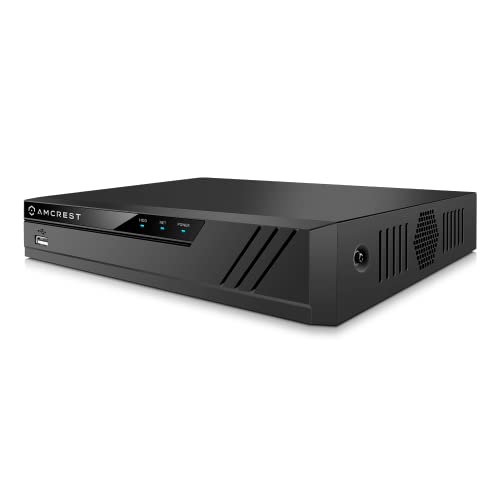
Amcrest’s NV4108E-A2 supports 8 channels with up to 8MP/4K live view and recording. It can handle up to 10TB HDD storage and offers H.265+ compression for reduced storage needs. It’s compatible with Amcrest cameras and selected third-party IP cameras, with AI features depending on camera models. This option is best for users prioritizing high-resolution footage and AI-assisted search, though note that AI capabilities are camera-dependent.
Best for: Users needing high-resolution 4K recording and AI features. Consideration: AI features depend on compatible cameras; no built-in AI on the NVR itself.
ANNKE 8CH 3K Lite Hybrid NVR

ANNKE’s 8-channel 3K Lite NVR is a hybrid system that supports up to eight analog cameras plus two IP cameras. It features Advanced H.265+ coding to extend recording time and efficient streaming. Smart human and vehicle detection helps reduce false alarms. It’s best for mixed-use environments where upgrading from analog to IP is gradual and AI-assisted alerts are valuable.
Best for: Users with existing analog setups migrating to IP cameras. Caution: Hybrid design means some cameras may require adapters; upgraded AI depends on camera models.
OOSSXX 32CH NVR for Large Installations

The 32-channel NVR by OOSSXX targets larger homes, offices, or small-to-mid-size commercial setups. It supports up to 32 IP cameras and is ONVIF compatible for flexibility with third-party cameras. It records at 5MP HD resolution and emphasizes scalable surveillance. Best for complex environments that require broad coverage.
Best for: Businesses or multi-room facilities needing extensive camera coverage. Caution: Requires careful network planning and potentially more storage and bandwidth than smaller systems.
Buying Guide
What should I consider for channel count?
Channel count determines how many cameras you can connect. Start with a number that matches your current needs, then consider future growth. If you plan to expand beyond eight cameras, a 16- or 32-channel NVR might be more cost-effective long term.
Do I need built-in storage or can I add my own?
Many NVRs come with a pre-installed hard drive, while others require that you add an HDD. If you expect heavy recording or 4K footage, larger HDDs (8TB or more) or multiple drives can extend retention times. Ensure the NVR supports your chosen drive type and size.
How important is AI and smart detection?
AI features (human, vehicle, or animal detection) improve alert relevance and reduce false alarms. Check compatibility between the NVR and your IP cameras, and verify which AI features are supported by your camera models. Note that some AI capabilities may be camera-dependent rather than NVR-wide.
Is PoE necessary for my setup?
Power over Ethernet simplifies cabling by delivering power and data through a single Ethernet cable. PoE is ideal for IP cameras installed in hard-to-reach locations where separate power wiring is impractical. If you already have non-PoE cameras, you’ll need a different approach or a separate power source.
What about remote access and local viewing?
Most modern NVRs offer remote viewing via apps or web portals. Consider how you want to access footage, whether you’ll view live streams remotely, and how you’ll back up important events. Local playback should be straightforward with intuitive search functions and event tagging.
Compatibility and future-proofing
Choose an NVR that supports ONVIF or directly supports your preferred camera brand. If you plan to mix brands, ONVIF compatibility can provide flexibility. Future-proofing includes considering higher-resolution cameras, storage expansion, and potential upcoming AI features.
FAQ
- Can a single NVR support multiple brands? If the NVR supports ONVIF or the brands are officially compatible, multiple brands can work together. Check compatibility before purchasing.
- What is DHCP, and why does it matter for NVRs? DHCP assigns IP addresses automatically, allowing the NVR to operate in a network without manual IP management. It can help devices join and operate independently.
- Do I need internet access for playback? Many NVRs can operate offline with local recording, but internet access enables remote viewing and cloud features. Determine your need for remote access in advance.
- How long should my recordings stay accessible? Retention time depends on camera resolution, frame rate, and storage. Higher resolution or longer retention requires more storage space.
- Is a larger HDD always better? More storage supports longer retention or more cameras, but ensure your system can handle the drive size and that you maintain backups if needed.
- Do NVRs require monthly subscriptions? Some brands offer optional cloud or AI services; base NVR functionality typically does not require ongoing subscriptions.
For buyers seeking straightforward, ready-to-use kits, the REOLINK options provide seamless setup with solid integration for Reolink cameras. For those needing higher resolution, AI features, or broader expansion, Amcrest, ANNKE, and OOSSXX offer versatile choices with varying levels of third-party compatibility and storage options. Each model is designed to address different installation scales and camera ecosystems while keeping remote access and long-term storage considerations in mind.