In this guide, you’ll find top pan-tilt-zoom (PTZ) and PTZ-capable cameras that fit a range of buyers from educators and event organizers to homeowners and small business owners. Each option highlights key control methods, auto-tracking, and multi-output capabilities to help you pick the right model for your needs. Below is a quick summary to compare five strong choices.
| Product | Best For | Key Feature | Output Formats |
|---|---|---|---|
| PTZOptics Move SE 20x | Live events, classrooms | Auto-tracking, multiple control methods | HDMI, SDI, NDI, USB, IP |
| Ring Pan-Tilt Indoor Cam | Home or small office monitoring | 360° pan, two-way talk | HD video via Ring app |
| REOLINK PoE 4K PTZ System | Comprehensive home security | Dual-view, auto tracking, AI search | HDMI/SDI/IP (system dependent) |
| REOLINK 4K Pan & Tilt | Smart home surveillance | 360° coverage, auto-tracking | Wi-Fi 6, Bluetooth setup |
| Tapo 2K Duo Pan/Tilt | Two-room monitoring | Dual lenses, real-time zoom | Wi‑Fi |
| Wyze Cam Pan v4 (2-Pack) | Budget-wide coverage | 4K clarity, 360° pan/180° tilt | Wi‑Fi |
PTZOptics Move SE 20x 1080p PTZ Camera

Best for: Education, conferences, and live streaming where auto-tracking and flexible control matter. The Move SE 20x supports easy auto-tracking and offers a broad array of control options, including IR remote, network, RS-232/RS-485, Web UI, PTZ Control App, USB, and a Camera Management Platform. It outputs simultaneously via HDMI, SDI, NDI, USB, and IP, making it versatile for different production environments.
Caution: Data shows multiple output options may require compatible capture hardware or software to fully leverage NDI and IP streaming capabilities.
Ring Pan-Tilt Indoor Cam

Best for: Home or small business surveillance where simple setup and real-time communication are priorities. The Ring Indoor Cam offers 360° pan and vertical tilt within the Ring app, plus two-way talk and HD video with day/night clarity, making it a strong choice for monitoring entryways or small offices.
Caution: 360° pan is software-driven through the app; hardware mounting may require additional accessories for best placement.
REOLINK PoE PTZ Security Camera System

Best for: Users wanting high-end tracking, dual-view monitoring, and 24/7 recording with AI video search. This system combines auto tracking with a dual-view setup on a single screen, enabling close-up telephoto detail via an 8mm telephoto lens and a wide panoramic view via a 2.8mm lens. It supports multiple tracking modes and does not require subscriptions for basic playback.
Caution: Requires compatible network setup to manage dual outputs and AI search workflows; may be more complex to install than single-camera kits.
REOLINK 4K Pan & Tilt Indoor Security Camera

Best for: Smart home surveillance with strong low-light performance. The 4K UHD resolution combines with 3x optical zoom to preserve detail when zooming in on distant activity. Auto-tracking and up to 64 presets help you quickly reframe key areas. Wi-Fi 6 and Bluetooth setup simplify installation.
Caution: Some users may notice higher bandwidth usage due to 4K streaming; ensure network capacity is adequate for multiple cameras.
Tapo 2K Indoor/Outdoor Dual Lens Pan/Tilt

Best for: Versatile monitoring across two areas simultaneously with dual-lens design. The fixed 2K lens covers one wide area, while a separate pan/tilt lens with 6mm telephoto provides detailed zoom. Independent lens positioning allows precise monitoring for homes or small offices. Requires 2.4 GHz Wi-Fi.
Caution: Dual-lens system adds install complexity; ensure you have appropriate mounting space for both lenses.
Wyze Cam Pan v4 (2-Pack)
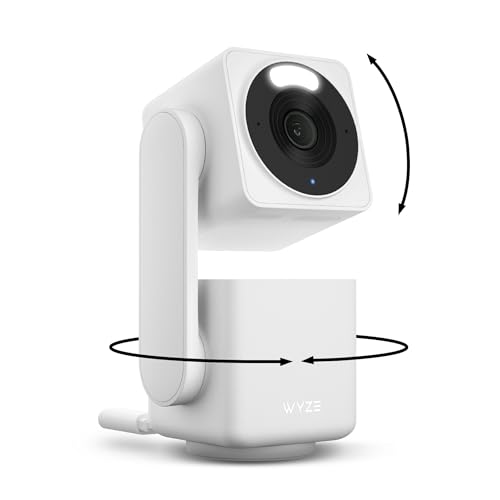
Best for: Budget-conscious buyers seeking broad coverage and smart features. The Wyze Cam Pan v4 provides 360° pan and 180° tilt with 4K clarity, active AI motion tracking for pets and people, and IP65 weather resistance for indoor/outdoor placement. The 2-pack option is cost-effective for multi-room setups.
Caution: Some users may experience higher data usage with 4K streams; ensure your network has adequate bandwidth and storage if recording locally or in the cloud.
Buying Guide
What should you look for when choosing a PTZ camera?
- Field of view and range: Consider horizontal and vertical angles to cover the intended space. Larger rooms may benefit from 360° pan and 90° tilt capabilities.
- Control options: IR remote, Web UI, app-based PTZ control, and integration with NDI or IP streaming can affect setup and usability.
- Auto-tracking and AI features: Auto-tracking helps keep subjects centered; AI detection (people, vehicles, pets) enhances security and reduces false alerts.
- Output formats: HDMI/SDI/USB/NDI compatibility affects how you connect to monitors, recorders, or streaming encoders.
- Networking type: PoE or Wi‑Fi affects installation cost and reliability. PoE provides stable power and data over a single cable.
- Installation environment: Indoor vs outdoor, weather resistance, and mounting options determine where to place the camera.
- Storage and playback: Decide if you need local storage, cloud options, or AI-driven search to quickly locate events.
Frequently Asked Questions
- What is PTZ and why would I need it?
PTZ stands for pan, tilt, and zoom. It allows a single camera to cover wide areas and zoom in on details, reducing the number of devices required for monitoring large spaces.
- Which camera is best for classrooms or live events?
Models with auto-tracking and multiple control options, like the PTZOptics Move SE 20x, are well-suited for dynamic environments where hands-free tracking and easy operation matter.
- Is PoE better than Wi-Fi for PTZ cameras?
PoE provides reliable power and data over one cable, which can improve stability in high-traffic setups. Wi‑Fi offers easier installation but may be less stable in congested networks.
- Can I use a PTZ camera without professional installation?
Many options support simple consumer setups via apps and Web UI, but some configurations (like PoE and advanced NDI outputs) may benefit from installer guidance.
- Do PTZ cameras require subscriptions for recording?
Some models include local storage or stand-alone recording without subscriptions, while others offer cloud or AI features that may involve fees.
- What should I consider for outdoor use?
Weather resistance, IP rating, and mounting flexibility are essential. Outdoor-rated cameras handle rain, dust, and temperature changes better than indoor-only devices.