Answering the search for polaroid-style photo printers, these compact devices deliver instant 2×3 or similar-sized prints with retro flair. They’re ideal for scrapbookers, party planners, students, and travelers who want physical keepsakes quickly. The top picks below emphasize portability, ease of use, and print quality, all while proving compatible with iOS and Android devices. Each option focuses on a slightly different use case, helping you choose the best match for your needs.
Summary of selected products
| Product | Best For | Key Benefit |
|---|---|---|
| Fujifilm Instax Mini Link 2 | Smartphone users who want mini 2×3 prints | Compact, frames and filters, wireless printing |
| Nelko PP01 Mini Photo Printer (White) | Budget-friendly, sticky-backed prints | Vivid inkjet prints on sticky paper |
| KODAK Mini 2 Retro | DIY projects and journaling | 3-layer dye sublimation with lamination |
| KODAK Step Instant Printer | On-the-go social sharing | Zero-ink, sticky-back paper, app editing |
| Polaroid Hi-Print Bundle | Complete starter kit | 2×3 dye-sub prints, bundled paper |
Fujifilm Instax Mini Link 2 Smartphone Printer
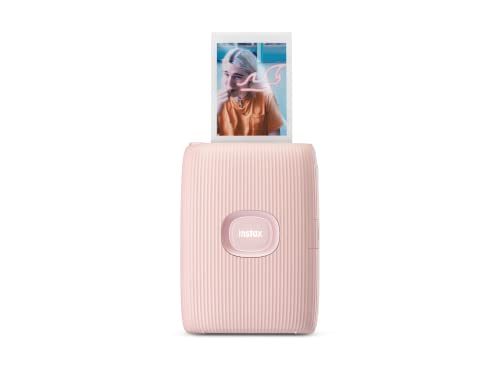
The Fujifilm Instax Mini Link 2 is best for smartphone users who want quick, pocketable, mini-format prints. It connects via Bluetooth and prints 2” x 3” photos on INSTAX MINI instant film (sold separately). The capability to add frames, filters, sketches, and stickers before printing makes it ideal for personal memories and scrapbooking. A key limitation is that prints rely on compatible film sold separately, which adds ongoing cost.
Nelko Photo Printer PP01 Mini (White)

The Nelko PP01 Mini Printer is best for users who want portable, sticky-backed prints with high color fidelity. It uses advanced inkjet technology to produce smudge-proof, water-resistant photos on sticky-backed paper. It’s notably light (about 0.6 pounds) and supports iOS and Android via Bluetooth, with the Nelko app guiding setup. A potential drawback is the need for compatible paper and cartridges, which could affect ongoing cost and availability.
KODAK Mini 2 Retro 2×3 Printer

The KODAK Mini 2 Retro is best for quick, user-friendly printing with durable results. It uses genuine 4PASS dye sublimation to deliver 3-layer color plus a protective lamination in about 55 seconds. This makes it a good fit for travel journaling and classrooms. A limitation is that it requires compatible paper and ink to achieve its best durability and finish, which can affect long-term running costs.
KODAK Step Instant Printer

The KODAK Step Instant Printer is best for mobile photographers who want quick, on-device editing and 2” x 3” ZINK prints with a sticky back. It supports iOS and Android via Bluetooth or NFC, with the KODAK app offering editing features and borders. A potential caveat is that ZINK paper can be pricier per print than some alternatives, affecting cost-per-photo over time.
Polaroid Hi-Print Paper Bundle

The Polaroid Hi-Print Bundle is best for newcomers who want a complete starter kit. It pairs the Hi-Print printer with 40 sheets of paper, offering instant, vibrant 2×3 prints via dye-sub technology. Printing is quick, but the bundle’s value depends on finding the right balance between printer capability and paper cost. It’s a solid all-in-one option for beginners and parties.
Nelko Pink PP01 Mini Photo Printer

The Nelko Pink PP01 is best for users seeking a stylish, compact device with the same sticky-backed print capability as the white variant. It supports iOS and Android via Bluetooth, offers app-driven printing, and targets school, travel, and daily memory-keeping. A potential limitation is the same as other inkjet-style mini printers: ongoing consumable costs and availability of paper and ink.
Buying Guide: How to Choose Your Polaroid-Style Printer
- Print size and format: Most polaroid-style devices deliver 2×3 prints. Confirm the exact dimensions and whether you need sticky-back or standard paper.
- Connectivity: Look for Bluetooth (and sometimes NFC) compatibility with your smartphone. Consider whether you need iOS-only or cross-platform support.
- Paper and ink costs: Some printers use dye-sub, others inkjet, and both approaches affect running costs and print durability.
- Print durability: Dye-sub and laminated prints tend to resist moisture and fading better than some inkjet options; sticky-back variants are ideal for scrapbooks and label-style projects.
- Device size and weight: If portability is a priority, favor a lighter, pocket-sized model with simple charging options.
- App features: Editing tools before printing, such as frames, filters, borders, and stickers, add value for creative projects.
- Starter bundle and consumables: Bundles with extra paper or starter ink can be cost-effective, but check long-term supply availability.
FAQ: Quick Answers For Shoppers
- What is the best polaroid-style printer for travel?
Printers that are compact and light, like the Fujifilm Instax Mini Link 2 or Nelko PP01, are ideal for travel due to portability and simple pairing with phones.
- Do these printers require special paper?
Yes. Most use mini-sized 2×3 or similar formats that are sold separately or in bundles. Always verify the paper type and compatibility with your chosen model.
- Are sticky-back prints suitable for scrapbooks?
Yes. Sticky-backed prints are designed for easy pasting into albums, planners, and décor projects, offering a quick memory-keeping solution.
- Which printer has the best color durability?
Dye-sub printers and laminated outputs generally offer stronger resistance to moisture, fading, and fingerprints compared to basic inkjet prints.
- Can I edit photos before printing?
Many models pair with companion apps that provide filters, frames, borders, and text before you print, enhancing personalization.
- Is a bundle worth it?
Bundles with paper or starter ink can provide a better overall value if you plan to print frequently, but compare per-print costs with standalone supplies.