Instantly print Polaroid-style photos from your phone with compact, pocket-friendly printers. This guide highlights five top picks that balance print quality, portability, and ease of use for different buyers—students, travelers, scrapbookers, or social sharers. Read on to find which model best fits your needs, plus a buying guide and FAQs to help you decide.
| Product | Best For | Key Benefit |
|---|---|---|
| Nelko PP01 White | Budget buyers and students | Vivid 2×3 prints on sticky-backed paper with Bluetooth printing |
| KODAK Step | All-around versatility | Zero-ink, durable, easy-to-use with editing app |
| Polaroid Hi-Print Everything Box | Complete starter kit | Includes printer and 40 sheets of paper for immediate use |
| Fujifilm Instax Mini Link 2 Soft Pink | Stylish, simple wireless printing | Frames and tweaks before printing for fun visuals |
| Fujifilm Instax Mini Link 3 Clay White | Newest Instax tech | Compact, easy to pair with mobile devices for 2×3 prints |
Nelko PP01 White: Pocket Photo Printer

Best for students and travelers who want portable, adhesive-backed prints. The Nelko PP01 uses advanced inkjet technology to produce 2×3″ sticky-backed photos with 603 DPI high-resolution color. It weighs about 0.6 pounds, making it highly portable, and connects via Bluetooth to iOS and Android devices through the Nelko app. Each ink cartridge supports around 80 full-color 2×3 photos. A USB charging cable is included, though an adapter is not. The printer is ideal for quick scrapbooks, backpacks, and field trips, where easy, mess-free printing matters.
- Best for: mobile printing on the go with adhesive-backed prints for scrapbooks or labels.
- Why selected: compact design, Bluetooth app control, and durable sticker paper make it versatile for school projects or travel journaling.
- Caution: requires the proper 2×3 sticky-backed paper and USB power; adapter not included.
KODAK Step: Durable, Ink-Free Printing

The Kodak Step is a reliable option for everyday photography printing with ZINK zero-ink technology. It works with iOS and Android devices over Bluetooth or NFC, and uses 2×3″ sticky-back photo paper. The device includes a starter pack of paper and a charging cable. It features a full editing suite via the KODAK app, enabling collages, filters, and borders, which helps you tailor prints before you tap print. This option is well suited for casual crafters and families who want simple, durable keepsakes without ink cartridges.
- Best for: quick, budget-friendly prints with simple editing features.
- Why selected: zero-ink performance reduces mess and maintenance; durable paper stands up to handling.
- Caution: prints may require compatible ZINK paper; ensure you have the right starter sheets.
Polaroid Hi-Print Everything Box

The Polaroid Hi-Print Everything Box provides a complete starter kit with the wireless pocket printer and two packs of Hi-Print 2×3 paper (40 sheets). This bundle targets users who want a ready-to-use setup for spontaneous photo printing and stick-on memories. The dye-sub technology yields vibrant photos in under 50 seconds and the adhesive backing lets you place prints anywhere. It’s best for enthusiasts who want a convenient, all-in-one solution for quick projects and scrapbooking.
- Best for: beginners who want an all-in-one starter kit with paper included.
- Why selected: immediate printing with high-quality color and easy sticking capability.
- Caution: prints rely on supplied paper; saving on paper costs may require extra packs.
Fujifilm Instax Mini Link 3 Clay White

The Instax Mini Link 3 is a newer model from Fujifilm that connects via Bluetooth to smartphones for 2×3″ Instax Mini prints. It supports wireless operation and offers built-in tools to frame, edit, and print photos before sending them to the printer. The design is sleek and portable, making it a strong pick for social media users who want quick, stylish prints from their phones. Best for: fans of Instax Mini film who want a compact companion with modern connectivity. Caution: film and paper come separately; ensure you stock up on compatible Mini film packs.
- Best for: stylish, easy-to-use printing with pre-print editing options.
- Why selected: modern Bluetooth connectivity and compact form factor suit on-the-go use.
- Caution: requires Instax Mini film (sold separately) for actual prints.
Fujifilm Instax Mini Link 2 Soft Pink
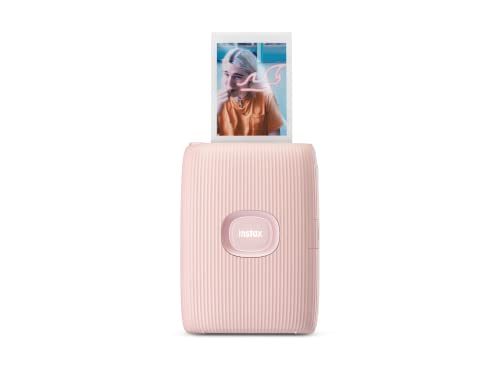
The Instax Mini Link 2 Soft Pink emphasizes style alongside function. It connects over Bluetooth to a smartphone to print 2×3″ Instax Mini photos. Users can add frames, filters, sketches, and stickers before printing, giving this model an edge for creative projects and social sharing. It’s a good choice for buyers who want a fun, colorful device that doubles as a fashion accessory. Best for: creative printing with on-device editing tools. Caution: film is separate; printing cost increases with paper purchases.
- Best for: users who value fun visuals and pre-print editing options.
- Why selected: visually appealing design and flexible pre-prints features.
- Caution: the need for separate Instax Mini film and paper can affect ongoing costs.
Buying Guide: How To Choose The Best Phone-To-Polaroid Printer
- Print technology: Inkjet vs. dye-sublimation vs. zero-ink. Inkjet (Nelko) offers vibrant colors and adhesive backing; dye-sub (Hi-Print) provides fast, durable prints; zero-ink (Kodak Step) minimizes maintenance but relies on heat-activated paper for durability.
- Paper type and size: Most devices use 2×3″ prints; some variants offer 2×3 or 2×5 formats. Adhesive backing is convenient for scrapbooks and planners.
- Connectivity: Bluetooth is standard; NFC and app integration can ease pairing and editing. Check for iOS and Android compatibility and whether an app is required for printing or editing.
- Portability and weight: If you travel or attend events, lighter printers under 1 pound are ideal. Consider battery life or USB charging options if you’re away from outlets.
- Print quality and durability: DPI and paper type influence sharpness and longevity. Dye-sub prints tend to resist smudges and fading better than some inkjet options dependent on paper.
- Media bundles: Starter packs save money upfront; ensure the included paper aligns with your preferred print style (adhesive vs. non-adhesive). Some sets include additional sheets or starter ink/paper combos.
- Ease of use: Apps that offer editing features, filters, borders, and collage options can streamline the process and expand creative possibilities.
- Cost of consumables: Paper and ink/paper costs accumulate. Compare per-print costs when selecting among models.
FAQ
- Which printer is easiest for beginners?
Polaroid Hi-Print Everything Box provides a ready-to-use starter kit with printed paper, making it a convenient choice for newcomers.
- Do these printers require ink cartridges?
Some models use inkjet cartridges (Nelko), while others use zero-ink or dye-sub paper (Kodak Step, Polaroid Hi-Print). Check the device’s disposal and replacement components before buying.
- Are 2×3 prints durable?
Dye-sub prints tend to resist moisture and fading, while adhesive-backed inkjet prints are good for scrapbooks but might require careful handling.
- Can I print from Android and iPhone?
All listed models support iOS and Android via Bluetooth or companion apps, though some require different pairing steps for setup.
- Is film required for Instax printers?
Yes. Instax Mini Link models print on Instax Mini film, which is sold separately. Availability of film colors and finishes expands creative options.
- Which option is best for travel?
Legal lightweight designs with adhesive-backed 2×3 prints are ideal for quick, on-the-go labeling and memory-posting in travel journals.