Discover top PTZ camera remote controls designed for streaming, education, worship services, and live events. This guide highlights models with IP/NDI support, diverse control protocols, and PoE power to simplify setup and operation. Each option is evaluated for ease of use, compatibility, and feature depth to help you choose a reliable controller for multi-camera productions.
Overview of Selected Products
| Product | Brand | Key Feature | Notes |
|---|---|---|---|
| FoMaKo KC608 Pro NDI PTZ Camera Controller | FoMaKo | NDI support, 4D Joystick, PoE | Ideal for church and education environments |
| AVKANS PowerJoy PTZ Controller | AVKANS | 4D Joystick, PoE, VISCA over IP | Flexible network control with multiple cameras |
| PZL Replacement Remote for Logitech PTZ Pro 2 | PZL | Plug-and-play, 26 ft range | Simple replacement for Logitech systems |
| Canon RC-IP100 Remote PTZ Controller | Canon | 7” touchscreen, 100 presets | Multi-camera Canon control via LAN |
| Tenveo KB300PRO NDI PTZ Controller | Tenveo | 7” LCD, NDI, 4D Joystick | Quad-screen real-time preview for up to four cams |
FoMaKo KC608 Pro NDI PTZ Controller
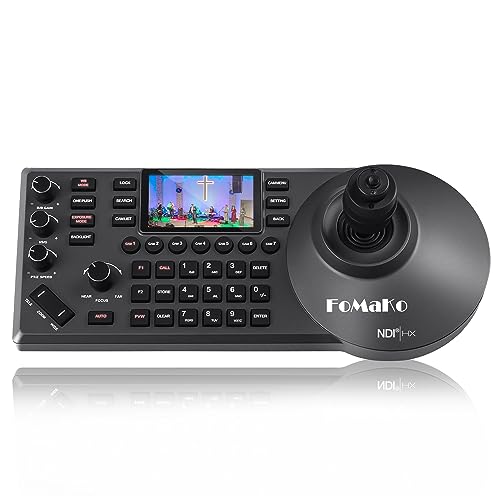
The FoMaKo KC608 Pro is a PoE-powered NDI PTZ IP controller with a built-in LCD preview and a 4D joystick for precise camera movements. It supports VISCA, Pelco-D/P, RS232/RS422/RS485, and Ethernet IP connections, enabling control over IP networks. The device is designed for church live streams, education, conferences, and esports, and it is compatible with FoMaKo video mixers and other FoMaKo PTZ cameras. NDI licensing allows control over NDI HX protocols for cross-compatibility with NDI PTZ cameras. This model emphasizes ease of use with a single LAN cable and robust protocol support for professional multi-camera setups.
Key features include POE power, NDI compatibility, 4D joystick precision, IP-based control, and presets. The ergonomic design supports long sessions in live environments. If your workflow relies on NDI-enabled cameras and you need centralized control across a LAN, this unit provides a strong, turnkey option with broad protocol support.
AVKANS PowerJoy PTZ Controller

The AVKANS PowerJoy PTZ Controller functions as an IP PTZ keyboard with a 4D joystick and PoE power. It supports VISCA over IP, Pelco-D, and Pelco-P protocols and can manage large camera rosters—up to 255 network cameras—across multiple setups. The unit is designed for multi-camera live streaming, church worship, and sports production, delivering plug-and-play operation with a single Ethernet cable powering the system. RS232/RS422/RS485 and Ethernet IP connections provide flexible integration options across brands and camera models.
Highlights include easy setup, responsive pan/tilt/zoom control, focus and iris adjustments, presets, speed controls, and track functionality. Its broad compatibility and multi-camera shortcuts make it suitable for complex productions where quick camera changes and reliable control are crucial.
PZL Replacement Remote for Logitech PTZ Pro 2

The PZL replacement remote is designed for Logitech PTZ Pro 2 and CC2900ep CC3000E cameras. It comes ready to use with no programming or pairing required. The remote offers a 26-foot control range and more than 120-degree angle coverage for flexible operation. It uses 3.0 technology for stable signals and quick responses, and it features an ergonomic design with responsive keys for comfortable handling during extended sessions. This option serves as an economical and straightforward replacement for Logitech-based systems.
PZL New Replacement Remote for PTZOptics

The PZL new replacement remote supports PTZOptics IR camera models including PT20X-NDI-GY, PT20X-SDI-GY-G2, PT12X-SDI-WH-G2, PT30X-SDI-G2, and related K2/USB-GY-G2 variants. It is not universal; compatibility must be confirmed with the specific model. The remote uses ABS construction for durability and features ergonomic arcs for comfortable use. With a signaling distance up to 12 meters (40 feet) and fast response times, it helps maintain precise control during fast-paced shoots and distance-critical operations.
Canon RC-IP100 Remote PTZ Controller

The Canon RC-IP100 provides remote control of up to 100 Canon-supported cameras, with the ability to control one camera via serial NU protocol. It offers a versatile remote experience with remote pan, tilt, zoom, and a dedicated zoom lever. The 7-inch touchscreen enables quick access to camera settings, focus, iris, and presets. This controller is designed for professional Canon PTZ ecosystems and is suitable for multi-camera broadcast studios, education facilities, and large houses of worship that rely on Canon cameras.
Tenveo NDI PTZ Controller KB300PRO

The Tenveo KB300PRO NDI PTZ controller features a 7-inch LCD real-time preview and a 4D joystick for precise PTZ control. It supports NDI with an included license, VISCA, Pelco-D/P, RS422/RS485, RS232, and RJ45 Ethernet connections, enabling PoE powering. The device is designed for church services, live events, and streaming workflows that require instant visual feedback and reliable multi-camera coordination. Its quad-view capabilities simplify monitoring of multiple feeds while adjusting shots in real time, making it well-suited for bigger productions.
Buying Guide: Key Considerations for PTZ Remote Controllers
Choosing the right PTZ controller depends on your production demands, camera ecosystem, and network setup. Consider these dimensions to compare options effectively:
- Protocol compatibility: Ensure the controller supports VISCA, Pelco-D/P, Onvif, and IP-based control if you use a mixed camera fleet. IP control can simplify routing across a LAN.
- Power delivery: PoE-powered units reduce clutter and simplify deployment. Confirm your network switch supports PoE and the required power level for the device.
- NDI and latency: If your workflow relies on NDI for video transport, prioritize controllers with NDI or NDI|HX licenses and check latency for live production needs.
- Display and previews: A built-in LCD or touch screen preview (7″ or 5″) helps operators frame shots without switching between devices. Quad-view is beneficial for multi-camera scenes.
- Number of supported cameras: For larger setups, select a controller that can manage dozens of devices or provide shortcuts and presets for rapid switching.
- Ergonomics and usability: A comfortable joystick and tactile keys reduce operator fatigue during long sessions. Ergonomic design matters in worship services and classrooms.
- Presets and speeds: Look for adjustable PTZ speeds, focus, iris control, and preset management to facilitate smooth, repeatable shots.
- Brand compatibility: If you own cameras from a specific brand, compatibility with that ecosystem (Canon, Logitech, PTZOptics, etc.) can streamline integration and support.