Real-time security cameras deliver immediate alerts, live viewing, and quick access to footage when you need it most. This guide highlights five top options suited for different buyers—whether you want battery-powered convenience, robust indoor coverage, or window-view monitoring. The selected models balance clear video, reliable alerts, and easy setup to help you choose confidently. Below is a quick summary table of the picks, then detailed sections to compare what each camera brings to the table.
| Product | Best For | Key Feature |
|---|---|---|
| Funstorm 4K Security Camera | Battery-powered, subscription-free local storage | 2K/4K-like clarity with 64GB local storage |
| Blink Outdoor 4 | Weatherproof, long battery life | Up to two years of battery life |
| Tapo C101 | Indoor monitoring, baby/pet camera | 2-way audio and local storage options |
| OZHGQ 2 Pack 2K Cameras | Dual-band WiFi, multi-camera setup | 2K HD, dual-band, easy multi-camera view |
| LongPlus 8MP 4K Window Camera | Window security with full-color night vision | Full-color night vision and 1-minute magnet mount |
Funstorm 4K Security Camera
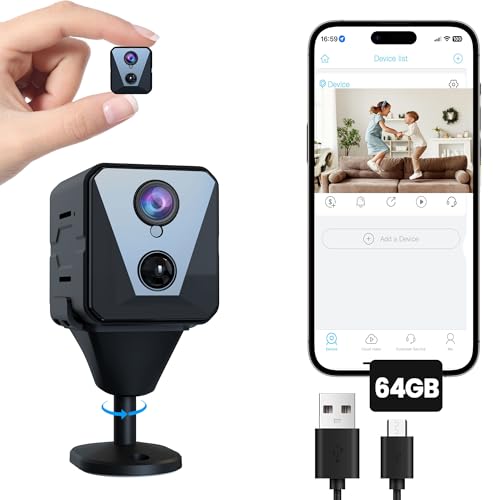
The Funstorm camera is ideal for buyers who want high-resolution indoor surveillance with local storage and smart alerts. It includes a 64GB SD card for immediate local recording and a seven-day cloud trial. Best for: homeowners seeking reliable, subscription-light security with clear daytime and nighttime footage. See clearly with a 2K/4K-capable sensor and a wide 120-degree lens for broad room coverage. A potential limitation is the reliance on local storage if cloud options are underutilized.
Who it’s best for
Best for households that want offline recording without ongoing fees and need sharp detail for pets or monitors in common spaces.
Why selected
Local storage plus cloud backup provides flexible safeguarding of footage, and the 120-degree wide view reduces blind spots in living areas.
Caution
Free cloud trial is limited; consider ongoing storage needs if you want constant off-site backups.
Blink Outdoor 4 – Wireless Security Camera

The Blink Outdoor 4 is designed for outdoor use with long battery life and simple setup. Best for: homes needing a budget-friendly, weatherproof solution with multi-camera expansion via the Sync Module Core. It does not include local storage by default in some configurations, so you may rely on cloud storage for footage. Consider this model if you prioritize low maintenance and extended battery life over integrated local storage.
Who it’s best for
Best for renters or homeowners who want a weatherproof solution that lasts years between charges and can be scaled with additional cameras.
Why selected
Its two-year battery life reduces the frequency of battery changes, enhancing convenience for exterior surveillance.
Caution
Local storage is not included with the core system, so plan for cloud storage if needed.
Tapo 1080P Indoor Wired Security Camera (C101)

The Tapo C101 is well-suited for indoor monitoring and nursery use. It features motion detection with instant push notifications, 2-way audio with a built-in siren, and night vision up to 30 feet. Best for: households seeking a versatile indoor camera that doubles as a baby monitor and pet cam with local storage or optional cloud storage. A limitation is that it operates over 2.4GHz Wi-Fi, which may impact performance in crowded networks.
Who it’s best for
Best for families needing a straightforward indoor camera that supports quick alerts, two-way communication, and flexible storage options.
Why selected
Strong footprint for indoor use with practical notification and audio features, plus no mandatory ongoing fees for basic functionality.
Caution
Issues may arise in households with weak 2.4GHz coverage; consider improving network reliability for smooth operation.
OZHGQ 2 Pack 2K Cameras For Home Security
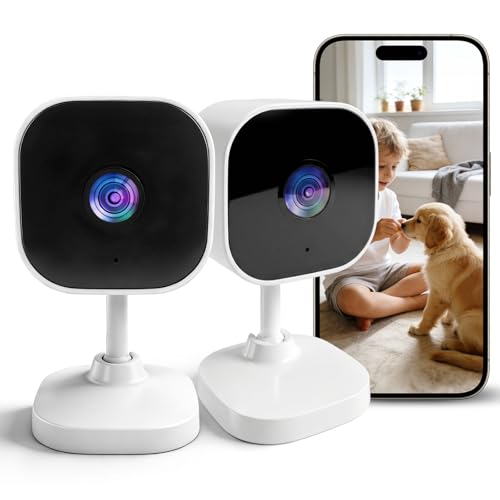
The OZHGQ two-pack provides dual-band WiFi (2.4G/5G) with 2K resolution and easy multi-camera setup. Best for: households wanting a scalable indoor system that supports simultaneous viewing from multiple cameras via the Yoosee app. It offers stable streaming on dual-band networks, which helps reduce buffering. A potential limitation is the lack of included cloud storage in some bundles.
Who it’s best for
Best for homeowners building a multi-camera inside system who value smoother connections and straightforward app control.
Why selected
Dual-band WiFi support helps maintain stable connections in larger homes, enabling reliable live view across screens.
Caution
Local storage or cloud subscription options may vary by bundle; verify included storage when purchasing.
LongPlus 8MP 4K Window Camera

The LongPlus window camera is designed for window-based monitoring with full-color night vision and a 118-degree view. Best for: people wanting a camera that blends into a window or glass space while delivering vivid color footage in low light. It features a 1-minute magnet mount for quick installation and 24/7 recording options. A caveat is the requirement for a stable window placement and secure mounting to avoid accidental damage.
Who it’s best for
Best for renters or homeowners who want discreet window surveillance with strong color night vision and easy mounting.
Why selected
Full-color night vision at night is a notable feature that helps identify details that IR-only cameras may miss.
Caution
Window placement may limit broad room coverage; consider pairing with another camera for full-home coverage.
Buying Guide: Real-Time Security Camera Considerations
- Power source: Battery-powered cameras reduce wiring but require battery changes. Wired or USB-powered models offer continuous operation but install more cabling.
- Video quality and color night vision: Look for 2K/4K for clear details and color night vision where available, especially for identifying faces or license plates.
- Storage options: Local SD cards offer offline backups; cloud storage provides off-site protection. Dual-storage setups give flexibility if Wi-Fi drops.
- Field of view and placement: Wider angles reduce blind spots. Indoor cameras benefit from positioning that covers entrances and high-traffic areas.
- Two-way audio: Essential for speaking to pets or family members remotely; consider siren features for deterrence.
- Motion and person detection: AI-based detection helps minimize false alerts. Check compatibility with other smart home devices if needed.
- Weatherproofing: Outdoor cameras should have IP-rated housings to withstand elements. Indoor cameras are not designed for weather exposure.
- Installation ease and app experience: Look for quick setup, stable Wi-Fi compatibility, and a user-friendly app with reliable push alerts.
FAQ
- What is the difference between local storage and cloud storage?
Local storage records to a built-in SD card or microSD in the camera. Cloud storage uploads footage to a remote server. Local storage works offline; cloud storage requires an internet connection and may incur ongoing fees.
- Do real-time security cameras require a subscription?
Some cameras offer free cloud trials or optional cloud plans. Many models provide local storage without a subscription, while cloud features enhance access and off-site backups.
- Which camera is best for pet monitoring?
Indoor cameras with motion alerts and two-way audio, such as the Tapo C101 or blurams models, are well-suited for pet monitoring and interaction.
- Is color night vision important?
Color night vision improves detail in low light, useful for reading signs or identifying features. It tends to be offered by higher-end models or cameras with built-in spotlights.
- Can I run multiple cameras on one app?
Many systems support multi-camera viewing via a single app or hub. Check app compatibility and whether you need a module or subscription to view multiple cameras simultaneously.
- How should I place cameras for best coverage?
Position near entry points, hallways, and common areas. Install at a height that minimizes tampering while still capturing useful angles.