Answering the demand for professional monitoring in the field, these recording monitors are designed to help videographers and photographers confirm focus, exposure, and color in real time. The list below highlights five options that balance brightness, resolution, LUT support, and portability. Best for run-and-gun shooters, documentary makers, and indie filmmakers who need reliable on-camera monitoring without weighing down the rig.
| Product | Brand | Key Benefit | Ideal For |
|---|---|---|---|
| NEEWER F700 7″ Monitor | NEEWER | High brightness 2000 nit, 4K HDR / LUT support | Outdoor shoots, bright environments |
| Atomos Ninja (5.2″) | Atomos | 4Kp60 recording, ProRes and RAW options | Independent recording and high-end workflows |
| SUIKUI RH35 | SUIKUI | HD recording with compact form, essential monitoring tools | Budget-conscious setups, compact rigs |
| FEELWORLD CUT6 | FEELWORLD | 6″ touch with LUTs and real-time recording | On-the-go interviews, run-and-gun filming |
| FEELWORLD F5 Prox | FEELWORLD | 5.5″ 1600 nit brightness, LUT support | Outdoor shoots, detailed focus and exposure work |
Below are five hand-picked models that cover a range of brightness, input/output options, LUT flexibility, and price points. Each product section explains who benefits most and why it was chosen for this guide.
NEEWER F700 7 Inch Field Monitor

The NEEWER F700 offers a 7-inch IPS touch screen with 1920×1080 resolution and 2000 nit brightness. It supports 4K HDMI loop in/out and includes 3D LUT support for on-set look management. Key features include false color, zebra, histogram, waveform, Vectorscope, and peak focus. It ships with two NP-F750 batteries for extended field use. Best for: outdoor shoots and daylight environments where brightness helps verify exposure and focus. Limitation: some users may find the menu and shortcut customization less intuitive than higher-end brands.
Atomos Ninja 5.2″ Recording Monitor
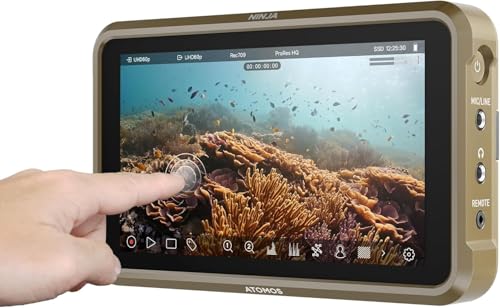
The Ninja features a compact 5.2-inch display capable of recording up to 4Kp60 in ProRes, DNxHD, and H.265 in an accessible ecosystem. It benefits workflows requiring on-device recording or quick turnaround, with AtomOS 11 providing responsive controls and improved memory management. Best for: independent filmmakers and shooters who need robust recording options in a small form factor. Caution: some users may prefer larger displays for detailed focus checks on tight shoots.
SUIKUI RH35 Unlimited Recording Monitor
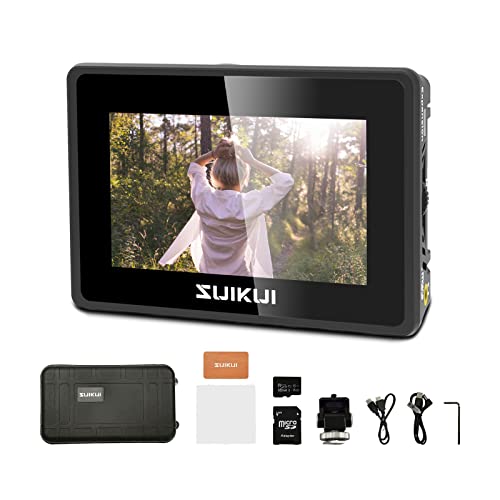
The SUIKUI RH35 focuses on essential monitoring with 1080p60 HDMI input/output and unlimited 1080p30 recording in MP4 to micro SD. It includes focus peaking, zebra, waveform, and exposure tools. Best for: budget-conscious creators who need a compact monitor with basic recording capability. Limitation: limited to 1080p output and basic recording formats, which may not satisfy high-end production needs.
FEELWORLD CUT6 6 Inch Recording Monitor

The FEELWORLD CUT6 delivers real-time recording up to 1080p30 via USB2.0, plus a 6-inch 1920×1080 touch screen with LUT support. It supports 4K HDMI input and out, enabling integration with 4K-capable cameras. Best for: field crews needing a versatile recorder that doubles as a monitor with straightforward drive-based recording. Caution: USB recording may require compatible USB drives and FAT32 formatting.
FEELWORLD F5 Prox 5.5 Inch Monitor

The FEELWORLD F5 Prox offers 1600 nit brightness on a 5.5-inch touchscreen, with 4K HDMI input/output and 3D LUT support. It emphasizes accurate focus and exposure, making it suitable for handheld and outdoor shoots. Best for: videographers needing bright, portable monitoring with LUT preview and external power options. Limitation: smaller screen may reduce detail checks on complex scenes.
Buying Guide: How to Choose The Right Recording Monitor
- Brightness and visibility: Choose 1000+ nits for outdoor shooting; 1600-2000 nits is ideal in bright daylight.
- Resolution and screen size: 5.5–7 inches is a common sweet spot for balance between portability and detail; 4K input support helps future-proof workflows.
- LUT and waveform tools: LUT preview helps with exposure and color grading on set; waveform and vectorscope improve color accuracy checks.
- Input/output flexibility: HDMI in/out is essential; some models offer USB recording or alternative interfaces for flexible setups.
- Recording capability: On-monitor recording (ProRes, DNxHD, H.265/RAW) is convenient for quick takes; check supported formats and card or drive requirements.
- Battery and power: Consider monitors that ship with multiple batteries or robust external power options for longer shoots.
- Size/weight: For gimbals and handheld rigs, lighter units prevent fatigue; for tripod work, bigger displays can help with focus accuracy.
- Build and usability: Touchscreen responsiveness, shortcut keys, and menus affect on-set efficiency; aim for intuitive controls.
FAQ
- What should I prioritize in a recording monitor for outdoor shoots?
Focus on brightness (ideally 1500+ nits), good outdoor visibility, and reliable LUT support for quick on-site grading. - Is a smaller monitor ever better than a larger one?
Yes for handheld or rig-restricted setups where weight and balance matter; larger displays can help with precise focus in studio settings. - Do these monitors require external recorders?
Some models can record directly on-device; others rely on external recorders or SD cards. Check each unit’s supported formats. - Can I use these monitors with DSLRs and mirrorless cameras?
Most listed models support common HDMI formats and work with a wide range of cameras, including DSLRs and mirrorless bodies. - What is the advantage of 4K HDMI loop-through?
It allows the same signal to be sent to a recorder or external displays while monitoring on the monitor itself, streamlining multi-device setups. - Are LUTs essential for all workflows?
LUTs help match on-set footage to post-production looks; they are especially useful when shooting in log profiles.