Yes—these scanners are built to turn your 35mm slides and film into convenient, shareable digital files. This guide highlights five reliable options suited for different buyers: casual collectors who want simple one-button scanning, parents or seniors digitizing family memories, hobbyists seeking large displays, and budget-conscious shoppers wanting essential features without extra fluff. Below you’ll find a quick comparison, followed by detailed product sections and a practical buying guide to help you choose the right unit for your needs.
| Best For | Why It Stands Out |
|---|---|
| Casual digitizers | Easy operation and immediate previews |
| Family memory preservation | Built-in displays for quick viewing and sharing |
| Budget-friendly options | Affordable, straightforward scanning |
| Flexible film formats | Supports multiple film sizes and slides |
| Archive projects | Good balance of quality and ease of use |
KODAK Slide N SCAN Film & Slide Scanner

KODAK Slide N SCAN is designed for 135, 110, and 126 film, plus their slides. It includes a 5” LCD for on-device viewing and editing, making it ideal for households that want instant previews and a gallery-style display. The device supports saving to an SD card (not included) and comes with a variety of adapters and a cleaning brush, which helps new users get started quickly. Best for memory keepers who value a built-in screen and simple setup.
- Best for quick previews and straightforward conversion
- Includes 50mm slide holder and multiple adapters
- Not included: SD card; requires USB/HDMI connections
Caution: The SD card is not included, so plan for card purchase separately. The built-in processing yields good results for casual sharing, but professional-grade color accuracy may require post-editing.
Magnasonic All-in-One 24MP Film Scanner

Magnasonic combines film and slide scanning with a 5″ display for direct viewing. It scans 35mm, 126, 110, and Super 8 film, plus 135/126/110 slides, converting them to 24MP JPEGs. Built-in memory supports quick saves, and an SD card slot expands storage. Best for users who want a compact, all-in-one scanner with a large display for immediate review.
- Better for high-contrast slides and quick previews
- HDMI output option (not included) for larger displays
- Internal memory is modest; use SD card for long-term projects
Limitation: The internal memory is limited, so large collections benefit from an expanded SD card. No PC software is required for basic use, but advanced editing relies on external apps.
DigitPro Film And Slide Scanner

DigitPro offers an all-in-one solution for converting 35mm, 126, and 110 film negatives, plus 50mm slides and Super 8. It records to built-in 128MB memory or an SD card (up to 64GB). The 5” LCD provides an instant preview and editing controls. This option is well-suited for users who prefer a simple one-device workflow with easy navigation.
- One-touch scanning for fast conversion
- Direct save to memory or SD card
- External storage may be needed for large archives
Caution: Some users may want additional color correction features in post-processing. One-touch simplicity shines, but advanced color grading is limited on-device.
DGODRT Mobile Film Scanner
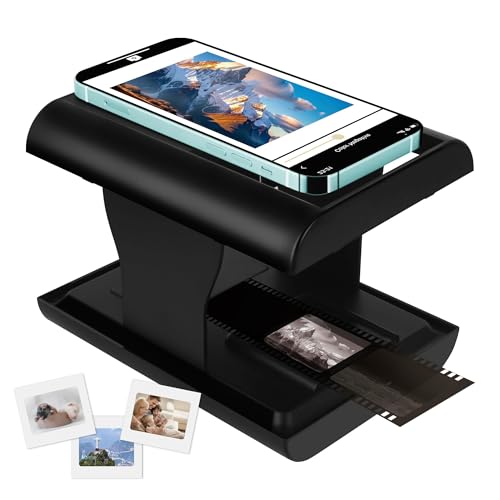
DGODRT’s Mobile Film Scanner is a compact, phone-centric solution. It digitizes 35mm negatives and slides and stores JPEGs on your phone, enabling easy sharing via apps. Best for travelers or casual users who want a portable option and direct smartphone integration. A limitation is dependence on a compatible phone app for full functionality.
- Best for on-the-go digitizing
- Directly stores to your phone; easy sharing
- Not ideal for heavy archival projects due to storage limits on phones
BEONEGLOBAL ClearScan MINI Film Scanner

BEONEGLOBAL ClearScan MINI is a compact 16MP scanner with a 2.31″ LCD. It’s designed for 35mm, 135, and 126 film plus slides. The ergonomic design places control buttons below the screen for comfortable operation. It’s best for beginners who value a small footprint and straightforward, reliable scanning of smaller collections.
- Small, portable, and easy to use
- 2.31″ LCD for quick previews
- Limited screen size may be less convenient for detailed edits
Buying Guide
What type of buyer are you?
- Casual memories: Look for a scanner with a large display and simple one-touch scanning.
- Archival projects: Prioritize higher megapixels, robust storage options, and reliable color handling.
- Travel or on-the-go: A portable, phone-connected scanner may be ideal.
Key features to compare:
- Resolution: Higher MP typically improves detail but larger file sizes.
- Display: Built-in LCDs help with instant previews and editing.
- Media compatibility: Ensure it supports your film formats (35mm, 126, 110, Super 8).
- Storage: Internal memory vs. SD card capacity; consider external options for large archives.
- Ease of use: One-touch scanning, clear instructions, and straightforward software.
Connectivity and future-proofing: Some models offer HDMI output for viewing on a TV or monitor, while others rely on SD cards or direct phone integration. Consider whether you need USB/HDMI compatibility, and if you prefer standalone operation or app-based workflows.
FAQ
- Q: Do I need a computer to use these scanners?
- A: Most models offer standalone operation with the built-in display and SD card saves, while some can export via USB or HDMI to a computer or TV.
- Q: What film formats are supported?
- A: Many scanners support 35mm, 126, 110, and slides; some also handle Super 8. Check each model’s listed formats.
- Q: Is an SD card required?
- A: Several scanners include SD card support (up to 32GB or 64GB). Some rely on internal memory; plan for an SD card if you have a large collection.
- Q: Can they preserve color accurately?
- A: On-device previews help, but for professional-grade color, post-editing in software may be needed.
- Q: Which is best for beginners?
- A: Look for models with easy one-touch scanning, clear instructions, and a user-friendly display.