Answering the need for mobile, hands-free inspection, these endoscope cameras connect to iPhone and Android devices to reveal hard-to-reach areas. They’re ideal for DIY plumbing, HVAC, automotive work, and electronics. The top picks below are chosen for compatibility with smartphones, image quality, and practical features such as semi-rigid cables and IP67 waterproofing. This guide helps buyers decide which endoscope best fits their projects and devices.
| Product | Best For | Cable Length | Key Feature |
|---|---|---|---|
| PAPIBLU Endoscope with Light | General home repairs, dark spaces | 16.4 ft | Dual-lens, 1920P |
| Kinpthy Endoscope Camera with Light (Dual-Lens) | Angle-critical inspections | 16.4 ft | Dual-lens with 360° view |
| DEPSTECH 2K Endoscope Camera | Professional clarity, detailed viewing | 16.5 ft | 2560×1440P, dual lenses |
| Elecshion [Dual-Lens] Endoscope Camera | Tight spaces, underwater work | 16.5 ft | 2MP, 1920P, IP67 |
| Teslong USB C Endoscope Camera | Newer USB-C devices | 10 ft | Wide compatibility, plug-and-play |
PAPIBLU Endoscope With Light

The PAPIBLU model offers a 1920P HD resolution with a 7.9mm probe and eight LEDs for bright inspection in pipes, HVAC, and dark corners. Its semi-rigid 16.4 ft cable helps navigate bends without losing direction, and the dual-lens setup allows quick view switching. Best for plumbers, mechanics, and homeowners who need flexible angles during inspections. Caution: battery or connectivity specifics are not detailed here; practice careful app setup for real-time viewing.
Kinpthy Endoscope Camera With Light (Dual-Lens)
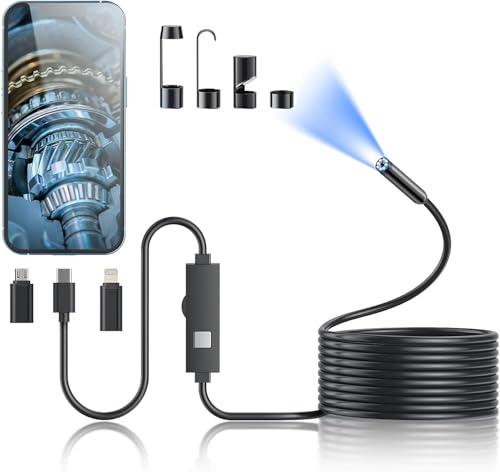
The Kinpthy Dual-Lens model provides 1920P HD with a 7.9mm probe, enabling front and side views to capture more angles without rotating the probe. Its 16.4 ft semi-rigid cable supports navigating long pipes or engine bays, and IP67 waterproofing allows brief underwater use. Best for users who need angle flexibility and quick sightlines. Limitation: app integration is device-dependent; ensure compatibility before purchase.
DEPSTECH 2K Endoscope Camera (NTC55)

The DEPSTECH NTC55 delivers a 2K (2560×1440P) lens for sharper images than standard 1080P, with dual front and side lenses for 360° viewing. It supports iPhone and Android through Type-C and Lightning adapters, and includes a dedicated app for photo/video capture and zoom. Best for professionals and hobbyists who need maximum detail in plumbing, HVAC, or automotive inspections. Caution: entry-level users may require time to master the app’s features.
Elecshion Dual-Lens Endoscope Camera

Elecshion pairs a dual-lens setup with 1920P HD clarity and a 16.5 ft semi-rigid cable. It features 2 million-pixel cameras, a 360-degree rotation, and IP67 waterproofing for underwater work up to about 3.28 feet for an hour. Best for users needing a broader field of view and underwater capability. Limitation: heavier cables can be less convenient for quick checks in tight slots.
Acoath Endoscope Camera With Light (Dual-Lens)

Acoath offers a dual-lens 1920P endoscope with IP67 waterproofing and a 16.4 ft semi-rigid cable. The dual-lens design helps reduce blind spots and improves inspection speed. Best for users who want solid image clarity and easy app pairing. Caution: confirm app compatibility with the latest iOS or Android version for real-time use.
Teslong USB-C Endoscope Camera

Teslong’s USB-C endoscope emphasizes wide compatibility with modern devices, including iPhone 15/16/17 and Android phones. It uses a plug-and-play approach with a Type-C connection and no WiFi required. Best for users with newer USB-C devices seeking straightforward setup. Limitation: often a basic set of features in the app may not cover advanced capture tools found in premium models.
Buying Guide
What matters most when choosing a phone-compatible endoscope? Consider these practical factors:
- Resolution and image quality: Higher resolutions (1920P to 2560P) reveal finer details in pipes, engines, and electronics. Look for models with dual lenses if you need multiple viewpoints.
- Cable design: Semi-rigid cables strike a balance between flexibility and control. Longer cables (around 16–16.5 ft) are helpful for deep inspections but may be heavier to maneuver.
- Waterproofing and durability: IP67 ratings protect against water immersion and dust, making devices suitable for wet environments.
- Device compatibility: Check whether the endoscope supports iOS, Android, or both, and whether your phone uses USB-C or Lightning connectors.
- App support and ease of use: Some devices rely on companion apps for live viewing, photo capture, and video playback. Ensure the app is available and actively maintained for your device.
- Angle and field of view: Dual-lens designs reduce the need to reposition the probe constantly. A wide-angle lens helps inspect larger spaces quickly.
- Limitations to watch for: Some models require app-based control, which may introduce latency, and not all features work equally across all devices or OS versions.
Frequently Asked Questions
- What is the typical cable length for home endoscopes?
Most consumer models offer 16–16.5 feet, which balances reach with manageability for home repairs.
- Do endoscopes require WiFi to work with phones?
Many models connect directly via USB-C or Lightning adapters or through a dedicated app, avoiding WiFi altogether.
- Are dual-lens endoscopes better than single-lens models?
Yes, dual lenses provide both front and side views, reducing the need to reposition the probe in tight spaces.
- Is IP67 waterproofing sufficient for underwater use?
IP67 means the camera can withstand immersion in water up to about 3.28 feet for up to one hour, suitable for light underwater inspections.
- What devices are best supported by these endoscopes?
Look for models with explicit support for iOS and Android and check whether you need USB-C or Lightning adapters.
- Should I prioritize higher resolution or a wider angle?
For detailed defects and leaks, prioritize higher resolution. For broad area scanning, prioritize a wider field of view or dual-lens capability.