Looking for the right office security cameras? This guide highlights five solid, budget-friendly indoor cameras that balance reliability, ease of use, and smart features. This selection is best for small office spaces, home offices, or shared workspaces where motion alerts, two-way talk, and night vision help maintain security and productivity. Each option supports important capabilities like motion detection, remote viewing, and integration with smart home systems. Below is a quick table of the chosen products to compare at a glance.
| Product | Key Benefit | Best For |
|---|---|---|
| TP-Link Tapo C100 | 2-way audio, night vision, local or cloud storage | Budget-conscious offices needing simple monitoring |
| LaView 4-Pack Indoor Cameras | Multiple cameras, 1080p, multi-user access | Small offices wanting full-room coverage |
| Blink Mini | Compact, plug-in, easy setup | Very small office spaces or deskside monitoring |
| ANNKE 3K Lite System | AI motion detection, reliable DVR, durable outdoor-ready design | Office perimeters with flexible storage |
| Blink Mini 2K+ | 2K resolution, enhanced audio, wide coverage | Higher detail for office monitoring and evidence |
TP-Link Tapo 1080P Indoor Security Camera for Baby Monitor

The TP-Link Tapo C100 is an affordable indoor camera designed for simple monitoring. This model offers motion detection with instant push notifications, 2-way audio with a built-in siren, and night vision up to 30 feet. It supports local SD card storage or cloud storage and connects over a 2.4 GHz Wi‑Fi network. This option is best for small offices or cubicles where a single, easy-to-manage camera can provide baseline coverage. A caution: the device relies on a stable Wi‑Fi connection for reliable alerts and live view.
Who it’s best for: small offices or individual desks with basic monitoring needs and a tight budget. Why selected: straightforward setup, reliable motion alerts, and optional local or cloud storage without extra fees for standard activity monitoring.
Key features at a glance:
- Motion detection with instant notifications
- 2-way audio with built-in siren
- Night vision up to 30 ft
- 2.4 GHz Wi-Fi, optional cloud or SD storage
LaView Security Cameras 4pcs Indoor 1080P

The LaView 4-pack delivers four 1080p indoor cameras designed for broader room coverage. These wired cameras provide 24/7 live streams via a mobile app and web access, with support for up to nine simultaneous feeds. Night vision covers up to 33 feet, and the system includes motion detection with clear two-way audio. It’s a solid choice for small offices that need multiple angles or a storefront’s back areas monitored simultaneously. Limitation: 5GHz Wi‑Fi is not supported; ensure your network can handle multiple streams if used in a larger space.
Who it’s best for: offices seeking multi-camera coverage without investing in a complex system. Why selected: scalable setup, robust night vision, and multi-device viewing support.
Key features at a glance:
- Up to 9 simultaneous live feeds
- 1080p HD with night vision
- Motion detection with two-way audio
- Works with Alexa, iOS & Android
Blink Mini – Compact Indoor Camera
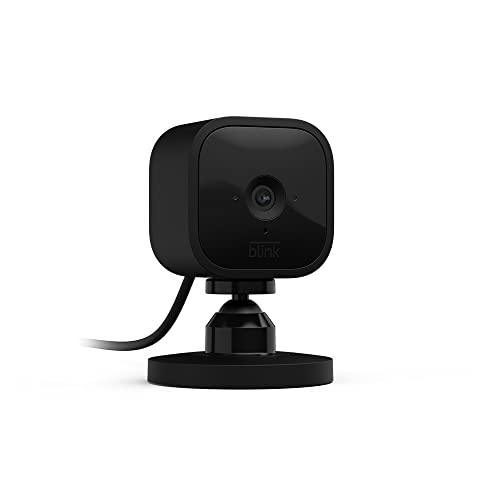
The Blink Mini is a compact plug-in indoor camera offering 1080p HD video, night vision, motion detection, and two-way audio. It is easy to set up and integrates with Alexa for smart home workflows. Best for small desks or single-room monitoring, the Blink Mini provides quick visibility and simple notifications to a mobile app. A limitation: it’s best used where Wi‑Fi is reliable; interference or weak network can affect streaming quality.
Who it’s best for: small offices or personal workspaces needing straightforward, plug-in security. Why selected: ultra-simple setup, reliable motion alerts, and seamless Alexa integration.
Blink Mini 2K+ (Newest Model) – 2K Indoor Camera

The Blink Mini 2K+ is an upgraded indoor security camera delivering sharper 2K video, enhanced audio, and broader coverage compared to earlier Mini models. It supports motion detection with alerts, two-way talk, and easy setup. This option is better for offices needing higher detail for identifying activity or faces within a space. Caution: while it offers strong performance, it remains a consumer-grade option; for larger offices or outdoor areas, consider a multi-camera or more robust system.
Who it’s best for: offices wanting higher resolution without moving to a larger system. Why selected: improved 2K video, clearer audio, and flexible placement options.
Buying Guide: Practical Office Camera Considerations
What features matter most for an office environment? Key considerations include video quality, storage options, multi-user access, and ease of use. For small teams, a single camera like the TP-Link Tapo C100 may suffice, while larger or multi-room offices benefit from multi-camera setups (LaView 4-pack) or higher resolution (Blink Mini 2K+).
Storage And Access
Decide between local (SD card) and cloud storage. Local storage reduces recurring costs but may limit access across devices. Cloud storage provides remote viewing and easier sharing but may incur ongoing fees. Some systems offer both options, giving you more flexibility.
Video Quality And Night Vision
1080p is common and adequate for most offices. If you need higher detail for incident review, consider 2K or 3K options like the Blink Mini 2K+. Night vision should cover the most critical areas; typical ranges of 30–33 feet work well for most office spaces.
Field Coverage And Multi-Device Viewing
For open-plan offices, multiple cameras or a system supporting several streams is important. The LaView 4-pack enables several live feeds, while single-camera setups focus on entryways or desks. Ensure your network can handle multiple streams without latency.
Two-Way Audio And Alerts
Two-way audio helps in communicating with visitors or employees. Instant alerts keep teams aware of activity. If your space has a loud environment, ensure the camera’s audio system can pick up relevant sounds without excessive background noise.
Smart Home Integration
Compatibility with Alexa or Google Home can simplify operation, especially in an office setting where voice commands and routines save time. Verify support and setup steps in advance.
FAQ
Do I need a professional installation for these cameras?
Most listed cameras are designed for DIY setup with Wi‑Fi or basic Ethernet connections. Follow the manufacturer’s instructions for mounting and configuration to ensure reliable alerts and coverage.
Can these cameras be used without cloud storage?
Yes. Several models offer SD card storage or local recording. Cloud storage is optional in many cases and can be used for remote access and longer retention.
Which camera is best for a small home office?
The TP-Link Tapo C100 or Blink Mini are well-suited for compact spaces due to their small footprint, straightforward setup, and reliable motion alerts.
Is higher resolution always better for office use?
Higher resolution provides clearer details for incident review but may demand more bandwidth and storage. Choose based on the necessary detail level and network capacity.
Do these cameras work with existing smart home ecosystems?
Many listed models support Alexa or Google Home. Check product pages for exact compatibility and setup steps to integrate with your current systems.