Need to convert old slide film for easy viewing, sharing, or long-term storage? This guide highlights top slide-to-digital converters that fit a range of budgets and needs. Each option is suitable for different user profiles—from casual family archivists to small-digitizing hobbyists. Below you’ll find concise comparisons, practical buying tips, and quick FAQ to help you choose with confidence.
| Product | Best For | Key Benefit | Notes |
|---|---|---|---|
| KODAK Slide N Scan | Families with mixed film types | Includes 5” LCD, supports 135/110/126 | Great gallery mode; needs SD card |
| Magnasonic All-in-One FS71 | All-in-one scanner with HDMI viewing | Large 5″ display; 24MP potential via software | Built-in memory; HDMI output option |
| KODAK Slide N Scan Max | Premium viewing and quick preview | 7” tiltable LCD; robust slide loading | Good for fast workflow in studios or offices |
| Wolverine Titan 8-in-1 | High-volume or diverse format users | HDMI output; large display; multiple formats | Includes 8 formats; fast previews |
| DigitConvert 2.4″ LCD Model | Compact, budget-friendly archiving | Standalone, no PC required; SD card ready | Balanced for simple, quick digitizing |
KODAK Slide N SCAN Film & Slide Scanner

Best for mixed slides and negatives. This 14.22MP digital film scanner converts color and black & white negatives in 135, 110, and 126 formats, plus 50mm slides. It saves directly to an SD card (not included) and features a 5” LCD for instant preview and editing. The quick-feeding tray enables continuous scanning, reducing handling time.
Who it’s for: households with a variety of film sizes and a desire for a built-in display to review while scanning. Why selected: broad compatibility and an onboard gallery mode simplify archiving and sharing, especially when you don’t want to attach a computer for every run.
Limitation: Requires an SD card (not included) to store the scans. Also, some users may prefer higher resolution than 14MP depending on source material.
DIGITNOW! 135 Film Negative Scanner

Best for standalone, simple digitizing without a PC. This scanner supports 35mm film and slides, producing JPEGs directly to its internal memory or an SD card (up to 32GB). It includes a rapid slide feeder for efficient batch processing and offers 1800DPI high-resolution scans.
Who it’s for: users who want an affordable, no-software setup that records directly to removable storage. Why selected: the built-in feeder helps process larger collections with less manual handling.
Limitation: External memory options are limited to an SD card, and higher-end color correction options are not extensive compared to PC-based workflows.
35mm Film & Slide Scanner With 2.4″ LCD

Best for compact, single-device users who want a portable, all-in-one solution. This standalone 35mm film scanner handles 135 negatives and slides, offering a 2.4” LCD for preview and editing. It supports positive, negative, and black-and-white modes to suit archival projects.
Who it’s for: seniors or hobbyists who appreciate a simple interface and immediate results without a PC. Why selected: its small footprint and easy load feeder make it convenient for smaller collections.
Limitation: Smaller LCD means limited detailed viewing compared with larger displays, which can affect precision adjustments during editing.
KODAK Slide N Scan Max Digital Film Scanner

Best for a larger viewing experience with quick, confident previews. This Kodak model features a 7” tiltable LCD, a gallery-style preview, and a 13MP sensor for clear scanning results. It uses a rapid feed tray to streamline large batches of slides and negatives.
Who it’s for: professionals or serious hobbyists who need a larger screen and rapid workflow for frequent digitization. Why selected: the tilting display enhances viewing comfort and layout planning during scanning.
Limitation: May be bulkier on a desk; ensure there is enough space for the 7” display and feeder tray.
Wolverine Titan 8-in-1 Film To Digital Converter
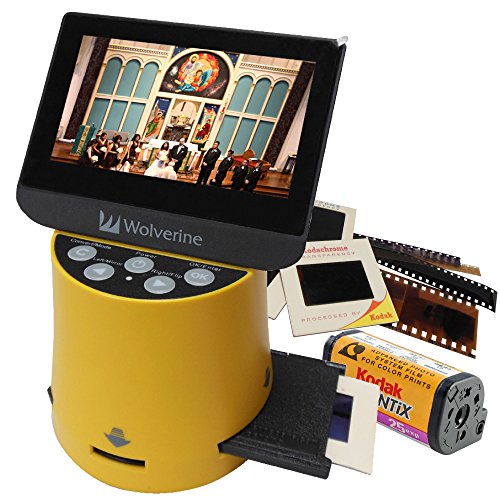
Best for users handling diverse formats and seeking quick, on-device previews. The Wolverine Titan supports 35mm, 127, 126kpk, 110, and APS formats, offering a 4.3″ color screen and HDMI output for viewing on a larger display. It emphasizes speed with a claimed three-second conversion per item.
Who it’s for: digitizers who work with multiple film formats and want a single device to handle most legacy formats. Why selected: broad format compatibility reduces the need for multiple machines.
Limitation: HDMI output requires compatible TV or monitor; ensure you have the right cable (not included) for extended viewing.
DigitConvert 2.4” LCD Film + Slide Scanner

Best for those who prioritize a compact, budget-friendly option with straightforward operation. This scanner handles 35mm, 135, 110, and 126 film negatives and 50mm slides. It saves to the built-in memory or an SD card (up to 64GB, FAT32/EXFAT). The 2.4” LCD supports quick preview and basic editing.
Who it’s for: casual archivists or seniors who want a simple, stand-alone device. Why selected: a balanced mix of features and price with a user-friendly interface.
Limitation: internal memory is modest, so larger collections will benefit from using an SD card for storage.
Buying Guide: How To Choose The Right Slide-To-Digital Converter
- Film formats supported: If you own a mix of 35mm, 126, 110, or APS film, ensure the device covers all formats in your collection. Some models focus on a subset, which could require multiple devices.
- Display size and quality: A larger LCD can improve editing precision and preview accuracy. Tiltable or HDMI-connected displays are helpful for sharing with others.
- Storage options: Look for built-in memory, SD card support, and the maximum card size. Bigger storage reduces the need for frequent transfers.
- One-touch scanning and ease of use: Devices with simple interfaces, quick-load feeders, and batch scanning save time and reduce handling errors.
- Output and compatibility: If you want to view scans on a TV or monitor, check for HDMI output and NTSC/PAL compatibility options.
- Portability vs. workflow: Compact units are good for light archiving, while larger units with quick feeders suit larger archives or frequent digitization sessions.
FAQ
- What is the typical resolution for these scanners?
Answer: Most devices offer from 14MP to 24MP effective output depending on source material and internal processing; higher resolutions benefit older color slides with fine details. - Do these scanners work without a computer?
Answer: Several models are standalone and save directly to SD cards or internal memory, while others may rely on PC software for advanced editing. - Can I preview and edit on the device?
Answer: Yes, many models have built-in LCD screens for previews and basic edits such as brightness and color adjustments. - Is HDMI output necessary for viewing scanned images?
Answer: HDMI output is optional but convenient if you want to display scans on a TV or larger monitor. - What about film compatibility beyond 35mm?
Answer: Some models support multiple formats beyond 35mm, including 126, 110, APS, and even Super 8 in select cases. - Are there any hidden costs I should anticipate?
Answer: Consider SD cards or USB cables if not included; some units also require power adapters or specific cables for HDMI output.