Finding the right compact HDMI monitor for camera work can dramatically improve focus, exposure accuracy, and on-site monitoring. This guide reviews five compact, feature-rich options suited for videographers, photographers, and hobbyists who need a portable display for cameras, PCs, or CCTV setups. Each pick targets a distinct scenario—field shoots, security setups, Raspberry Pi projects, and in-car monitoring—so you can choose the best match for your workflow.
| Product | Brand | Best For | Why It Stands Out | Limitation |
|---|---|---|---|---|
| JINSWY 10.1″ Mini Monitor | JINSWY | Security, CCTV, Raspberry Pi | Broad input options (HDMI, VGA, BNC, AV, USB) and built-in speakers enable flexible usage and quick setup | Lower brightness compared to pro field models |
| FEELWORLD FW759 7″ Monitor | FEELWORLD | On-the-go filming | Slim, lightweight with 4K HDMI input and sun shade | Smaller screen size may feel cramped for detailed focus checks |
| FEELWORLD S55 V3 6″ Monitor | FEELWORLD | Studio or indoor shooting | Advanced exposure tools (waveform, histogram, LUTs) for accurate framing | Requires separate power/battery for field use |
| CUQI 7″ Small Monitor | CUQI | Budget Raspberry Pi and CCTV projects | IPS panel with wide viewing angles and multi-interface inputs | Benchtop readability may vary in bright sun |
| Jexiop 12.5″ Security Monitor | Jexiop | Home/office surveillance | Large Full HD screen with HDMI/VGA dual input and built-in speakers | Smaller pixel density compared to true 4K/HD field monitors |
The table above highlights five solid options across sizes and use cases. Read on for in-depth insights into each model to help you pick the right one for your camera rig or security setup.
JINSWY 10.1″ Security Monitor For CCTV And More

The JINSWY 10.1″ monitor integrates multiple video interfaces—HDMI, VGA, BNC, AV, and USB—making it ideal for CCTV systems, DVR setups, Raspberry Pi projects, and compact computer displays. Its 1024×600 resolution and 16:9 aspect ratio deliver sharp visuals for everyday monitoring. Best for budget-conscious buyers who require flexible inputs and built-in speakers in a small footprint. A potential limitation is lower brightness relative to professional field monitors, which can affect outdoor visibility.
FEELWORLD FW759 7″ Field Monitor
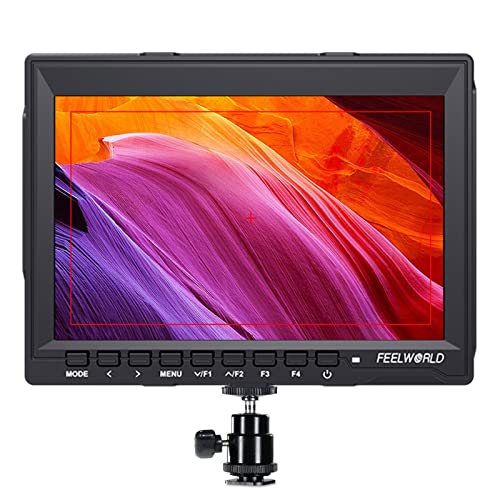
The FEELWORLD FW759 offers a compact 7″ IPS display with 1280×800 resolution and 4K HDMI compatibility. Weighing around 300 grams, it suits handheld shoots, gimbals, or stabilizers where portability matters. It’s best for filmmakers who need a bright, color-accurate view on location. The main caution is its smaller screen size, which can limit critical focus checks in detail-heavy scenes.
FEELWORLD S55 V3 6″ On-Camera Monitor

The FEELWORLD S55 V3 provides a compact 6″ display with 1920×1080 resolution and 450nit brightness, plus advanced tools like waveform, vectorscope, RGB histogram, LUT support, and focus assists. It’s well-suited for indoor studios and on-the-ground shoots where accurate exposure and focus are essential. A caveat is that it relies on external power for extended field use, so plan for battery or power options accordingly.
CUQI 7″ IPS Mini Monitor For Pi And More

The CUQI 7″ monitor features a 1024×600 IPS panel with a wide 178° viewing angle and built-in speakers. It supports HDMI, VGA, and AV inputs, making it a versatile option for Raspberry Pi projects, PCs, DVD players, and CCTV setups. It’s a good pick for budget-conscious buyers who want decent color accuracy and broad compatibility. The caveat is that brightness and glare handling can be less robust in very bright environments.
Jexiop 12.5″ Security Monitor With Dual Inputs

The Jexiop 12.5″ security monitor emphasizes a larger display for surveillance setups or office monitoring. It supports HDMI and VGA inputs and includes built-in stereo speakers for synchronized audio. Best for users who need a bigger viewing area for multi-camera feeds. A potential limitation is lower pixel density than smaller, high-end field monitors, which may impact fine detail viewing from a distance.
Buying Guide: Key Purchase Considerations
- Screen size and resolution: Choose a size that fits your workspace and a resolution that supports precise focus and exposure checks. Larger displays help with multi-camera feeds, while smaller ones excel in tight setups.
- Input options: Confirm HDMI is essential, but if you work with vintage gear or Raspberry Pi, ensure VGA, BNC, AV, or USB inputs are available.
- Brightness and color accuracy: For outdoor shoots or bright studios, prioritize higher brightness and color calibration features like LUT support or waveform tools.
- Portability vs. features: Slim, light monitors are ideal for gimbals and field use, while feature-rich models suit studios and surveillance tasks.
- Power considerations: Some monitors require external power. Check battery options or USB-C/USB power compatibility for long shoots.
- Speaker performance: Built-in speakers are convenient for quick checks, but external audio monitoring remains essential for professional work.
Frequently Asked Questions
- What size is best for handheld camera work? – A 5.5″ to 7″ monitor is typically ideal for handheld use, balancing portability with on-screen detail.
- Do I need 4K input for external monitors? – Not always; many workflows benefit from reliable 1080p displays, but 4K HDMI input supports future-proofing and higher detail when needed.
- Can these monitors be used with Raspberry Pi? – Yes, many models offer HDMI, VGA, or AV inputs compatible with Raspberry Pi projects.
- Is a sun hood necessary for outdoor shoots? – For many field monitors, a sun hood helps reduce glare and improve visibility in bright conditions.
- Are built-in speakers sufficient for critical audio? – Built-in speakers are convenient for quick checks but should be complemented with external audio monitoring for professional work.
- What is the advantage of a LUT and waveform on a monitor? – These tools provide real-time exposure and color monitoring, reducing guesswork and reshoots.