Answering the need for hands-free, precise script control, this guide highlights the best wireless scroll controls for teleprompters. Ideal for content creators, educators, live broadcasters, and speakers who require seamless prompt management without distracting mic noise. The top picks below are chosen for compatibility, silent operation, and reliable Bluetooth or wireless connectivity. Each section explains who benefits most, why it was selected, and any practical limitations to consider.
| Product | Best For | Key Benefit |
|---|---|---|
| TELEPROMPTER PAD Bluetooth Remote Control for Teleprompter | Professional broadcasters and multi-platform users | Out-of-the-box control with the TeleprompterPAD app; silent buttons |
| Desview Bluetooth Remote Control for Teleprompter | Users with Desview teleprompters | Cross-device app control, simple Bluetooth pairing |
| Donner Wireless Page Turner Pedal Teleprompter App Control | Hands-free operation for mobile and tablet setups | Foot pedal flexibility across platforms |
| TELEPROMPTER PAD Foot Switch Pedal Remote | Hands-free prompter control with extended setup | Pedal accessory that complements the TeleprompterPAD app |
| Norwii Bluetooth Presentation Clicker | Presenters and educators needing pointer and slide control | Long-range Bluetooth with re-connect and customizable buttons |
TELEPROMPTER PAD Bluetooth Remote Control for Teleprompter

The TELEPROMPTER PAD remote is designed for use with mirror-based teleprompters and its companion TeleprompterPAD APP. It lets you adjust speed, font size, and markers while controlling main app functions like play-pause and fast-forward. The Bluetooth pairing is automatic after first use, and the device operates quietly to avoid capturing mic noise. Best for professional productions where a single remote controls both script scroll and app features.
Who it’s best for: content creators and on-camera talent who want a streamlined, silent control experience across iOS, Android, Windows, and Mac. Why selected: it pairs seamlessly with TeleprompterPAD’s own app ecosystem and provides a reliable, out-of-the-box workflow for live events and studio shoots. Caution: ensure compatibility with your specific teleprompter mirror setup before purchase.
Desview Bluetooth Remote Control for Teleprompter
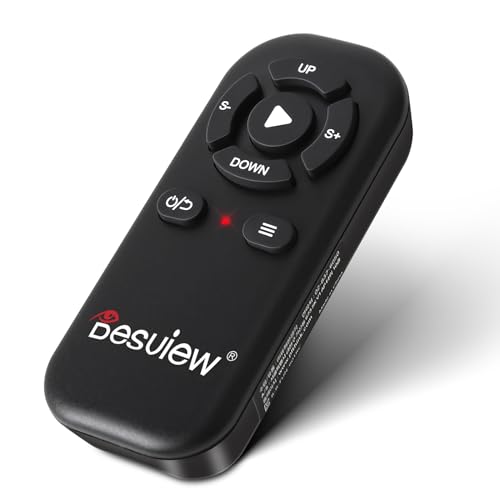
This remote is advertised as compatible with Desview teleprompters, including T3, T2, T12S, TP150, and TP170 models. It enables page turning, pausing, and text color changes through a smartphone or tablet Teleprompter App. The Desview app is free and supports both iOS and Android. Best for users already in the Desview ecosystem seeking straightforward Bluetooth control.
Who it’s best for: creators who rely on Desview hardware and want cohesive app control. Why selected: strong cross-device app support and simple Bluetooth pairing. Caution: compatibility is primarily with Desview models and may have limited tight integration with non-Desview teleprompters.
Donner Wireless Page Turner Pedal Teleprompter App Control

The Donner pedal offers a hands-free page-turning solution that adapts to multiple platforms, including iOS, Android, Mac, PC, Kindle, and more. Its wooden design provides an elegant aesthetic, and the pedal allows broader multitasking during performances or shoots. Best for writers and presenters who need to keep both hands free for product manipulation or gesturing.
Who it’s best for: video creators needing flexible platform support and a tasteful pedal interface. Why selected: expands control beyond touch devices, promoting smoother on-camera movements. Caution: must be used with a compatible teleprompter app setup to unlock full pedal features.
TELEPROMPTER PAD Foot Switch Pedal Remote

This pedal case transforms the TeleprompterPAD remote into a hands-free teleprompter foot pedal. It’s lightweight, portable, and durable, designed to work with any mirror-based iPad, tablet, smartphone, or laptop teleprompter in conjunction with the TeleprompterPAD app. Best for hands-free operation and smooth prompting when hand gestures or product demonstrations are involved.
Who it’s best for: creators seeking hands-free prompting while keeping delivery natural and fluid. Why selected: integrates with the TeleprompterPAD ecosystem to extend control options. Caution: the pedal is a case accessory and requires the main remote to function.
Norwii Bluetooth Presentation Clicker

The Norwii clicker supports both Bluetooth and USB-A connections, with auto-reconnect across multiple devices. It offers reprogrammable buttons via its software and a long-range wireless setup. Best for presenters who need reliable slide and prompt control across a variety of devices without interruption.
Who it’s best for: teachers, lecturers, and multi-device presenters seeking dependable long-range control. Why selected: versatile connectivity and customizable buttons. Caution: some users may prefer a dedicated teleprompter app over generic presentation control, depending on workflow.
Buying Guide
What should you consider when choosing a teleprompter scroll control?
Compatibility: Check whether the remote works with your teleprompter model and the app ecosystem you use. Some devices target specific brands, while others offer broader compatibility.
Connectivity: Bluetooth vs. wireless or USB. Consider auto-reconnect reliability, potential interference, and how you’ll power or recharge the device during longer shoots.
Which control style fits your workflow?
- Handheld remotes: Ideal for seated or standing prompts where you can reach the control without looking away from the camera.
- Foot pedals: Best for hands-free prompting during demonstrations or multitasking scenes.
- Apps and integration: Some remotes pair with prompter apps for richer control like font size, color, markers, and mirror modes.
What are practical trade-offs?
- Silent operation reduces microphone noise but may limit haptic feedback.
- Cross-brand compatibility offers flexibility but may require additional app downloads or setup steps.
- Accessory bundles (like pedals) add convenience but require compatible teleprompter hardware to function optimally.
How to set up quickly?
Install the recommended teleprompter app for your device, pair via Bluetooth, and run a quick script test. Ensure mirror mode and prompt speed align with your delivery style. For best results, configure font size, color, and markers to match your typical scripts.
What about safety and reliability?
Choose reputable brands with clear compatibility notes. Silent operation minimizes interference with audio, and automatic Bluetooth re-pairing helps maintain continuity during shoots. Always test your setup before live events to avoid interruptions.
Summary of top picks
The five selections cover a range of prompting needs—from compact phone-friendly remotes to hands-free pedal solutions—while emphasizing reliability, quiet operation, and ecosystem compatibility. For most users, starting with the TELEPROMPTER PAD remote offers a robust all-in-one experience. If you already use Desview or want a traditional foot pedal approach, Donner or TeleprompterPAD accessories provide strong alternatives.
Frequently Asked Questions
- What is the best wireless scroll control for a mirror-based teleprompter?
A handheld Bluetooth remote like the TELEPROMPTER PAD remote is a strong all-around option, offering both scroll control and app features.
- Can I use these remotes with any teleprompter app?
Most remotes support common prompter apps, but some are optimized for specific ecosystems. Check compatibility for your device and app before purchasing.
- Do foot pedals work for on-camera prompting?
Yes. Foot pedals provide hands-free control, which is useful during demonstrations or product reveals where hands are occupied.
- Is long-range Bluetooth important for prompts?
Long-range Bluetooth helps when you move away from the camera or stand at a distance, reducing prompts interruptions during streaming.
- Should I buy a dedicated teleprompter app or a generic presenter app?
Dedicated teleprompter apps typically offer richer script display controls (colors, markers, font size) and better integration with prompter hardware.