Answering the common question, this guide presents reliable devices to transfer and preserve old home movies as digital files. The top picks cover 8mm, Super 8, VHS, and various film formats, suitable for different levels of DIY involvement. Best for hobbyists who want a straightforward, self-contained scan without a computer; better for archival projects that require larger-screen previews; choose this if you value built-in displays and simple operation. The following selections explain who each product is best for and why it stands out.
Buying Summary (selected products)
– KODAK REELS 8mm & Super 8 Films Digitizer: Best overall for direct-to-SD storage with a large onboard screen.
– Portta VHS to Digital Converter: Best for converting VHS and related formats without a computer.
– Eyesen 8mm & Super 8 Film to Digital Converter: Best value for quick, screen-based digitization.
– Magnasonic Super 8/8mm Film Scanner: Best for small reel families needing simple playback options.
– ClearClick Video to Digital Converter 2.0: Best for users with existing tapes and want direct USB output.
KODAK REELS 8mm & Super 8 Films Digitizer

The KODAK REELS Digitizer supports 3”, 5”, 7”, 8”, and 9” film reels with a frame-by-frame digitizing process. It auto-captures 8.08-megapixel images and records 1080p MP4 files without sound for easy viewing and sharing. The 5” onboard LCD interface, oversized controls, and on-screen prompts make it a strong pick for beginners and non-tech users who want hands-off scanning. Use the supplied Micro USB to transfer scans to a TV, computer, or smart device for big-screen viewing. Best for: families digitizing a broad range of film reel sizes with minimal external equipment. Caution: No built-in audio capture, so sound from original footage is not preserved unless added later from another source.
Portta VHS to Digital Converter

Portta’s device converts analog video and audio signals from VHS, VCR, and other AV sources to digital MP4 or MP3 formats. It supports CVBS+R/L, S-Video, and AUX inputs, with a 3.0″ built-in preview LCD and a USB/SD storage option. It’s ideal for those who want a plug-and-play, all-in-one converter that records directly to USB drives or SD cards. Best for: users who have mixed media in VHS or AV formats and want a simple capture workflow without a computer. Caution: It is a converter/recorder, not a standalone player; you need your tapes to begin with playback hardware.
8mm & Super 8 Film to Digital Converter (Eyesen)

Eyesen’s fully automated digitizer converts 3”, 5”, 7”, and 9” reels into 1080P MP4 files, saved directly to an included 32GB SD card. The compact 2.4″ LCD screen allows immediate playback, and no computer is required. This option suits casual users who want a quick, self-contained workflow and immediate preview. Best for: households with a few reels and limited desk space. Caution: The device relies on SD card storage, so larger collections may require multiple cards or periodic offloads.
Magnasonic Super 8/8mm Film Scanner

Magnasonic’s scanner converts 3”, 5”, and 7” reels to digital MP4s and offers a built-in 2.3” LCD screen for direct review. It supports SD card storage (up to 32GB via included slot) for archiving. Best for: users seeking a compact, straightforward device with a simple playback path. Caution: It scans video only, so no audio from the original film is preserved unless added later.
ClearClick Video to Digital Converter 2.0

ClearClick’s second-generation converter focuses on direct capture from VCRs, VHS tapes, and other analog sources to USB drives or SD cards. It does not upscale from older streams and requires a working VCR/camcorder and tapes. Best for: users who already own working playback gear and want a simple, PC-free capture workflow. Caution: Requires a working tape source and may need compatible software for some workflows.
Oassuose VHS to Digital Converter

Oassuose offers a USB-A/USB-C video capture card that digitizes analog signals from VHS, VCR, DVD, and other sources to 1080P/30fps. It emphasizes easy plug-and-play operation and PC/Mac compatibility via software. Best for: users who want a flexible capture device that can work with varied playback hardware. Caution: Requires software and may need driver setup for certain systems.
Wolverine Titan 8-in-1 Film Converter
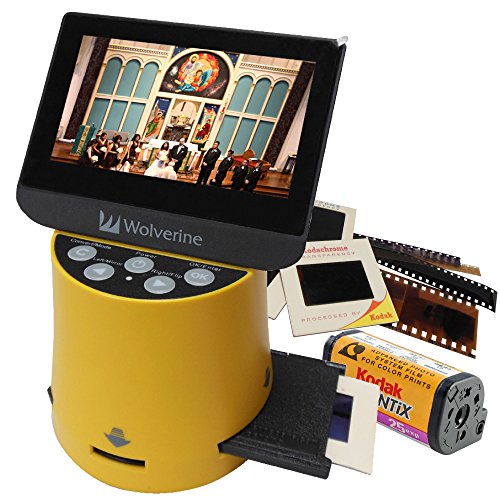
The Wolverine Titan handles multiple formats including 35mm, 127, 126, 110, and APS slides and negatives. It features a 4.3″ color screen and HDMI output for viewing on a TV in high definition (cable not included). Best for: those who want high-compatibility for a mixed-format archival workflow. Caution: HDMI output requires the appropriate cable and may introduce setup steps for some users.
Buying Guide
- What format is your original film or tape? Some devices specialize in 8mm and Super 8, while others handle VHS or multiple formats.
- Do you want a standalone device or something that connects to a computer? Standalones are simpler; PC-connected options offer more editing flexibility.
- Is a built-in display important? Devices with LCD screens let you preview and decide before saving.
- Storage needs: check whether the device records directly to SD cards or requires a USB drive. Consider card capacity for your collection.
- Sound and video quality: many scanners capture 1080p video but may not preserve original audio. Decide if you need audio as part of the digitization.
- Future-proofing: some devices offer HDMI output or TV compatibility for easier viewing on larger screens.
FAQ
- What should I digitize first? Start with the most important memories or the reels with the most visible deterioration, to maximize value per minute of effort.
- Can these devices fix color or exposure issues? Basic controls exist on some models to adjust exposure, sharpness, and tint, but deep color correction may require post-processing on a computer.
- Do these tools preserve audio? Several options capture video with audio, but many 8mm/Super 8 scanners focus on video frames; confirm audio support before purchasing.
- Is a computer required? Some models are PC-free and save directly to SD cards or USB drives; others may need companion software for full functionality.
- What size reels can be scanned? Reels vary by device; common supports include 3”, 5”, 7”, 8”, and 9” reels. Verify reel compatibility before purchase.
- How long does the process take? Scanning speed depends on reel length and device capabilities; plan for longer sessions for large collections.