Answering the question “how can I turn phone pictures into Polaroids?” this guide highlights five reliable printers that convert digital images into physical 2×3 sticky-back prints. These options are ideal for travelers, party planners, scrapbookers, and anyone who loves tangible memories. Each pick explains who it’s best for, plus practical pros and a key limitation to watch for.
| Product | Why It Stands Out |
|---|---|
| KODAK Step Instant Smartphone Photo Printer (White) | Best for iOS & Android users who want robust editing in-app and reliable, budget-friendly prints. |
| KODAK Step Instant Smartphone Photo Printer (Black) | Better for travelers who want a compact, versatile color option with strong app editing features. |
| Polaroid Hi-Print + 20 Photo Bundle | Best for quick, colorful prints with easy wireless use and a bundled starter pack. |
| Polaroid Hi-Print + 40 Photo Bundle | Best for heavy users who print more often and want extra paper in the box. |
| HP Sprocket Portable 2×3 Inch Printer | Best for social events where multiple devices print quickly from a pocket-sized unit. |
KODAK Step Instant Printer — White

The Kodak Step uses ZINK Zero Ink technology to produce 2×3″ sticky-back prints. It connects via Bluetooth or NFC to iOS and Android devices and includes a starter pack of ZINK paper. The in-app editing suite lets users collage, filter, border, and add stickers or text before printing. This model is best for casual photographers who want quick, affordable prints without buying ink cartridges.
- Best for: Everyday users who want simple setup and solid editing features in the app.
- Limitations: No ink cartridges required, but print quality may vary with lighting or photo complexity.
KODAK Step Instant Printer — Black

This variant shares the same 2×3″ ZINK prints and wireless printing capability, with a focus on a compact, travel-friendly form. The included app supports collages, filters, borders, and fun text to personalize each print. Choose this if you prefer a darker color option or want to blend with other gear for night-shoot prints.
- Best for: People who want a portable printer with strong in-app editing and a sleek black finish.
- Limitations: As with other ZINK prints, media cost and color fidelity can vary by lighting in your photo.
Polaroid Hi-Print + 20 Photo Bundle

The Polaroid Hi-Print printer uses dye-sub technology to deliver vibrant 2×3″ photos quickly. The bundle includes 20 sheets of paper and the wireless printer connects via Bluetooth to iOS and Android devices. It enables easy editing in the Polaroid app, with frames, filters, and text for personalization. Best for casual users who want quick, vivid prints with a simple setup and a starter pack.
- Best for: Beginners who want a complete starter kit with enough paper to start printing right away.
- Limitation: Fewer sheets in the basic bundle may require frequent reorders for large projects.
Polaroid Hi-Print + 40 Photo Bundle
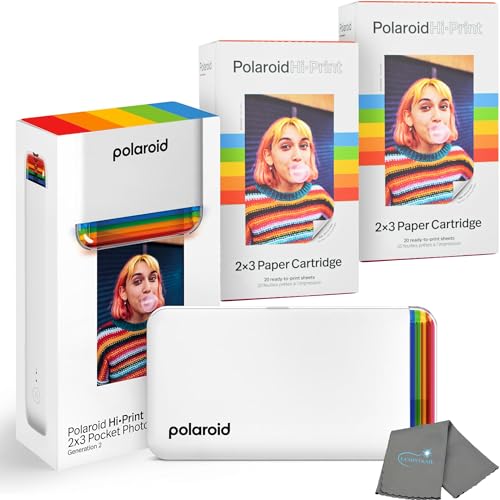
This bundle extends the 2×3″ Hi-Print project with 40 sheets, offering more prints per charge and reducing the need to reorder paper frequently. Like the 20-shot option, it supports Bluetooth printing from mobile devices and includes editing capabilities in the Polaroid app. Best for families or event hosts who print a lot over a single outing or project.
- Best for: High-output printing needs without frequent paper replenishment.
- Limitation: Higher upfront cost due to more paper included, though cost per print remains competitive.
HP Sprocket Portable Printer

The HP Sprocket prints on 2×3″ ZINK paper and supports simultaneous multi-device connections. It is pocket-sized for quick print sessions at events and gatherings. The Sprocket app enables basic editing and fun AR features through the Sprocket app, making it a handy pick for on-the-go printing. Best for social events where multiple people print from their phones.
- Best for: Quick, shareable prints at parties or meetups.
- Limitation: AR features and app experience may vary by device and software updates.
Buying Guide: Key Purchase Considerations
- Print technology: Most options use ZINK dye-free ink or dye-sub paper. Consider ink-free options for lower ongoing costs and ease of use, but be mindful of paper availability and print resilience.
- Paper size and compatibility: All listed products favor 2×3″ prints. Confirm compatibility with your device’s OS and whether NFC or Bluetooth pairing is required.
- App editing features: Some printers offer robust in-app editing with borders, filters, and text. If you value customization, prioritize those with strong mobile apps.
- Portability vs. output: Travel and on-the-go use benefit from compact designs. If you print often at events, bundles with more paper can reduce reorders.
- Connectivity: Bluetooth is common, with some models supporting NFC. If you print from multiple devices, ensure easy pairing and cross-device compatibility.
- Durability of prints: ZINK prints are moisture and tear resistant, but color quality can vary by lighting and image quality prior to printing.
Frequently Asked Questions
- Can I print directly from iPhone and Android with the same printer? Yes. All listed models support both iOS and Android via Bluetooth or NFC in most cases.
- Do these printers require ink? Most use zero-ink or dye-sub paper, so no traditional ink cartridges are needed. Paper cost remains a consideration.
- Is 2×3″ a good print size for albums or scrapbooks? Yes, 2×3″ photos fit well in mini albums and are ideal for sticking into journals or memory boards.
- Which printer is best for families with kids? The Polaroid Hi-Print bundles offer straightforward editing, fun frames, and easy paper access, making them kid-friendly.
- Are bundled paper packs worth it? Bundles with extra paper reduce reordering frequency and are cost-effective for frequent printing.
- Can these printers print in color with high fidelity? Most do, but results depend on the original image quality and lighting when captured. Editing in-app can help optimize color before printing.